Updating


-21
#74 in Top Paid Apps > Productivity
iPhone Screenshots


iPad Screenshots



Description
Alfred Remote is your personal command centre for Alfred 2 for Mac. Your iPhone or iPad now becomes a perfect day-long companion to your Mac; Whether at work or play, be more productive than ever!
Alfred 2 for Mac is available from http://www.alfredapp.com/
WHAT CAN I DO WITH REMOTE?
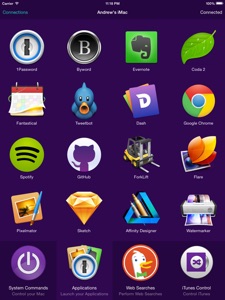
With a single touch on your iOS device, you can control many Alfred 2 actions on your Mac, including:
- Show Alfred 2 on your Mac
- System Commands: Lock, restart, shut down, log out or sleep your Mac, eject all devices, quit all apps and empty trash
- Launch Applications and System Preferences on your Mac
- Open files and folders you've defined on your Mac
- Open websites and bookmarks, or pop up Alfred with a custom search filled in
- Replace hard to remember hotkey combinations and keywords with icons on iOS
If you're an Alfred 2 Powerpack user, you can control Powerpack features, such as:
- iTunes on your Mac: Play, skip, rate your tracks and even start playing random albums
- Quickly paste user-defined clipboard snippets into text fields and documents on your Mac
- Run user-defined scripts, AppleScripts and terminal commands
- Connecting Remote to your favourite Alfred 2 Workflows gives almost limitless possibilities!
SETTING UP REMOTE
1. Ensure that your Mac and iOS device are on the same network
2. Open Alfred 2's Remote preferences on Mac and select 'Add iOS Remote'
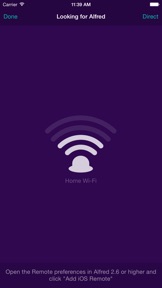
3. Open Alfred Remote on iOS to the 'Add' screen, "Looking for Alfred"
4. Select your Mac when you see it appear on iOS, then type the passcode on your Mac
Your Mac and iOS device will now be securely connected, and the power of Alfred 2 will be at your fingertips, making you even more productive!
MINIMUM REQUIREMENTS:
Alfred Remote is a counterpart app which requires Alfred 2 on Mac, and the ability to connect to it from your iPhone/iPad over Wi-Fi.
- Alfred Remote is available for iPhone & iPad on iOS 7+
- Alfred v2.6 on OS X 10.8+ is required on your Mac
- You'll need the ability to connect both your Mac and your iOS device to the same network through wired or Wi-Fi connection
- To control Alfred 2's Powerpack actions, you'll need the Powerpack for Alfred 2 on your Mac
Take a look at http://www.alfredapp.com for more details about Alfred 2 for Mac and Alfred Remote.
What's New in Version 1.1
This app has been updated by Apple to use the latest Apple signing certificate.
- Move confirming of system commands to iOS (as double tap) instead of Mac (alert dialog)
- Nicer behaviour on passphrase screen when there is a delay in showing passphrase (e.g. slow network)
- Add in URL scheme for launching Alfred Remote, alfredremote://
- Fix page navigation loop after cancelling a 'direct connect' action
- Fix page re-selection in Remote when reordering pages in Alfred's preferences
- Prevent crash in "Discover" screen with unexpected duplicate bonjour events
- Future iOS compatibility (Remove SSID from connecting screens)
Seller
Name
Running with Crayons Ltd
Information
Developer
Categories
Version
1.1
Size
2.2 MB
Game Center
No
VPP Device Licensing
Yes
Rating
Rated: 4+
Compatibility
iOS 7.1 or later
Devices
iPhone 4, iPhone 4S, iPhone 5, iPhone 5c, iPhone 5s, iPhone 6, iPhone 6 Plus, iPhone 6s, iPhone 6s Plus, iPhone SE, iPhone 7, iPhone 7 Plus, iPhone 8, iPhone 8 Plus, iPhone X, iPhone XR, iPhone XS, iPhone XS Max, iPhone 11, iPhone 11 Pro, iPhone 11 Pro Max, iPhone SE (2nd generation), iPad 2 (Wi-Fi), iPad 2 (3G), iPad (3rd Generation) (Wi-Fi), iPad (3rd Generation) (4G), iPad (4th Generation) (Wi-Fi), iPad (4th Generation) (4G), iPad (5th Generation) Wi-Fi, iPad (5th Generation) Wi-Fi + Cellular, iPad (6th generation) Wi-Fi, iPad (6th generation) Wi-Fi + Cellular, iPad Pro, iPad Pro (Cellular), iPad Pro (9.7-inch), iPad Pro (9.7-inch) (Cellular), iPad Pro 12.9-inch (2nd generation), iPad Pro 12.9-inch (2nd generation) Wi-Fi + Cellular, iPad Pro (10.5-inch), iPad Pro (10.5-inch) Wi-Fi + Cellular, iPad Pro (11-inch), iPad Pro (11-inch) Wi-Fi + Cellular, iPad Pro 12.9-inch (3rd generation), iPad Pro 12.9-inch (3rd generation) Wi-Fi + Cellular, iPad Air, iPad Air (Cellular), iPad Air 2, iPad Air 2 (Cellular), iPad Air (3rd generation), iPad Air (3rd generation) Wi-Fi + Cellular, iPad mini (Wi-Fi), iPad mini (4G), iPad mini Retina, iPad mini Retina (Cellular), iPad mini 3, iPad mini 3 (Cellular), iPad mini 4, iPad mini 4 (Cellular), iPad mini (5th Generation), iPad mini (5th Generation) Wi-Fi + Cellular, iPad (7th generation) Wi-Fi, iPad Pro 11-inch (2nd generation), iPad Pro 11-inch (2nd generation) Wi-Fi + Cellular, iPad Pro 12.9-inch (4th generation), iPad Pro 12.9-inch (4th generation) Wi-Fi + Cellular, iPod touch (5th generation), iPod touch (6th Generation), iPod touch (7th generation)
Languages
English
App Store: Customer Ratings
Ratings & Reviews
5.0 of 5 (1 Rating)
App Store: Customer Reviews
No Entry