AboutTermsPrivacyContact
 
Updating
Home Remote

Home Remote

Released: 2014-10-14
© Bouncing Ball Limited
Home Remote - QR Code
Version 3.7
4+
Download on the App Store
Version 3.7
4+
Download on the App Store
Released: 2014-10-14
© Bouncing Ball Limited

iPhone Screenshots

Screenshot
Screenshot
Screenshot
Screenshot
Screenshot

iPad Screenshots

Screenshot
Screenshot
Screenshot
Screenshot
Screenshot

Description

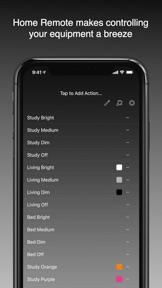
Tired of all the different apps you need to control your smart home? Are they missing features you’d like to see such as schedules, geofencing or Today Screen access?
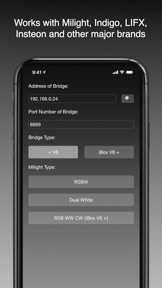
Then Home Remote is for you. With native support for Milight, LimitlessLED, EasyBulb, LIFX, Belkin WeMo, Indigo, along with URL calls and TCP/UDP packets, there isn’t much that Home Remote can’t control.
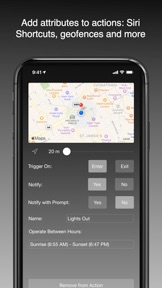
You can add attributes to any action, such as location triggering with beacons or geofences, schedules, even voice recognition.
Home Remote - Great for any smart home with Home Automation.
Sunrise and sunset times are provided by http://sunrise-sunset.org

What's New in Version 3.7

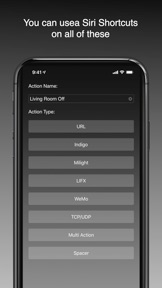
Home Remote now works with Shortcuts! You can now use Siri to trigger to your Home Remote actions!

Seller

Name

Bouncing Ball LTD

Information

Categories

Version

3.7

Size

31 MB

Game Center

No

VPP Device Licensing

Yes

Rating

Rated: 4+

Compatibility

iOS 12.0 or later

Devices

iPhone 5s, iPhone 6, iPhone 6 Plus, iPhone 6s, iPhone 6s Plus, iPhone SE, iPhone 7, iPhone 7 Plus, iPhone 8, iPhone 8 Plus, iPhone X, iPhone XR, iPhone XS, iPhone XS Max, iPhone 11, iPhone 11 Pro, iPhone 11 Pro Max, iPhone SE (2nd generation), iPhone 12, iPhone 12 Pro, iPhone 12 Pro Max, iPhone 12 mini, iPhone 13, iPhone 13 Pro, iPhone 13 Pro Max, iPhone 13 mini, iPhone SE (3rd generation), iPhone 14, iPhone 14 Plus, iPhone 14 Pro, iPhone 14 Pro Max, iPhone 15, iPhone 15 Plus, iPhone 15 Pro, iPhone 15 Pro Max, iPhone 16, iPhone 16 Plus, iPhone 16 Pro, iPhone 16 Pro Max, iPhone 16e, iPhone 17, iPhone 17 Pro, iPhone 17 Pro Max, iPhone Air, iPad (5th Generation) Wi-Fi, iPad (5th Generation) Wi-Fi + Cellular, iPad (6th generation) Wi-Fi, iPad (6th generation) Wi-Fi + Cellular, iPad Pro, iPad Pro (Cellular), iPad Pro (9.7-inch), iPad Pro (9.7-inch) (Cellular), iPad Pro 12.9-inch (2nd generation), iPad Pro 12.9-inch (2nd generation) Wi-Fi + Cellular, iPad Pro (10.5-inch), iPad Pro (10.5-inch) Wi-Fi + Cellular, iPad Pro (11-inch), iPad Pro (11-inch) Wi-Fi + Cellular, iPad Pro 12.9-inch (3rd generation), iPad Pro 12.9-inch (3rd generation) Wi-Fi + Cellular, iPad Air, iPad Air (Cellular), iPad Air 2, iPad Air 2 (Cellular), iPad Air (3rd generation), iPad Air (3rd generation) Wi-Fi + Cellular, iPad mini Retina, iPad mini Retina (Cellular), iPad mini 3, iPad mini 3 (Cellular), iPad mini 4, iPad mini 4 (Cellular), iPad mini (5th Generation), iPad mini (5th Generation) Wi-Fi + Cellular, iPad (7th generation) Wi-Fi + Cellular, iPad Pro 11-inch (2nd generation), iPad Pro 11-inch (2nd generation) Wi-Fi + Cellular, iPad Pro 12.9-inch (4th generation), iPad Pro 12.9-inch (4th generation) Wi-Fi + Cellular, iPad Air (4th Generation) (Wi-Fi), iPad Air (4th Generation) (Wi-Fi + Cellular), iPad (8th generation) Wi-Fi, iPad (8th generation) Wi-Fi + Cellular, iPad Pro 11-inch (3rd generation), iPad Pro 11-inch (3rd generation) Wi-Fi + Cellular, iPad Pro 12.9-inch (5th Generation), iPad Pro 12.9-inch (5th Generation) Wi-Fi + Cellular, iPad (9th Generation), iPad (9th Generation) Wi-Fi + Cellular, iPad mini (6th Generation), iPad mini (6th Generation) Wi-Fi + Cellular, iPad Air (5th generation), iPad Air (5th generation) Wi-Fi + Cellular, iPad Pro 11-inch (4th generation), iPad Pro 11-inch (4th generation) Wi-Fi + Cellular, iPad Pro 12.9-inch (6th generation), iPad Pro 12.9-inch (6th generation) Wi-Fi + Cellular, iPad (10th generation), iPad (10th generation) Wi-Fi + Cellular, iPad Air 11-inch (M2) Wi-Fi, iPad Air 13-inch (M2) Wi-Fi, iPad Air 13-inch (M2) Wi-Fi + Cellular, iPad Pro 11-inch (M4) Wi-Fi, iPad Pro 11-inch (M4) Wi-Fi + Cellular, iPad Pro 13-inch (M4) Wi-Fi, iPad Pro 13-inch (M4) Wi-Fi + Cellular, iPad mini (A17 Pro) Wi-Fi, iPad mini (A17 Pro) Wi-Fi + Cellular, iPad (A16) Wi-Fi, iPad (A16) Wi-Fi + Cellular, iPad Air 11-inch (M3) Wi-Fi, iPad Air 11-inch (M3) Wi-Fi + Cellular, iPad Air 13-inch (M3) Wi-Fi, iPad Air 13-inch (M3) Wi-Fi + Cellular, iPad Pro 11-inch (M5) Wi-Fi, iPad Pro 11-inch (M5) Wi-Fi + Cellular, iPad Pro 13-inch (M5) Wi-Fi, iPad Pro 13-inch (M5) Wi-Fi + Cellular, iPod touch (6th Generation), iPod touch (7th generation)

Languages

English, Dutch, German, Japanese

App Store: Customer Ratings

Ratings & Reviews

3.0 of 5 (4 Ratings)

App Store: Customer Reviews

2019-10-08

Just fantastic - Does exactly what it says

I've been using this app since version 1. It is excellent. A little fiddly to setup but after that it is perfect. I control all my lights using this app on my iPhone and iPad. I have not found any other app (and I have tried them all) that could even attempt to replace this.
Onesimusix
Version 3.7
2017-06-23

Forget it if you have MiLight Bridge v6

If you bought the MiLight v6 bridge that came out 6mths ago now (to run all of their latest bulbs) then there's no use getting this app - it doesn't support it.
Home Remote have noted in their Feb release notes that they are working on it... but no news since.
Jellygoop
Version 3.4.2
2016-03-05

Terrific

The missing link between iPhone and indigodomo
manwithavan
Version 3.0
2015-12-29

Hidden gem

One of the best apps out there for home control and integrates properly with indigodomo. Provides interaction from the Today view which is great for quick actions. The developer is also quite active on the indigodomo forums which is a plus.
Coolcaper
Version 2.9
2015-12-17

Excellent app.

Seriously awesome app. Easy to set-up and use, and the developer is very responsive to suggestions. I can control all my smart things from this app. So cool!
Jas0nM
Version 2.9
2015-12-17

A great app, with improvements could be fantastic!

This is a great app for controlling smart LEDs. I'm using the LimitlessLED MiLight globes and the software is great. Puts everything just a touch away with the notification centre widget.
A couple of improvements though: the interface to set up new programs is a bit clunky (editing, having to always press continue and sometimes having to press accept, the icons are in odd places and settings are everywhere). Another example of this is there is a pencil button to edit the position of apps at the top of the screen but there are also three little dots to the right of each action, when pressed there is another pencil which does something totally different (it edits the action settings, something you'd expect from the pencil). I think that the continue buttons or accept buttons need to be different sizes and colours than the back buttons and other buttons so the interface is easier to use at a glance, though once you get the hang of it all it goes relatively quickly.
The main feature I'd like is the ability to have multi actions be able to be created without having to create each individual component first. The setup for multi actions is very convoluted and once done you need to manually go through each individual component and stop it from appearing on notification centre and the Apple Watch because in reality you only want the multi action there.
The watch app is good but the integrated voice control, while working, is usually much slower to use than just pressing the desired action.
All-in-all a very useful app that I would most definitely recommend if you have the MiLight bulbs, with a few updates this app will be perfect!
Greg Rice
Version 2.8
2015-07-26

Incredible app

Gives Belkin and especially Hue a run for their money
GrayCarroll
Version 2.5
2015-05-16

Great app, simple to use!

Awesome app, especially with the watch app! Using to control voxcommando. Developer is also great to deal with, and implements suggestions really quickly!
J0$hK
Version 2.4.2
2015-05-15

Awesome

This is a great app and works incredibly well with my limitless LED lights. Love the apple watch app. Thanks!
Adrune
Version 2.4.2