AboutTermsPrivacyContact
 
Updating
Sensor Play - Data Recorder

Sensor Play - Data Recorder

Released: 2014-10-05
© 2014 Philip Broder
Sensor Play - Data Recorder - QR Code
Version 5.2
4+
Download on the App Store
Version 5.2
4+
Download on the App Store
Released: 2014-10-05
© 2014 Philip Broder

iPhone Screenshots

Screenshot
Screenshot
Screenshot
Screenshot
Screenshot
Screenshot
Screenshot
Screenshot
Screenshot
Screenshot

iPad Screenshots

Screenshot
Screenshot
Screenshot
Screenshot
Screenshot
Screenshot

Description

Sensor Play - the iPhone Sensor Playground, and the best app for serious scientific research and data recording.
Used by engineers, scientists, teachers, and enthusiasts all around the world.
The sensors built into all iPhones are amazing examples of the power in your pocket. To have a GPS receiver, an accelerometer, a gyroscope, even a Barometer with you at all times is a marvel of miniature engineering. It's simply fun to see the output from all these sensors, play with each interactively, or just view the raw data.
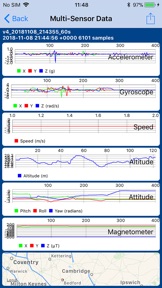
Record Accelerometer, Gyroscope, GPS, Barometer, Magnetometer sensor data and share by email for further analysis, or review using the in app viewer.
However Sensor Play is not just a toy.
Beyond the obvious fun of watching the accelerometer and gyroscope graphs bounce around you can now record multi-sensor data all at the same time, even in the background, for a full external analysis of your, or your iPhone's, motion through time and space however you so desire.
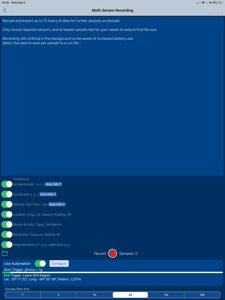
And now with Automation you can trigger your recordings to start either after a simple delay, when you enter or leave a preset GPS Region, or when the iPhone is nudged above a selected gForce.
Then end your recordings either after a set duration, or when you enter or leave a preset GPS Region.
Automation makes getting the data you want so much easier, and eliminates lots of unnecessary recorded data. Set up the triggers as required, close the phone and go.
Set and Forget! Later when you open SensorPlay the data you were after will have been automatically recorded and saved for you.
The following data is recorded to a csv file for sharing through the standard iPhone share sheet.
Timestamp
Accelerometer: X, Y, Z
Gyroscope: X, Y, Z
Attitude: Roll, Pitch, Yaw
Location: Longitude, Latitude, Speed, TrueHeading, Altitude
Motion Activity: Type & Confidence
Barometer: Pressure, Relative Altitude
Magnetometer: µT X, Y, Z, calibrated x,y,z, rotation matrix, and quaternion
Visual graphs of sensor recordings in one place, as long as they're not too large anyway.
Background mode is supported for all recordings, accelerometer, gyro, and multi-sensor export, lock your screen and keep recording all sensor data for up to six hours.
A serious engineering, scientific, and educational analysis tool.
Sharing of all recordings is now through the built in share options which includes, Airdrop, mail, message, notes, dropbox (if installed), etc.
Sensors currently supported:
Barometer (iPhone 6 and above only)
- see the atmospheric pressure in a choice of 7 units, see your relative altitude plotted over time.
- Widget available to display the atmospheric pressure in the notification centre.
Accelerometer
- See the g-forces on the X,Y,Z axis and see them traced over time.
- Widget available to show gMax in X,Y,Z axis on notification screen.
- Record the data and share for further analysis
Gyroscope
- Watch the rate of rotation over the X,Y,Z axis plotted over time.
- Record the data and share for further analysis
GPS/Location Services
- See your exact location mapped on screen and share your Lat/Long coordinates by text or email.
Magnetometer/Compass
- See the magnetic field acting on the X, Y, Z, axis along with an interactive compass.
3D/Force Touch (6S & above only)
Note: Continued use of GPS running in the background can dramatically decrease battery life.
What's New in Version 5.2

Added real time charting of the Magnetometer calibrated magnetic field, finally!

Seller

Name

Philip Broder

URL

Information

Developer

Categories

Version

5.2

Size

23.1 MB

Game Center

No

VPP Device Licensing

Yes

Rating

Rated: 4+

Compatibility

iOS 10.3 or later

Devices

iPhone 5, iPhone 5c, iPhone 5s, iPhone 6, iPhone 6 Plus, iPhone 6s, iPhone 6s Plus, iPhone SE, iPhone 7, iPhone 7 Plus, iPhone 8, iPhone 8 Plus, iPhone X, iPhone XR, iPhone XS, iPhone XS Max, iPhone 11, iPhone 11 Pro, iPhone 11 Pro Max, iPhone SE (2nd generation), iPhone 12, iPhone 12 Pro, iPhone 12 Pro Max, iPhone 12 mini, iPad (4th Generation) (Wi-Fi), iPad (4th Generation) (4G), iPad (5th Generation) Wi-Fi, iPad (5th Generation) Wi-Fi + Cellular, iPad (6th generation) Wi-Fi, iPad (6th generation) Wi-Fi + Cellular, iPad Pro, iPad Pro (Cellular), iPad Pro (9.7-inch), iPad Pro (9.7-inch) (Cellular), iPad Pro 12.9-inch (2nd generation), iPad Pro 12.9-inch (2nd generation) Wi-Fi + Cellular, iPad Pro (10.5-inch), iPad Pro (10.5-inch) Wi-Fi + Cellular, iPad Pro (11-inch), iPad Pro (11-inch) Wi-Fi + Cellular, iPad Pro 12.9-inch (3rd generation), iPad Pro 12.9-inch (3rd generation) Wi-Fi + Cellular, iPad Air, iPad Air (Cellular), iPad Air 2, iPad Air 2 (Cellular), iPad Air (3rd generation), iPad Air (3rd generation) Wi-Fi + Cellular, iPad mini Retina, iPad mini Retina (Cellular), iPad mini 3, iPad mini 3 (Cellular), iPad mini 4, iPad mini 4 (Cellular), iPad mini (5th Generation), iPad mini (5th Generation) Wi-Fi + Cellular, iPad (7th generation) Wi-Fi, iPad Pro 11-inch (2nd generation), iPad Pro 11-inch (2nd generation) Wi-Fi + Cellular, iPad Pro 12.9-inch (4th generation), iPad Pro 12.9-inch (4th generation) Wi-Fi + Cellular, iPad Air (4th Generation) (Wi-Fi), iPad Air (4th Generation) (Wi-Fi + Cellular), iPad (8th generation) Wi-Fi, iPad (8th generation) Wi-Fi + Cellular, iPod touch (6th Generation), iPod touch (7th generation)

Languages

English

App Store: Customer Ratings

Ratings & Reviews

5.0 of 5 (4 Ratings)

App Store: Customer Reviews

2018-01-15

Barometric Height Surveys

I am undertaking an engineering investigation of a water pipeline through heavy rainforest. Although I can get OK GPS location fix of the route, I had not been able to get reasonable elevation fix using GPS due to the terrain and tree cover. Sensor Play has preformed brilliantly using a 2 station relative barometric elevation setup with an estimated accuracy of about +/- 1m over the alignment. The alternative survey was cost prohibitive. Sensor Play is a serious piece of kit for serious data collection. Thank you Philip Broder. Best $8 I have ever spent!
John Macintosh
Version 4.2
2016-05-19

Perfect app for research

Really good app. I am using it to record acceleration data for my final year engineering thesis. Works awesome and so easy to send the data to my computer. When I have lots of files (20+) sending them to my computer with airdrop is doable but would be easier if it could somehow select all and send in one go. App now runs in background which is great so I can take photos while recording data, very useful!
Jazza2442
Version 3.4
2016-04-03

Doesn't record in background

A great app, but it needs to be open and in screen to record data. If the phone locks or you open another app the data recording is paused. It will not record data in the background.
Such a shame, because the point would be to record data while you focused on the activity.
I missed out on recording data from an aerobatics flight.
I will give it an extra star if this improvement is introduced.
polemicol
Version 3.2
2015-07-21

Great app

Great app
Longbeach43
Version 2.1