AboutTermsPrivacyContact
 
Updating
Switcher Studio

Switcher Studio

Released: 2014-09-25
Copyright © 2012-2020 Switcher Inc.
Switcher Studio - QR Code
Version 5.2.0
4+
Download on the App Store
Version 5.2.0
4+
Download on the App Store
Released: 2014-09-25
Copyright © 2012-2020 Switcher Inc.

iPhone Screenshots

Screenshot
Screenshot
Screenshot
Screenshot
Screenshot
Screenshot
Screenshot

iPad Screenshots

Screenshot
Screenshot
Screenshot
Screenshot
Screenshot
Screenshot
Screenshot

Description

Switcher Studio lets you capture and stream video from multiple iPhones and iPads — and edit it in real time — helping you connect with your community in the most engaging way yet.
Whether you’re syncing multiple iOS devices or just using one, your Switcher account lets you polish live videos to create something amazing. It’s perfect for streaming talk shows and podcasts, meetings and company announcements, demos, education and training sessions, marketing and creative content, live events, sports, and more. And the intuitive interface ensures everyone can create stunning videos.
Feature overview:
- Multicamera streaming: Wirelessly connect up to 9 iPhones or iPads to switch camera angles with a single tap.
- Social video integrations: Stream live directly to Facebook, YouTube, LinkedIn, Microsoft Stream, and beyond.
- Live-editing: Switch camera angles, add graphics, b-roll, text, titles, effects, and more in real time.
- Image insertion: Tap to display images, logos, or graphics in your videos.
- Prerecorded video: Roll in prerecorded videos for openers, b-roll, interviews, or special segments.
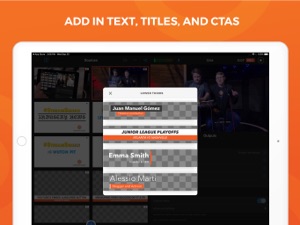
- Customizable text: Easily add and edit text, titles, CTAs, and lower thirds.
- Video Chat: Bring in a guest caller, co-host, or on-site correspondent from anywhere.
- Switcher Cloud: Store your video assets in the Switcher Cloud for access on any device.
- Camera control: Adjust each camera’s exposure, white balance, focus, and zoom in one place.
Why Switcher Studio?
- No expensive gear: Switcher works entirely with iPhone and iPad cameras.
- Zero turnaround time: Live-editing ensures that when you’re done shooting, you’re done editing.
More features to love in Switcher:
- Stream and record: Record 1080p or 4K video from multiple cameras and export the auto-synced files for Final Cut Pro.
- Facebook comments: Tap Facebook comments in the Switcher app to display them in your stream.
- Multiview layouts: Show multiple camera angles or sources at once with side-by-side, split-screen, and picture-in-picture layouts.
- Scoreboard extension: Keep score during sports streams with customizable Scoreboard templates.
- RTMP streaming: Use RTMP data to stream to Twitter, Vimeo, Twitch, Ustream, and nearly anywhere else.
- Screensharing: Show presentations, websites, games, and apps in your livestream or video by sharing your computer or device screen though our Switcher Cast app (available for Mac, PC, and iOS).
- Audio control: Connect your audio mixer to ensure perfect sound for viewers.
- HDMI output: Send live video to a projector or external display with HDMI or AirPlay.
Got questions? Email us at support@switcherstudio.com
Privacy policy: http://switcherstudio.com/privacy-policy
Terms of use: http://switcherstudio.com/terms-of-use
Compatible devices: http://switcherstudio.com/compatible-devices

What's New in Version 5.2.0

• New autoswitching feature for hands-free switching among camera angles
• Introduced tool for trimming prerecorded videos like b-roll and openers
• Added customizable gradient backgrounds for multiview layouts
• Introduced eight alignment options for perfectly positioning logos and graphics
• Bug fixes and stability improvements

Seller

Name

Switcher Inc.

Information

Developer

Categories

Version

5.2.0

Size

118 MB

Game Center

No

VPP Device Licensing

Yes

Rating

Rated: 4+

Compatibility

iOS 13.0 or later

Devices

iPhone 5s, iPhone 6, iPhone 6 Plus, iPhone 6s, iPhone 6s Plus, iPhone SE, iPhone 7, iPhone 7 Plus, iPhone 8, iPhone 8 Plus, iPhone X, iPhone XR, iPhone XS, iPhone XS Max, iPhone 11, iPhone 11 Pro, iPhone 11 Pro Max, iPhone SE (2nd generation), iPhone 12, iPhone 12 Pro, iPhone 12 Pro Max, iPhone 12 mini, iPad (5th Generation) Wi-Fi, iPad (5th Generation) Wi-Fi + Cellular, iPad (6th generation) Wi-Fi, iPad (6th generation) Wi-Fi + Cellular, iPad Pro, iPad Pro (Cellular), iPad Pro (9.7-inch), iPad Pro (9.7-inch) (Cellular), iPad Pro 12.9-inch (2nd generation), iPad Pro 12.9-inch (2nd generation) Wi-Fi + Cellular, iPad Pro (10.5-inch), iPad Pro (10.5-inch) Wi-Fi + Cellular, iPad Pro (11-inch), iPad Pro (11-inch) Wi-Fi + Cellular, iPad Pro 12.9-inch (3rd generation), iPad Pro 12.9-inch (3rd generation) Wi-Fi + Cellular, iPad Air, iPad Air (Cellular), iPad Air 2, iPad Air 2 (Cellular), iPad Air (3rd generation), iPad Air (3rd generation) Wi-Fi + Cellular, iPad mini Retina, iPad mini Retina (Cellular), iPad mini 3, iPad mini 3 (Cellular), iPad mini 4, iPad mini 4 (Cellular), iPad mini (5th Generation), iPad mini (5th Generation) Wi-Fi + Cellular, iPad (7th generation) Wi-Fi, iPad Pro 11-inch (2nd generation), iPad Pro 11-inch (2nd generation) Wi-Fi + Cellular, iPad Pro 12.9-inch (4th generation), iPad Pro 12.9-inch (4th generation) Wi-Fi + Cellular, iPad Air (4th Generation) (Wi-Fi), iPad Air (4th Generation) (Wi-Fi + Cellular), iPad (8th generation) Wi-Fi, iPad (8th generation) Wi-Fi + Cellular, iPod touch (6th Generation), iPod touch (7th generation)

Languages

English, French

App Store: Customer Ratings

Ratings & Reviews

3.5 of 5 (19 Ratings)

App Store: Customer Reviews

2020-07-16

Great application

The app help me alot building my channel.
funkybigchadler
Version 5.0.2
2020-04-15

Worth the investment

Loving this app. For someone who is a novice who has been thrown into this space (running a church) this app has meant we’ve been able to use what we have to create a really professional and interactive ability with our audience.
Whether prerecording or going live - so easy to use on the fly and so many capabilities.
Again - worth the investment.
Brian.Webber
Version 4.4.2
2019-08-23

Great for a external app to stream with. Some Bugs

Love using this for my Facebook live page and the overlay templates the app provides but once streaming starts it’s only in landscape mode on Facebook live and that makes the screen 70% smaller on Phone platforms as a viewer. A portrait mode would be awesome to outlet to Facebook live.
-The streams description is actually the title section.
-Amazing overlays + playbacking videos/ photos on live.
-app doesn’t run in background so if you hit the home button you have to restart the steps again.
- Lets You stream out to nearly every platform all for free.
-If you have signed out / password change you need to create a new account as it states your accounts expired ?
please fix these bugs as I’ve had high hopes for this app for a few months now and haven’t seen any improvement :/
Johnne19941
Version 4.1.0
2019-07-11

$29 per month for personal users

Was enjoying where this was going until *nope* not affording $29 per month (billed annually) or $39 per month pay as you go for a personal/enthusiast license? Sorry but that’s not going to happen. Maybe it’d be more worthwhile for the business out there?
donotshare
Version 4.1.0
2018-10-10

Costs money

I am not a rich guy so I now have to pay
Analog TV
Version 3.8.2
2018-06-28

Brilliant but useless.

Really great video switching tool! Just one snag once you’ve logged in once you can’t get back into the app unless, even after resetting your password. Went to lodge a tech fault problem and it wouldn’t allow me to do that. I have to set up a new email account each time to get in... So it’s useless... if someone from switcher can contact me I’d be happy to change my review.
Pete Salvorock
Version 3.8.0
2018-06-22

Impressive

Everything you want, and it’s solid. I’m such a fan of this app, can’t say enough good stuff about it.
Voodaha
Version 3.8.0
2016-01-25

A-MAZ-ING!!!!!

Love this soooo much. Just what I need. LOVE THE NEW UPDATE!!!!!! Just one thing, could u add replays, like so I can show slow mo replays, that would be great! :)
ethanwhite07
Version 2.6.1