Updating


Re
#82 in Top Grossing iPad Apps > Utilities
iPhone Screenshots


iPad Screenshots


Description
PDF Reader is an easy-to-use software that can quickly view, edit, search, annotate, share or print PDF content ,including forms and multimedia to meet your daily work needs.
【Main functions】
• View
• Text search
• Annotations
• Document Management
• Support multiple document formats
• Share
• Print
【Starter guide】
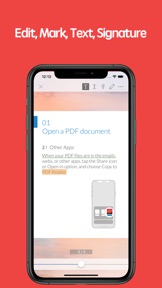
1. Open the PDF document
1) Open from other applications
Find the PDF document on emails, webs or other application, tap the Share icon or Open-in option, and choose Copy to PDF Reader, select "PDF Reader". The document will be opened in the PDF Reader .
2) Within the APP
You can open the PDF documents that you viewed or edited recently within the APP .
2. Process the documents
Open the PDF documents and choose the tools at the top right to process.
3. Complete processing
Share files to your friends with email, Facebook, Twitter, Airdrop. Or, print it.
【PDF Reader VIP member subscription instructions】
We offer subscription plans as followed, the price will change depending on the currency
1-month subscription
1-year subscription
Payment will be charged to iTunes Account at confirmation of purchase. Subscriptions automatically renew unless auto-renew is turned off at least 24-hours before the end of the current period. Account will be charged for renewal within 24-hours prior to the end of the current period, and identify the cost of the renewal. Subscriptions may be managed by the user and auto renewal may be turned off by going to the user's Account Settings after purchase. No cancellation of the current subscription is allowed during active subscription period. Any unused portion of a free trial period will be forfeited when the user purchases a subscription to that publication, where applicable.
Terms of service: https://kkyun.com/html/service.html
Privacy policy: https://kkyun.com/html/privacy.html
【Feedback】
Please contact us: service@kkyun.com
What's New in Version 2.1.3
• Optimize display of list thumbnails.
• Optimize the display of function menu.
Information
Developer
Categories
Version
2.1.3
Size
58.5 MB
Game Center
No
VPP Device Licensing
Yes
Rating
Rated: 4+
Compatibility
iOS 9.0 or later
Devices
iPhone 4S, iPhone 5, iPhone 5c, iPhone 5s, iPhone 6, iPhone 6 Plus, iPhone 6s, iPhone 6s Plus, iPhone SE, iPhone 7, iPhone 7 Plus, iPhone 8, iPhone 8 Plus, iPhone X, iPhone XR, iPhone XS, iPhone XS Max, iPhone 11, iPhone 11 Pro, iPhone 11 Pro Max, iPhone SE (2nd generation), iPhone 12, iPhone 12 Pro, iPhone 12 Pro Max, iPhone 12 mini, iPad 2 (Wi-Fi), iPad 2 (3G), iPad (3rd Generation) (Wi-Fi), iPad (3rd Generation) (4G), iPad (4th Generation) (Wi-Fi), iPad (4th Generation) (4G), iPad (5th Generation) Wi-Fi, iPad (5th Generation) Wi-Fi + Cellular, iPad (6th generation) Wi-Fi, iPad (6th generation) Wi-Fi + Cellular, iPad Pro, iPad Pro (Cellular), iPad Pro (9.7-inch), iPad Pro (9.7-inch) (Cellular), iPad Pro 12.9-inch (2nd generation), iPad Pro 12.9-inch (2nd generation) Wi-Fi + Cellular, iPad Pro (10.5-inch), iPad Pro (10.5-inch) Wi-Fi + Cellular, iPad Pro (11-inch), iPad Pro (11-inch) Wi-Fi + Cellular, iPad Pro 12.9-inch (3rd generation), iPad Pro 12.9-inch (3rd generation) Wi-Fi + Cellular, iPad Air, iPad Air (Cellular), iPad Air 2, iPad Air 2 (Cellular), iPad Air (3rd generation), iPad Air (3rd generation) Wi-Fi + Cellular, iPad mini (Wi-Fi), iPad mini (4G), iPad mini Retina, iPad mini Retina (Cellular), iPad mini 3, iPad mini 3 (Cellular), iPad mini 4, iPad mini 4 (Cellular), iPad mini (5th Generation), iPad mini (5th Generation) Wi-Fi + Cellular, iPad (7th generation) Wi-Fi + Cellular, iPad Pro 11-inch (2nd generation), iPad Pro 11-inch (2nd generation) Wi-Fi + Cellular, iPad Pro 12.9-inch (4th generation), iPad Pro 12.9-inch (4th generation) Wi-Fi + Cellular, iPad Air (4th Generation) (Wi-Fi), iPad Air (4th Generation) (Wi-Fi + Cellular), iPad (8th generation) Wi-Fi, iPad (8th generation) Wi-Fi + Cellular, iPod touch (5th generation), iPod touch (6th Generation), iPod touch (7th generation)
Languages
English, Chinese
App Store: Customer Ratings
Ratings & Reviews
5.0 of 5 (2 Ratings)
App Store: Customer Reviews
No Entry