AboutTermsPrivacyContact
 
Updating
Tiny Month - Easy Calendar

Tiny Month - Easy Calendar

Released: 2014-01-21
© PIXO Incorporation
Tiny Month - Easy Calendar - QR Code
Version 2.0
4+
Download on the App Store
Version 2.0
4+
Download on the App Store
Released: 2014-01-21
© PIXO Incorporation

iPhone Screenshots

Screenshot
Screenshot
Screenshot
Screenshot
Screenshot

Description

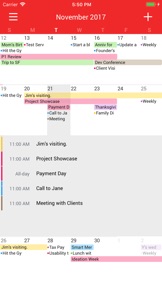
Tiny Month is designed to show you clear and readable month view and list view with the intuitive interface.
Why Tiny? Instead of forcing you to learn some new way to read your events, Tiny Month gives you tiny size of grid month view so that you can see everything at a glance. You can switch between three sizes. Make it tiny if you're going through busy days, or switch back to normal size if your schedule is not so busy for a while.
• NO MORE DOTS ON YOUR MONTH VIEW
- Tiny Month gives you colorful agenda title on your month view. Each day expands when you touch. This simple and intuitive interface makes reading event a breeze.
• ADJUST YOUR MONTH VIEW
- Is your month packed with busy schedule? Change the size of events on month view so you can see more. You can choose between Tiny/Small/Regular sizes (Default is small). Nothing can replace the same old grid month view you've always been using.
• FINDER
- Two things are different from normal list view. First, it gives you Month Separator that makes it easy to read events in the same month. Second, it has Day Indicator that makes it easy to see how far in the future it is as you scroll.
• ADDING TIME IS A SINGLE TOUCH
- You can add an event in a single touch by simply sliding your finger to set a time for events.
• BE COLORFUL WITH CALENDARS
- No matter what calendar service you use (iCloud/Google/Exchange,Etc), you can change color and name of your calendars. Have fun playing with our easy to use color picker!
• Other Features
- Date Badge, Week Number, Default Alarm, Default Event Length

What's New in Version 2.0

This app has been updated by Apple to display the Apple Watch app icon.
• Bug Fixes and Minor Changes
• iOS 11 Optimization

Seller

Name

PIXO Incorporation

URL

Information

Categories

Version

2.0

Size

8 MB

Game Center

No

VPP Device Licensing

Yes

Rating

Rated: 4+

Compatibility

iOS 9.0 or later

Devices

iPhone 4S, iPhone 5, iPhone 5c, iPhone 5s, iPhone 6, iPhone 6 Plus, iPhone 6s, iPhone 6s Plus, iPhone SE, iPhone 7, iPhone 7 Plus, iPhone 8, iPhone 8 Plus, iPhone X, iPhone XR, iPhone XS, iPhone XS Max, iPhone 11, iPhone 11 Pro, iPhone 11 Pro Max, iPhone SE (2nd generation), iPhone 12, iPhone 12 Pro, iPhone 12 Pro Max, iPhone 12 mini, iPhone 13, iPhone 13 Pro, iPhone 13 Pro Max, iPhone 13 mini, iPad 2 (Wi-Fi), iPad 2 (3G), iPad (3rd Generation) (Wi-Fi), iPad (3rd Generation) (4G), iPad (4th Generation) (Wi-Fi), iPad (4th Generation) (4G), iPad (5th Generation) Wi-Fi, iPad (5th Generation) Wi-Fi + Cellular, iPad (6th generation) Wi-Fi, iPad (6th generation) Wi-Fi + Cellular, iPad Pro, iPad Pro (Cellular), iPad Pro (9.7-inch), iPad Pro (9.7-inch) (Cellular), iPad Pro 12.9-inch (2nd generation), iPad Pro 12.9-inch (2nd generation) Wi-Fi + Cellular, iPad Pro (10.5-inch), iPad Pro (10.5-inch) Wi-Fi + Cellular, iPad Pro (11-inch), iPad Pro (11-inch) Wi-Fi + Cellular, iPad Pro 12.9-inch (3rd generation), iPad Pro 12.9-inch (3rd generation) Wi-Fi + Cellular, iPad Air, iPad Air (Cellular), iPad Air 2, iPad Air 2 (Cellular), iPad Air (3rd generation), iPad Air (3rd generation) Wi-Fi + Cellular, iPad mini (Wi-Fi), iPad mini (4G), iPad mini Retina, iPad mini Retina (Cellular), iPad mini 3, iPad mini 3 (Cellular), iPad mini 4, iPad mini 4 (Cellular), iPad mini (5th Generation), iPad mini (5th Generation) Wi-Fi + Cellular, iPad (7th generation) Wi-Fi + Cellular, iPad Pro 11-inch (2nd generation), iPad Pro 11-inch (2nd generation) Wi-Fi + Cellular, iPad Pro 12.9-inch (4th generation), iPad Pro 12.9-inch (4th generation) Wi-Fi + Cellular, iPad Air (4th Generation) (Wi-Fi), iPad Air (4th Generation) (Wi-Fi + Cellular), iPad (8th generation) Wi-Fi, iPad (8th generation) Wi-Fi + Cellular, iPad Pro 11-inch (3rd generation), iPad Pro 11-inch (3rd generation) Wi-Fi + Cellular, iPad Pro 12.9-inch (5th Generation), iPad Pro 12.9-inch (5th Generation) Wi-Fi + Cellular, iPad (9th Generation), iPad (9th Generation) Wi-Fi + Cellular, iPad mini (6th Generation), iPad mini (6th Generation) Wi-Fi + Cellular, iPod touch (5th generation), iPod touch (6th Generation), iPod touch (7th generation), Apple Watch Series 4, Apple Watch Series 5, Apple Watch Series 6 (GPS), Apple Watch Series 6 (GPS + Cellular), Apple Watch Series SE (GPS), Apple Watch Series SE (GPS + Cellular), Apple Watch Series 7 (GPS), Apple Watch Series 7 (GPS + Cellular)

Languages

English, Catalan, Chinese, Czech, Danish, Dutch, Finnish, French, German, Greek, Hebrew, Hungarian, Italian, Japanese, Korean, Norwegian Bokmål, Polish, Portuguese, Romanian, Russian, Slovak, Spanish, Swedish, Turkish

App Store: Customer Ratings

Ratings & Reviews

3.5 of 5 (36 Ratings)

App Store: Customer Reviews

2021-06-02

Stay Away

Does not work as stated - waste of money
Waste of MON3Y
Version 2.0
2019-10-15

App won’t let me add new events

Please fix this bug, this has been my favorite calendar app, but suddenly it stopped letting me add events!
remisko
Version 2.0
2019-04-30

Not working

I was really excited about this app but I can't add events or new calendars. I can go through the process but when I tap done nothing appears - I just have a big blank calendar.
Mummy Red Bird
Version 2.0
2018-10-26

Crashes instantly

Crashes instantly whenever I try to open it. Haven’t even been able to do anything with it
Goldysmith
Version 2.0
2018-03-15

Need widget

Need widget
JR_A
Version 2.0
2017-10-12

Not working since update

As above
Gilldo_
Version 2.0
2017-01-04

Looks ok but doesn't do what it says

Got this to use my outlook calendar but it doesn't even give you the choice to add it... the title is basically lying.
jeeaysee
Version 1.2
2016-07-11

LOVE it

The calendar is simple and clean with a very user-friendly interface. It does exactly what it says it can do. There are no unnecessary features that clutter up month and week views which distract from an organised calendar. The month-view allows user to see full words at a glance what event is on for the day, not some meaningless coloured dot that you have to try and figure out what it means. Well done, thankyou for creating something that is easy and uncluttered to use!
SirSmarty
Version 1.2
2016-02-08

Don't waste your time

Doesn't do what it claims to, can't even add other calendars. Useless and a waste of money
Charbear11
Version 1.2