Updating

Smart GPS Speedometer
Released: 2013-10-01
© 2018 AppAspect Technologies Pvt. Ltd.


-31
#90 in Top Grossing Apps > Navigation
iPhone Screenshots


iPad Screenshots



Description
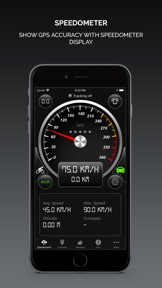
Displays current speed on a digital/analog speedometer, keeps track of your top speed and average speed. Speedometer also allows you to easily switch between units of measurement (mph or km/h) for use in your vehicle (your cycle, your car, on a boat or on an airplane) and track your journey with live tracking on map!
● DISPLAY MODE
- Switch between KM/H and MPH mode for speed measurement.
- Analog speedometer in portrait mode.
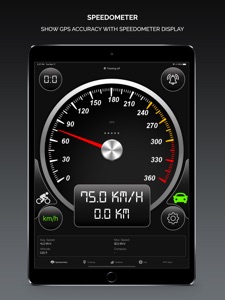
- Landscape mode to display digital Speedometer in full screen.
- Showing Average and Maximum Speed of the trip.
- Switch between bike and car mode with 120 km/h to 360 km/h speed range.
● GPS INDICATOR
- Show GPS accuracy indicator.
● TRACKING
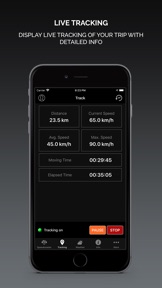
- Keeps track of travelled distance, average speed and top speed.
- Store history of tracking data along with the real time data display.
- Ability to turn tracking on/off.
- Time tracking with total travelled time.
- Reset history tracking data quickly and easily.
● SPEED LIMIT ALARM
- Option to set speed limit and get notification alarm when you cross the predefined speed limit.
- Advanced feature to provide you safely while driving
● MUSIC
- Select multiple songs or music track from the music library
- Play music in background when using Speedometer for live tracking
● MAP
- Show current speed and distance.
- Show current position on map in real time with Standard, Satellite or Hybrid view.
● WEATHER
- Show weather conditions for the current place.
- Show sunrise and sunset time.
● NOTE:
- Continued use of GPS running in the background can dramatically decrease battery life.
- GPS is not always accurate due to device hardware sensor limitations.
- Data connection is required to see map.
- Make sure you have enabled the location service for the application.
To enable - Settings > Privacy > Location Services > ON
What's New in Version 10.1
minor bug fixes and performance improvement.
Seller
Name
APPASPECT TECHNOLOGIES PRIVATE LIMITED
Information
Developer
Categories
Version
10.1
Size
84.1 MB
Game Center
No
VPP Device Licensing
Yes
Rating
Rated: 4+
Compatibility
iOS 10.0 or later
Devices
iPhone 5, iPhone 5c, iPhone 5s, iPhone 6, iPhone 6 Plus, iPhone 6s, iPhone 6s Plus, iPhone SE, iPhone 7, iPhone 7 Plus, iPhone 8, iPhone 8 Plus, iPhone X, iPhone XR, iPhone XS, iPhone XS Max, iPhone 11, iPhone 11 Pro, iPhone 11 Pro Max, iPhone SE (2nd generation), iPad (4th Generation) (Wi-Fi), iPad (4th Generation) (4G), iPad (5th Generation) Wi-Fi, iPad (5th Generation) Wi-Fi + Cellular, iPad (6th generation) Wi-Fi, iPad (6th generation) Wi-Fi + Cellular, iPad Pro, iPad Pro (Cellular), iPad Pro (9.7-inch), iPad Pro (9.7-inch) (Cellular), iPad Pro 12.9-inch (2nd generation), iPad Pro 12.9-inch (2nd generation) Wi-Fi + Cellular, iPad Pro (10.5-inch), iPad Pro (10.5-inch) Wi-Fi + Cellular, iPad Pro (11-inch), iPad Pro (11-inch) Wi-Fi + Cellular, iPad Pro 12.9-inch (3rd generation), iPad Pro 12.9-inch (3rd generation) Wi-Fi + Cellular, iPad Air, iPad Air (Cellular), iPad Air 2, iPad Air 2 (Cellular), iPad Air (3rd generation), iPad Air (3rd generation) Wi-Fi + Cellular, iPad mini Retina, iPad mini Retina (Cellular), iPad mini 3, iPad mini 3 (Cellular), iPad mini 4, iPad mini 4 (Cellular), iPad mini (5th Generation), iPad mini (5th Generation) Wi-Fi + Cellular, iPad (7th generation) Wi-Fi, iPad Pro 11-inch (2nd generation), iPad Pro 11-inch (2nd generation) Wi-Fi + Cellular, iPad Pro 12.9-inch (4th generation), iPad Pro 12.9-inch (4th generation) Wi-Fi + Cellular, iPod touch (6th Generation), iPod touch (7th generation), Apple Watch Series 4
Languages
English, Chinese, Danish, Dutch, French, German, Italian, Japanese, Korean, Portuguese, Russian, Spanish, Thai
App Store: Customer Ratings
Ratings & Reviews
4.0 of 5 (81 Ratings)
App Store: Customer Reviews
No Entry