AboutTermsPrivacyContact
 
Updating
Mellotron

Mellotron

Released: 2013-10-23
© Mellotron Inc
Mellotron - QR Code
Version 2.0.3
4+
Download on the App Store
Version 2.0.3
4+
Download on the App Store
Released: 2013-10-23
© Mellotron Inc

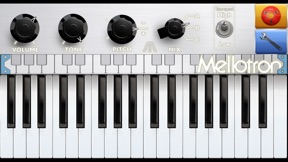
iPhone Screenshots

Screenshot

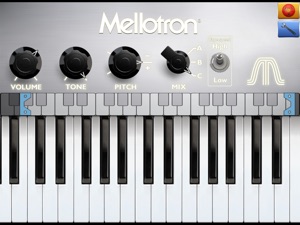
iPad Screenshots

Screenshot

Description

Description
This is the official and the only Mellotron app with sounds from the original library. This app contains 6 sounds but we also have the Mellotron XL app available, which contains 18 sounds plus emulations of the characteristics of different Mellotron and Chamberlin models. The XL version has some rare Chamberlin sounds, more Mellotron rhythms and fills from the MkII Mellotron plus a reverb unit.
This instrument supports Core Midi, Audiobus output (Audiobus 2 & 3) and midi input (Audiobus 3 only).
The Mellotron is a keyboard instrument that uses magnetic tape to play back recordings where each key has one tape. When you press a key, the tape starts and the corresponding pre-recorded note or sound is played back. When you release the key the tape is quickly rewound back to the start point.
Invented in 1950 by the American, Harry Chamberlin, it became popular among recording musicians when it was
manufactured in the UK as the "Mellotron" (a hyphenation of "melody-electronics").
Before the introduction of digital samplers, this was the only way for keyboardists to play real instrument sounds
like strings, flutes, rhythm ensembles and sound effects from a keyboard instrument.
Few people know about Mellotrons and Chamberlins, but almost everybody has heard the sounds they produce.
Among the most well-known tracks are BeatIes "Strawberry Fields Forewer" (flute), Moody Blues "Nights in White Satin" (3 violins), Oasis "Wonderwall" (cello), Radiohead "Exit Music for a Film" (choir), Lana del Rey "Ride" (Chamberlin flute).
We at Mellotron have collected, conserved and improved Mellotrons since 1989, and have been making tape Mellotrons since 1999 (the MkVI and MkVII). Please check out our website www.mellotron.com for a more complete history, real hardware instruments, our new digital M4000D Mellotron and M4000D Mini, tapes from the original masters, parts, service and lots of more info.

What's New in Version 2.0.3

Will still play audio when device is in silent mode
Minor graphic bug fixes
(2.0)
Fix for crashing app
New improved graphics
Core midi support
Double tap to reset knobs to default

Seller

Name

Markus Resch

URL

Information

Developer

Categories

Version

2.0.3

Size

92.7 MB

Game Center

No

VPP Device Licensing

Yes

Rating

Rated: 4+

Compatibility

iOS 9.3 or later

Devices

iPhone 4S, iPhone 5, iPhone 5c, iPhone 5s, iPhone 6, iPhone 6 Plus, iPhone 6s, iPhone 6s Plus, iPhone SE, iPhone 7, iPhone 7 Plus, iPhone 8, iPhone 8 Plus, iPhone X, iPhone XR, iPhone XS, iPhone XS Max, iPhone 11, iPhone 11 Pro, iPhone 11 Pro Max, iPhone SE (2nd generation), iPhone 12, iPhone 12 Pro, iPhone 12 Pro Max, iPhone 12 mini, iPhone 13, iPhone 13 Pro, iPhone 13 Pro Max, iPhone 13 mini, iPhone SE (3rd generation), iPhone 14, iPhone 14 Plus, iPhone 14 Pro, iPhone 14 Pro Max, iPad 2 (Wi-Fi), iPad 2 (3G), iPad (3rd Generation) (Wi-Fi), iPad (3rd Generation) (4G), iPad (4th Generation) (Wi-Fi), iPad (4th Generation) (4G), iPad (5th Generation) Wi-Fi, iPad (5th Generation) Wi-Fi + Cellular, iPad (6th generation) Wi-Fi, iPad (6th generation) Wi-Fi + Cellular, iPad Pro, iPad Pro (Cellular), iPad Pro (9.7-inch), iPad Pro (9.7-inch) (Cellular), iPad Pro 12.9-inch (2nd generation), iPad Pro 12.9-inch (2nd generation) Wi-Fi + Cellular, iPad Pro (10.5-inch), iPad Pro (10.5-inch) Wi-Fi + Cellular, iPad Pro (11-inch), iPad Pro (11-inch) Wi-Fi + Cellular, iPad Pro 12.9-inch (3rd generation), iPad Pro 12.9-inch (3rd generation) Wi-Fi + Cellular, iPad Air, iPad Air (Cellular), iPad Air 2, iPad Air 2 (Cellular), iPad Air (3rd generation), iPad Air (3rd generation) Wi-Fi + Cellular, iPad mini (Wi-Fi), iPad mini (4G), iPad mini Retina, iPad mini Retina (Cellular), iPad mini 3, iPad mini 3 (Cellular), iPad mini 4, iPad mini 4 (Cellular), iPad mini (5th Generation), iPad mini (5th Generation) Wi-Fi + Cellular, iPad (7th generation) Wi-Fi + Cellular, iPad Pro 11-inch (2nd generation), iPad Pro 11-inch (2nd generation) Wi-Fi + Cellular, iPad Pro 12.9-inch (4th generation), iPad Pro 12.9-inch (4th generation) Wi-Fi + Cellular, iPad Air (4th Generation) (Wi-Fi), iPad Air (4th Generation) (Wi-Fi + Cellular), iPad (8th generation) Wi-Fi, iPad (8th generation) Wi-Fi + Cellular, iPad Pro 11-inch (3rd generation), iPad Pro 11-inch (3rd generation) Wi-Fi + Cellular, iPad Pro 12.9-inch (5th Generation), iPad Pro 12.9-inch (5th Generation) Wi-Fi + Cellular, iPad (9th Generation), iPad (9th Generation) Wi-Fi + Cellular, iPad mini (6th Generation), iPad mini (6th Generation) Wi-Fi + Cellular, iPad Air (5th generation), iPad Air (5th generation) Wi-Fi + Cellular, iPad Pro 11-inch (4th generation), iPad Pro 11-inch (4th generation) Wi-Fi + Cellular, iPad Pro 12.9-inch (6th generation), iPad Pro 12.9-inch (6th generation) Wi-Fi + Cellular, iPad (10th generation), iPad (10th generation) Wi-Fi + Cellular, iPod touch (5th generation), iPod touch (6th Generation), iPod touch (7th generation)

Languages

English

App Store: Customer Ratings

Ratings & Reviews

5.0 of 5 (1 Rating)

App Store: Customer Reviews

2020-03-14

This App Is Amazing!

Just what I needed, thank. It’s fun to play around with all the sounds. I give this a five star.
saarahbabe
Version 2.0.3
2017-11-28

Will be amazing once fixed

I just downloaded this onto an iPhone X on iOS 11.1 and there is a horrible distorted digital flickering clipping sound over all the samples. I’m not taking about tape wow & flutter. The issue is not present if you airplay the audio, but is through the phone internal speaker, and speakers connected to the lightning port.
Amperzand
Version 1.13.0
2014-12-01

No sound!

Opens up fine but no sound, please fix or refund. Thanks
Thuqular
Version 1.04