AboutTermsPrivacyContact
 
Updating
Dexcom ONE+

Dexcom ONE+

Released: 2025-01-17
© 2025 Dexcom, Inc
Dexcom ONE+ - QR Code
Version 1.6.0
4+
Download on the App Store
Version 1.6.0
4+
Download on the App Store
Released: 2025-01-17
© 2025 Dexcom, Inc

iPhone Screenshots

Screenshot
Screenshot
Screenshot
Screenshot
Screenshot
Screenshot

Description

Diabetes goes where you go, now your glucose readings can too, with the Dexcom ONE+ Continuous Glucose Monitoring (CGM) system and mobile app†.
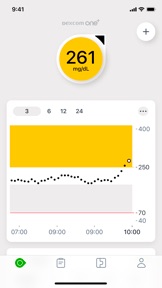
With the Dexcom ONE+ mobile app†, users can access their real-time glucose readings at a glance and set customisable alerts that can help warn of highs and lows, all with no finger pricks* or scanning. Discuss with your healthcare professional how you should use the information displayed on the Dexcom ONE+ to help manage your diabetes.
The Dexcom ONE+ mobile app† has been designed with enhanced features to help in the management of diabetes:
• The app-led onboarding allows users get started in a few clicks only.
• Share your glucose data with up to 10 followers who can monitor your glucose data and trends on their compatible smart device with the Dexcom Follow app. Share and Follow functions require an internet connection.
• Key diabetes metrics displayed in the Clarity Card section of the mobile app, so that users can see both real-time and retrospective glucose data.**
• Event logging where users can track activities like meal intake, exercise sessions and insulin injections, helping them better understand their glucose patterns.1
• Alerts to notify users 12-hours before the end of a sensor session, so you can change your sensor when it’s convenient for you.1
Apple Watch:
• View your glucose information, trend graph, and alerts right from your wrist with the Dexcom ONE+ Apple Watch app. Watches require compatible smart device to use app.
Learn more at Dexcom.com.
This app is only for use with the Dexcom ONE+ Continuous Glucose Monitoring System.
*If your glucose alerts and readings from the Dexcom ONE+ do not match symptoms or expectations, use a blood glucose meter to make diabetes treatment decisions
† Smart device sold separately. For a list of compatible devices, visit www.dexcom.com/compatibility.
**An internet connection is required for patients to send their glucose data to Dexcom Clarity via a compatible smart device: dexcom.com/compatibility.
1 Dexcom ONE+ User Guide, 2023.

What's New in Version 1.6.0

Performance enhancement and bug fixes
For technical assistance please contact technical support at dexcom.com or contact your local Dexcom representative.

Seller

Name

DexCom, Inc.

Information

Developer

Categories

Version

1.6.0

Size

513 MB

Game Center

No

VPP Device Licensing

Yes

Rating

Rated: 4+

Compatibility

iOS 16.4 or later

Devices

iPhone 5s, iPhone 6, iPhone 6 Plus, iPhone 6s, iPhone 6s Plus, iPhone SE, iPhone 7, iPhone 7 Plus, iPhone 8, iPhone 8 Plus, iPhone X, iPhone XR, iPhone XS, iPhone XS Max, iPhone 11, iPhone 11 Pro, iPhone 11 Pro Max, iPhone SE (2nd generation), iPhone 12, iPhone 12 Pro, iPhone 12 Pro Max, iPhone 12 mini, iPhone 13, iPhone 13 Pro, iPhone 13 Pro Max, iPhone 13 mini, iPhone SE (3rd generation), iPhone 14, iPhone 14 Plus, iPhone 14 Pro, iPhone 14 Pro Max, iPhone 15, iPhone 15 Plus, iPhone 15 Pro, iPhone 15 Pro Max, iPhone 16, iPhone 16 Plus, iPhone 16 Pro, iPhone 16 Pro Max, iPhone 16e, iPhone 17, iPhone 17 Pro, iPhone 17 Pro Max, iPhone Air, iPad (5th Generation) Wi-Fi, iPad (5th Generation) Wi-Fi + Cellular, iPad (6th generation) Wi-Fi, iPad (6th generation) Wi-Fi + Cellular, iPad Pro, iPad Pro (Cellular), iPad Pro (9.7-inch), iPad Pro (9.7-inch) (Cellular), iPad Pro 12.9-inch (2nd generation), iPad Pro 12.9-inch (2nd generation) Wi-Fi + Cellular, iPad Pro (10.5-inch), iPad Pro (10.5-inch) Wi-Fi + Cellular, iPad Pro (11-inch), iPad Pro (11-inch) Wi-Fi + Cellular, iPad Pro 12.9-inch (3rd generation), iPad Pro 12.9-inch (3rd generation) Wi-Fi + Cellular, iPad Air, iPad Air (Cellular), iPad Air 2, iPad Air 2 (Cellular), iPad Air (3rd generation), iPad Air (3rd generation) Wi-Fi + Cellular, iPad mini Retina, iPad mini Retina (Cellular), iPad mini 3, iPad mini 3 (Cellular), iPad mini 4, iPad mini 4 (Cellular), iPad mini (5th Generation), iPad mini (5th Generation) Wi-Fi + Cellular, iPad (7th generation) Wi-Fi + Cellular, iPad Pro 11-inch (2nd generation), iPad Pro 11-inch (2nd generation) Wi-Fi + Cellular, iPad Pro 12.9-inch (4th generation), iPad Pro 12.9-inch (4th generation) Wi-Fi + Cellular, iPad Air (4th Generation) (Wi-Fi), iPad Air (4th Generation) (Wi-Fi + Cellular), iPad (8th generation) Wi-Fi, iPad (8th generation) Wi-Fi + Cellular, iPad Pro 11-inch (3rd generation), iPad Pro 11-inch (3rd generation) Wi-Fi + Cellular, iPad Pro 12.9-inch (5th Generation), iPad Pro 12.9-inch (5th Generation) Wi-Fi + Cellular, iPad (9th Generation), iPad (9th Generation) Wi-Fi + Cellular, iPad mini (6th Generation), iPad mini (6th Generation) Wi-Fi + Cellular, iPad Air (5th generation), iPad Air (5th generation) Wi-Fi + Cellular, iPad Pro 11-inch (4th generation), iPad Pro 11-inch (4th generation) Wi-Fi + Cellular, iPad Pro 12.9-inch (6th generation), iPad Pro 12.9-inch (6th generation) Wi-Fi + Cellular, iPad (10th generation), iPad (10th generation) Wi-Fi + Cellular, iPad Air 11-inch (M2) Wi-Fi, iPad Air 13-inch (M2) Wi-Fi, iPad Air 13-inch (M2) Wi-Fi + Cellular, iPad Pro 11-inch (M4) Wi-Fi, iPad Pro 11-inch (M4) Wi-Fi + Cellular, iPad Pro 13-inch (M4) Wi-Fi, iPad Pro 13-inch (M4) Wi-Fi + Cellular, iPad mini (A17 Pro) Wi-Fi, iPad mini (A17 Pro) Wi-Fi + Cellular, iPad (A16) Wi-Fi, iPad (A16) Wi-Fi + Cellular, iPad Air 11-inch (M3) Wi-Fi, iPad Air 11-inch (M3) Wi-Fi + Cellular, iPad Air 13-inch (M3) Wi-Fi, iPad Air 13-inch (M3) Wi-Fi + Cellular, iPad Pro 11-inch (M5) Wi-Fi, iPad Pro 11-inch (M5) Wi-Fi + Cellular, iPad Pro 13-inch (M5) Wi-Fi, iPad Pro 13-inch (M5) Wi-Fi + Cellular, iPod touch (6th Generation), iPod touch (7th generation), Apple Watch Series 4

Languages

English, Arabic, Bulgarian, Croatian, Czech, Dutch, Estonian, French, German, Greek, Italian, Latvian, Lithuanian, Polish, Romanian, Spanish, Swedish

App Store: Customer Ratings

Ratings & Reviews

3.5 of 5 (22 Ratings)

App Store: Customer Reviews

2026-02-15

Should be much better

Whilst they work ok, with the amount of money Dexcom get every month they should be better. The app is sadly missing bolus calculation, live activity support, and import of carbs from Health at least. It would be great to have integration with MyFitnessPal or MySugr for food and bolus. To get this I have to use 3 different apps. Not good enough.
gjlamb
Version 1.6.0
2026-01-16

Compatibility issue

Not compatible with iPhone 17 air despite it being on the list. Had to set up on my old iPhone 15
Tixylyx
Version 1.6.0
2025-12-15

App doesn’t work.

Frustrating as the app doesn’t open and the customer support is useless. I have to pull out the needle from my arm and try another brand.
DDyang
Version 1.6.0
2025-12-04

Australia

The app doesn’t show for Australia as a country all it showing is United States nothing else
ES8812
Version 1.6.0
2025-10-16

Very good app

The app is very good and when contacted with the Dexcom Clarity app the reports are very helpful. The only thing I can suggest to improve the app is as the app passes the glucose levels to apple health app I would like it to add the insulin doses to the apple health app as well.
barrel406
Version 1.4.0
2025-10-01

Ok but room for improvement

The app itself works. But here are the major drawbacks in order of priority.
1) mo way to look prior to the current day or period, would be great to look at previous periods. App only allows you to view the prior 3, 6, 12 or 24 hours with no way to go earlier than that. This makes it hard to compare any improvements. I’d recommend just having arrows at the top that allow you to go back in time as a simple next version.
2) can’t see prior days or select a prior day by calendar date to view
3) syncing with Apple health works, but is delayed by 3 hours with no clear reason why.
4) keeps popping up an alert every time you go into the app saying iPhone Air isn’t supported. I get it, let me ack it once perhaps when I start the app, not have to click every single time I open the app
5) does not show any trending average graph
6) no dark mode for use at night.
raasdnil
Version 1.5.0
2025-08-31

Sign-in Issue

I like other reviewers am having difficulty in signing in to the app. The app overall is great, as is the CGM. In my opinion it is far more accurate than the other CGM's on the market. My only gripe is the sign in on the app. Luckily you can still get data but cannot analysis it which you need to be able to do!! Please fix this, please.
adk431
Version 1.3.0
2025-08-15

Dexcom

Excellent the best
Max Mino
Version 1.6.0
2025-05-08

Unable to sign in

Can’t sign into app just throws a generic error.
Funny I can login to clarity in the web browser with the credentials & the old G6 app on my old iPhone
Anon_2546
Version 1.2.0
2025-04-26

Interactive Widget ?

One+ App is great. A small interactive widget (mini display of BGL only) would be amazing. Leaving the One+ App on all day, when BGL needs constant attention, blocks other apps. Some Apps freeze One+ too. Need a quick fix to allow tiny display.
KLAKaz
2025-04-25

App doesn’t work

Installed app after buying a 1-month supply of Dexcom One+. App won’t let me sign in and just states ‘Dexcom Server Issue’. I’ve deleted the app, reinstalled & still the same issue.
Craigwells
2025-03-30

Garbage

Within one day I had to reinstall 3 times. Bt Cuts off even within 5 meters. Warning when sugar within range.
Sydvets
2025-03-22

Works fine - add dark mode

Everything in the app has worked seamlessly for me. My one request to the development team would be to please add a dark mode!
Eve salt
2025-03-13

Won’t work

Have contacted support and app won’t work with latest IOS update. So they sent me a replacement sensor. Haha, but it’s useless when the app won’t work!
Johannagoanna