AboutTermsPrivacyContact
 
Updating
Document Writer for Microsoft Office - Word & PDF

Document Writer for Microsoft Office - Word & PDF

Released: 2013-02-06
© Mindspeak Software
Document Writer for Microsoft Office - Word & PDF - QR Code
Version 4.4.4
17+
Download on the App Store
Version 4.4.4
17+
Download on the App Store
Released: 2013-02-06
© Mindspeak Software

iPhone Screenshots

Screenshot
Screenshot
Screenshot
Screenshot
Screenshot

iPad Screenshots

Screenshot
Screenshot
Screenshot
Screenshot
Screenshot

Description

THE BEST DOCUMENT EDITING AND MANAGEMENT SUITE FOR IPHONE AND IPAD.
+ Create and Edit Rich Text Documents on your iPhone or iPad.
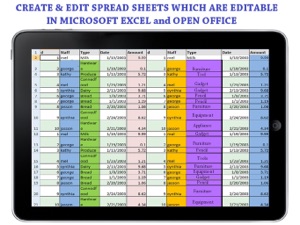
+ Create and Edit Spreadsheets
+ Scan documents and convert to PDF
+ Create Hand-Written notes and Drawings
+ Annotate PDF Documents, Fill out PDF Forms, Sign & Send Documents
+ Create Voice Memos
+ FAX Documents
+ Transfer files to or from your PC or Mac WIRELESSLY or through USB
+ Works in OFFLINE or ONLINE mode. Work on your documents even when you are not connected to the internet
+ Send documents as EMAIL ATTACHMENTS
+ Synch your documents with DROPBOX, GOOGLE DRIVE, BOX or SUGARSYNC.
+ View Word & Excel files (Office 2007/2008/2010)
+ VIEW PowerPoint, PDF, iWork, Text, .RTF, and more!
+ Open & Edit files created through this app from any 3rd party app that supports the “Open In” feature
+ Create or Download Documents from anywhere and carry it with you wherever you go
Look at what some of the Top Review Sites say about the app:
"This has to be the best document app we have road tested for use on the iPhone and iPad" (iphoneglance.com)
"A very well-developed word processor app that I would definitely recommend...." (apppicker.com)
FREE CUSTOMER SUPPORT:
• Product backed by 100% satisfaction guarantee.
• Premium customer support available through email, free of cost, from within the app.
DOCUMENT EDITOR:
• View/Edit/Create Rich Text Documents
• Fonts, Styles,Font Sizes
• Bold, italic, Underline, Strike out
• Text Color, Background Color selection
• Text Alignment
• Import Pictures from your Photo Library and paste in the documents
• Take Pictures from Camera and insert in the document
• Various bullet styles/formatting
• Auto bullets/numbers
• Undo Changes
• Easy Copy and Paste
PDF EXPERT:
• Annotate or draw sketches in your PDF documents.
• Write hand-written notes or comments or highlight text in your PDF documents.
• Fill out PDF Forms and send through email.
• Sign & Send Documents - Receive documents through email, sign them using this app and send back through email.
SPREADSHEETS :
• Create & Edit Spreadsheets that can be opened or edited in Microsoft Excel
• Editing features including colors, fonts, sizing etc
• Multiple Select operations copy, paste, cut etc
DOCUMENT SCANNER :
• High quality document scanner included
• Scan documents and convert to PDF
• Scan Images and convert to PNG, JPG or PDF
• Document / Image cropping and size adjustment
• Easily sharing through email attachment, Whats App, Dropbox, Google Drive and Microsoft Drive
VOICE RECORDER:
• Record Voice Memos and save on your iPhone or iPad
• Easily transfer your recordings to PC or Mac
PDF Converter
• Convert Microsoft Office and other document types to PDF
• Annotate converted PDFs and write your notes, drawings, signature on PDF
FAX :
• Fax documents from within the app.
• This feature is provided through Interfax.Net and involves a fee of few cents per fax.
PDF To Go VIEWING :
• Thumbnail, Fit to Screen, Fit to Width, Actual Size & full screen views
• Go to/rotate page
• Multiple Bookmarks
• Wireless Printing
• Email Attachments
SHARING
• Send and Receive Documents as Email Attachments
• Dropbox
• Google Drive
• Box.Net
• SugarSync
FOLDERS & SUB-FOLDERS
• Create Folders & Sub-folders
• Delete, Rename files
• Drag and Drop files across folders
USABILITY FEATURES
• Smooth User Interface
• Drag & Drop Files
• Creates files that can be opened and edited in Microsoft Word, Apple TextEdit, Notepad, Openoffice, Browser & other office suites.
• Works anywhere online or offline.
DOCUMENT TEMPLATES AND SAMPLES
* Resume and Cover Letters
* Meeting Minutes Template
* Business Plan for Small Businesses
* Weekly/Monthly Planner
* Contract for the Sale of Goods
* Resignation Letters
* Power of Attorney
* Weekly Time Sheet
* Agenda Sample
* Statement of Services
* Budget Sheet
* Blog Post Sample
And many more…

What's New in Version 4.4.4

This app has been updated by Apple to display the Apple Watch app icon.
*** ALL FUNCTIONALITY INCLUDED IN THE PRICE.
NO MONTHLY SUBSCRIPTION OR IN-APP PURCHASE REQUIRED *****
* Improvements in Rich Text Editor
* Sign & send PDF documents in zoom mode
* Ability to drag & drop file across file systems. For example drag from Dropbox and and drop on Google Drive
* Improved document scanner and PDF convertor
* Optimized for iOS 10
* Some bug fixes

Seller

Name

Mindspeak Software (Pvt) Limited

URL

Information

Categories

Version

4.4.4

Size

48.5 MB

Game Center

No

VPP Device Licensing

Yes

Rating

Rated 17+ for the following:
Unrestricted Web Access

Compatibility

iOS 6.0 or later

Devices

iPhone 3GS, iPhone 4, iPhone 4S, iPhone 5, iPhone 5c, iPhone 5s, iPhone 6, iPhone 6 Plus, iPhone 6s, iPhone 6s Plus, iPhone SE, iPhone 7, iPhone 7 Plus, iPhone 8, iPhone 8 Plus, iPhone X, iPhone XR, iPhone XS, iPhone XS Max, iPhone 11, iPhone 11 Pro, iPhone 11 Pro Max, iPhone SE (2nd generation), iPhone 12, iPhone 12 Pro, iPhone 12 Pro Max, iPhone 12 mini, iPhone 13, iPhone 13 Pro, iPhone 13 Pro Max, iPhone 13 mini, iPhone SE (3rd generation), iPhone 14, iPhone 14 Plus, iPhone 14 Pro, iPhone 14 Pro Max, iPhone 15, iPhone 15 Plus, iPhone 15 Pro, iPhone 15 Pro Max, iPhone 16, iPhone 16 Plus, iPhone 16 Pro, iPhone 16 Pro Max, iPhone 16e, iPhone 17, iPhone 17Pro, iPhone 17ProMax, iPhone Air, iPad 2 (Wi-Fi), iPad 2 (3G), iPad (3rd Generation) (Wi-Fi), iPad (3rd Generation) (4G), iPad (4th Generation) (Wi-Fi), iPad (4th Generation) (4G), iPad (5th Generation) Wi-Fi, iPad (5th Generation) Wi-Fi + Cellular, iPad (6th generation) Wi-Fi, iPad (6th generation) Wi-Fi + Cellular, iPad Pro, iPad Pro (Cellular), iPad Pro (9.7-inch), iPad Pro (9.7-inch) (Cellular), iPad Pro 12.9-inch (2nd generation), iPad Pro 12.9-inch (2nd generation) Wi-Fi + Cellular, iPad Pro (10.5-inch), iPad Pro (10.5-inch) Wi-Fi + Cellular, iPad Pro (11-inch), iPad Pro (11-inch) Wi-Fi + Cellular, iPad Pro 12.9-inch (3rd generation), iPad Pro 12.9-inch (3rd generation) Wi-Fi + Cellular, iPad Air, iPad Air (Cellular), iPad Air 2, iPad Air 2 (Cellular), iPad Air (3rd generation), iPad Air (3rd generation) Wi-Fi + Cellular, iPad mini (Wi-Fi), iPad mini (4G), iPad mini Retina, iPad mini Retina (Cellular), iPad mini 3, iPad mini 3 (Cellular), iPad mini 4, iPad mini 4 (Cellular), iPad mini (5th Generation), iPad mini (5th Generation) Wi-Fi + Cellular, iPad (7th generation) Wi-Fi + Cellular, iPad Pro 11-inch (2nd generation), iPad Pro 11-inch (2nd generation) Wi-Fi + Cellular, iPad Pro 12.9-inch (4th generation), iPad Pro 12.9-inch (4th generation) Wi-Fi + Cellular, iPad Air (4th Generation) (Wi-Fi), iPad Air (4th Generation) (Wi-Fi + Cellular), iPad (8th generation) Wi-Fi, iPad (8th generation) Wi-Fi + Cellular, iPad Pro 11-inch (3rd generation), iPad Pro 11-inch (3rd generation) Wi-Fi + Cellular, iPad Pro 12.9-inch (5th Generation), iPad Pro 12.9-inch (5th Generation) Wi-Fi + Cellular, iPad (9th Generation), iPad (9th Generation) Wi-Fi + Cellular, iPad mini (6th Generation), iPad mini (6th Generation) Wi-Fi + Cellular, iPad Air (5th generation), iPad Air (5th generation) Wi-Fi + Cellular, iPad Pro 11-inch (4th generation), iPad Pro 11-inch (4th generation) Wi-Fi + Cellular, iPad Pro 12.9-inch (6th generation), iPad Pro 12.9-inch (6th generation) Wi-Fi + Cellular, iPad (10th generation), iPad (10th generation) Wi-Fi + Cellular, iPad Air 11-inch (M2) Wi-Fi, iPad Air 13-inch (M2) Wi-Fi, iPad Air 13-inch (M2) Wi-Fi + Cellular, iPad Pro 11-inch (M4) Wi-Fi, iPad Pro 11-inch (M4) Wi-Fi + Cellular, iPad Pro 13-inch (M4) Wi-Fi, iPad Pro 13-inch (M4) Wi-Fi + Cellular, iPad mini (A17 Pro) Wi-Fi, iPad mini (A17 Pro) Wi-Fi + Cellular, iPad (A16) Wi-Fi, iPad (A16) Wi-Fi + Cellular, iPad Air 11-inch (M3) Wi-Fi, iPad Air 11-inch (M3) Wi-Fi + Cellular, iPad Air 13-inch (M3) Wi-Fi, iPad Air 13-inch (M3) Wi-Fi + Cellular, iPod touch (4th generation), iPod touch (5th generation), iPod touch (6th Generation), iPod touch (7th generation)

Languages

English

App Store: Customer Ratings

Ratings & Reviews

1.0 of 5 (1 Rating)

App Store: Customer Reviews

2015-09-21

Perfect for using with Dropbox or Google Drive

I use Dropbox to store all my files across my devices, so I was pleased to see how easily it links up with Microsoft office on this app. If you use google drive it's integrated with that, too. The interface is colourful and easy to navigate, and I particularly appreciate the annotate function when I'm reading PhDs on my iPad for work. I usually hate opening word docs on my phone, so I'm really glad I got this app to make the process easier.
Gemmaflorenceagatha
Version 4.3.2
2014-11-21

You'll want this one

This app, at last makes Microsoft compatible with Apple iPhone & iPad through the information exchange of sharing documents. Additionally this app has a lot of really useful features. Personally, the ability to open a PDF for editing and then convert back to a PDF has been fabulous.
As is being able to fill in PDF form on screen, save and return back to sender without having to print them out first. Out of interest, you can print from this app using a Wi-Fi Printer set up.
The "Annotation Button" is genius as it provides the options of free-hand writing, using typed text, adding in a signature and date throughout a document. Further to this you can sign documents on screen, save them and return to sender all without printing a single page. For someone who gets so sick of the paper build-up from excessive printing, I'm all over this one too!
Lastly, have found it's fabulous to be able to download my documents onto the iPhone to access when away from the computer.
Dodds453
Version 4.3.2
2014-03-30

Does not do as advertised

This app only allows you to save as HTML or PDF, not .doc or .docx. Yes you can edit and view word documents IF you have saved them in HTML first. Very disappointed and would like a refund.
Erebus76
Version 4.2.6
2013-12-05

Mr ybax

Refund please does not work as it says
Xbda
Version 4.1
2013-10-26

Rip off!!

Crashes every time!!! Does not work!!! Do not buy!!! I want a refund!!!
PNGninja
Version 4.1
2013-03-25

Mathew

When it down loads I like
Fixitmate
Version 2.1.3
2013-03-01

puggy

It does not seem to have a spell checker - doceuments or documents?
RossKembla
Version 2.1.3
2013-02-23

Not working.

Not working
Renn01
Version 1.0
2013-02-18

Annoying

Having troubles when rotating my iPad to type horizontally, seems like this app was made in a rush (spelling mistakes and organisation is poor)
Clawwd
Version 1.0
2013-02-12

Mr

Not working,stuck
Tasguy
Version 1.0