AboutTermsPrivacyContact
 
Updating
CX ToolKit

CX ToolKit

Released: 2012-11-02
© 2012 Stealth Productions
CX ToolKit - QR Code
Version 7.11
4+
Download on the App Store
Version 7.11
4+
Download on the App Store
Released: 2012-11-02
© 2012 Stealth Productions

iPhone Screenshots

Screenshot
Screenshot
Screenshot
Screenshot
Screenshot
Screenshot
Screenshot
Screenshot
Screenshot

Description

ToolKit is intended to assist aircrew in their day to day activities.
Features:
• Standard Flight Duty Period calc
• LR Flight Duty Period calc
• ULR Flight Duty Period calc
• Split Duty Flight Duty Period calc
• Flight Duty Period following Reserve Duty calc
• Required Rest between Flight Duty Periods calc
• eHOT (Holdover Time) calc
• Simple Logbook
• ZFW / Extra Fuel calc
• Fuel calc given a specific RTOW, ZFW or Landing weight limit
• Cat B/C fuel calc
• Common aviation unit conversion calc
• Cross Wind and Cross Wind Limit calc
• 8 digit Runway State decoder
• SNOWTAM decoder
• Crew Rest timing calc
• Whose Sector random selector
• Exchange Rate calc
• SMS RTOW composer
• Overtime calc
• Meteorological Decode
• DG Decode and segregation
• Low Temperature Altimetry calc
• Density Altitude calc
• Turn Rate/Radius calc
• Generic volume/weight fuel calc
• Sick Day, Reserve Day Tracker and G Day Tracker
• Leave Tracker for Australian Base
• Linear and bilinear integration tool
ToolKit can calculate Flight Duty and Extended Flight Duty Periods by use of inflight relief and Commander Discretion for given start times and acclimatised statuses for the various types of operations.
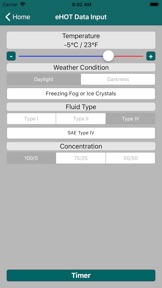
The eHOT calc will allow you to determine and calculate the end of the minimum and maximum holdover time for various de-icing fluids. It will also present a visual countdown timer.
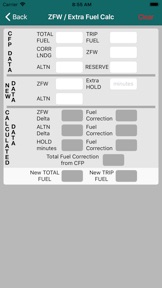
The ZFW change / Extra fuel calc will allow you to determine final fuel taking into account ZFW change, change of alternate and/or extra holding required.
Fuel Calc can be used to determine the change in cargo and fuel weights from flight plan figures to make either a RTOW, ZFW or Landing weight limit.
The 'Cat B/C Fuel Calc' will allow you to quickly determine if Full Cat B/C fuel can be carried or not.
The logbook tool will allow you to:
- Enter flight details
- Search for flight details
- Edit flight details
- Report on various parameters
- Send logbook data via email
The Cross Wind calc can be used to determine cross wind and head/tail wind values for a given runway and wind direction/speed along with the maximum wind strength from the set wind direction for a given cross wind limit (e.g. JFO limit).
The SMS RTOW tool allows you to easily configure the text message required to receive an SMS RTOW. This method will be easier and quicker then trying to amend a previous text you may have stored in your Messages.
The Runway State decoder can be used to quickly decode weather reports that may contain the standard 8-digit code. This can be useful for Moscow flights etc.
The SNOWTAM tool will provide assistance in decoding standard SNOWTAMs and will decode Japanese SNOWTAMs.
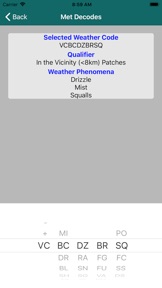
The Meteorological Decode tool that will allow you to quickly decode significant present and forecast weather codes (i.e. +TSRA).
The Overnight Allowance calc allows you to easily check that the allowances you receive at check in. It will not tell you how much you will receive but it will tell you how many breakfast, lunch, dinner etc allowances you are entitled to.
The Last Pushback Time calc will calculate the required pushback time to allow you to achieve an on-blocks time inside your max FDP time taking into consideration sector time and taxi times. You will also be able to set a Notification to alert you that you have passed the Last Pushback Time.
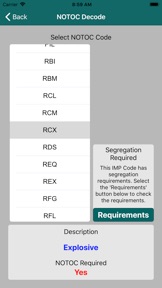
The DG tool decodes DG codes and show loading restrictions and segregration requirements for specific DG as requested along with Lithium battery restrictions.
The Low Temperature Altimetry calc can be used to determine altitude corrections for MSA and approaches conducted in low temperatures.
The MEL Rectification calc will provide the expiry date for a deferred defect given the DD entry date and the rectification interval category.
The Linear and bilinear integration tool for those occasions where you have to use tables.

What's New in Version 7.11

Minor improvements and bug fixes

Seller

Name

Stealth Productions Limited

URL

Information

Categories

Version

7.11

Size

26.2 MB

Game Center

No

VPP Device Licensing

Yes

Rating

Rated: 4+

Compatibility

iOS 12.0 or later

Devices

iPhone 5s, iPhone 6, iPhone 6 Plus, iPhone 6s, iPhone 6s Plus, iPhone SE, iPhone 7, iPhone 7 Plus, iPhone 8, iPhone 8 Plus, iPhone X, iPhone XR, iPhone XS, iPhone XS Max, iPhone 11, iPhone 11 Pro, iPhone 11 Pro Max, iPhone SE (2nd generation), iPhone 12, iPhone 12 Pro, iPhone 12 Pro Max, iPhone 12 mini, iPhone 13, iPhone 13 Pro, iPhone 13 Pro Max, iPhone 13 mini, iPhone SEThirdGen, iPad (5th Generation) Wi-Fi, iPad (5th Generation) Wi-Fi + Cellular, iPad (6th generation) Wi-Fi, iPad (6th generation) Wi-Fi + Cellular, iPad Pro, iPad Pro (Cellular), iPad Pro (9.7-inch), iPad Pro (9.7-inch) (Cellular), iPad Pro 12.9-inch (2nd generation), iPad Pro 12.9-inch (2nd generation) Wi-Fi + Cellular, iPad Pro (10.5-inch), iPad Pro (10.5-inch) Wi-Fi + Cellular, iPad Pro (11-inch), iPad Pro (11-inch) Wi-Fi + Cellular, iPad Pro 12.9-inch (3rd generation), iPad Pro 12.9-inch (3rd generation) Wi-Fi + Cellular, iPad Air, iPad Air (Cellular), iPad Air 2, iPad Air 2 (Cellular), iPad Air (3rd generation), iPad Air (3rd generation) Wi-Fi + Cellular, iPad mini Retina, iPad mini Retina (Cellular), iPad mini 3, iPad mini 3 (Cellular), iPad mini 4, iPad mini 4 (Cellular), iPad mini (5th Generation), iPad mini (5th Generation) Wi-Fi + Cellular, iPad (7th generation) Wi-Fi + Cellular, iPad Pro 11-inch (2nd generation), iPad Pro 11-inch (2nd generation) Wi-Fi + Cellular, iPad Pro 12.9-inch (4th generation), iPad Pro 12.9-inch (4th generation) Wi-Fi + Cellular, iPad Air (4th Generation) (Wi-Fi), iPad Air (4th Generation) (Wi-Fi + Cellular), iPad (8th generation) Wi-Fi, iPad (8th generation) Wi-Fi + Cellular, iPad Pro 11-inch (3rd generation), iPad Pro 11-inch (3rd generation) Wi-Fi + Cellular, iPad Pro 12.9-inch (5th Generation), iPad Pro 12.9-inch (5th Generation) Wi-Fi + Cellular, iPad (9th Generation), iPad (9th Generation) Wi-Fi + Cellular, iPad mini (6th Generation), iPad mini (6th Generation) Wi-Fi + Cellular, iPad AirFifthGen, iPad AirFifthGenCellular, iPod touch (6th Generation), iPod touch (7th generation)

Languages

English

App Store: Customer Ratings

Ratings & Reviews

5.0 of 5 (2 Ratings)

App Store: Customer Reviews

2013-08-21

Practical

Easy to use and has most functions that we may need. Could do with some serious work on the Graphics. Although it adds a bit of aviation feel to it with the background pics, they do make it look cluttered and difficult to read sometimes. The only other improvements I could think of is to make the x-wind calculator a bit easier to see the results ie a bold font and no background pic. Also, the addition of a CAT C fuel calc would help when one is sprung on us every couple of years.
Overall a good app that I'm sure will improve over time. Well done Stealth
TheGravois
Version 1.15
2013-08-17

Great App

Works well. Love the flight time part.
Needs dangerous goods codes (all) with the ones requiring NOTOC in red!!
Also, include details on Durian, dry ice etc.
Nils Gruttner
Version 1.15
2013-08-07

CX

This is a great app for anyone just starting out in CX, or even for those slightly more experienced who might wish to cross check some of their basic knowledge.
My only suggestion (as someone who now needs glasses more often than not) would be to change the background on some of the screens to something a little more plain. It would be great to be able to use this app without getting the glasses out all the time!
PDKK
Version 1.15