AboutTermsPrivacyContact
 
Updating
Counting Dots: Number Practice

Counting Dots: Number Practice

Released: 2011-12-09
© Ellie's Games 2013
Counting Dots: Number Practice - QR Code
Version 3.0
4+
Download on the App Store
Version 3.0
4+
Download on the App Store
Released: 2011-12-09
© Ellie's Games 2013

iPhone Screenshots

Screenshot
Screenshot
Screenshot
Screenshot
Screenshot
Screenshot

iPad Screenshots

Screenshot
Screenshot
Screenshot
Screenshot
Screenshot

Description

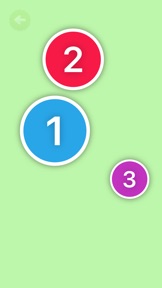
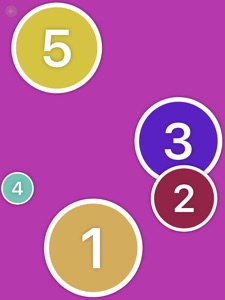
Build counting confidence while having fun in this colorful counting game. Helping kids learn to count from one to one million! Tap the colorful dots in order from smallest to biggest.
Counting Dots has been selected for eSpark Learning's Top of the Class list!
"eSpark has selected Counting Dots for our Top of the Class list, which features the best 15 apps in our curriculum! Out of the 750 apps in our curriculum, Counting Dots stands out as an exemplary model for what we seek."
- eSpark Learning
"My sons counting is getting better because of this app"
- HappyFather858
"Great app for my kids who are working on their counting and recognizing their numbers"
- tori
"My lil guy loves this! He is actually counting as he pops the bubbles... thanks!
- Mom2tyler
FEATURES:
● Vibrant, Visually Stimulating Colors
● Popping Sounds
● Pop Vibration (iPhone)
● iPhone 5 support
● Kid friendly menu
● Smooth Animations
● iPad and Retina Display Support
● No Ads! Perfect for infants!
SETTINGS:
● Remove Dot Border
● Remove Dot Sound
● Enable Dot Vibration (iPhone)
● Hinting
● Number to start counting from
● Count by 1s, 5s or 10s
Have a great suggestion for Ellie's Games? Please send it to Erik@ElliesGames.com

What's New in Version 3.0

Updated the settings to change the starting number from 100 max to 1000 and the count by from 10 max to 100 max.
Thanks for the suggestion Lynda!

Seller

Name

Ellie's Games, LLC

Information

Categories

Version

3.0

Size

28.8 MB

Game Center

No

VPP Device Licensing

Yes

Rating

Rated: 4+

Compatibility

iOS 9.0 or later

Devices

iPhone 4S, iPhone 5, iPhone 5c, iPhone 5s, iPhone 6, iPhone 6 Plus, iPhone 6s, iPhone 6s Plus, iPhone SE, iPhone 7, iPhone 7 Plus, iPhone 8, iPhone 8 Plus, iPhone X, iPhone XR, iPhone XS, iPhone XS Max, iPhone 11, iPhone 11 Pro, iPhone 11 Pro Max, iPhone SE (2nd generation), iPhone 12, iPhone 12 Pro, iPhone 12 Pro Max, iPhone 12 mini, iPhone 13, iPhone 13 Pro, iPhone 13 Pro Max, iPhone 13 mini, iPad 2 (Wi-Fi), iPad 2 (3G), iPad (3rd Generation) (Wi-Fi), iPad (3rd Generation) (4G), iPad (4th Generation) (Wi-Fi), iPad (4th Generation) (4G), iPad (5th Generation) Wi-Fi, iPad (5th Generation) Wi-Fi + Cellular, iPad (6th generation) Wi-Fi, iPad (6th generation) Wi-Fi + Cellular, iPad Pro, iPad Pro (Cellular), iPad Pro (9.7-inch), iPad Pro (9.7-inch) (Cellular), iPad Pro 12.9-inch (2nd generation), iPad Pro 12.9-inch (2nd generation) Wi-Fi + Cellular, iPad Pro (10.5-inch), iPad Pro (10.5-inch) Wi-Fi + Cellular, iPad Pro (11-inch), iPad Pro (11-inch) Wi-Fi + Cellular, iPad Pro 12.9-inch (3rd generation), iPad Pro 12.9-inch (3rd generation) Wi-Fi + Cellular, iPad Air, iPad Air (Cellular), iPad Air 2, iPad Air 2 (Cellular), iPad Air (3rd generation), iPad Air (3rd generation) Wi-Fi + Cellular, iPad mini (Wi-Fi), iPad mini (4G), iPad mini Retina, iPad mini Retina (Cellular), iPad mini 3, iPad mini 3 (Cellular), iPad mini 4, iPad mini 4 (Cellular), iPad mini (5th Generation), iPad mini (5th Generation) Wi-Fi + Cellular, iPad (7th generation) Wi-Fi + Cellular, iPad Pro 11-inch (2nd generation), iPad Pro 11-inch (2nd generation) Wi-Fi + Cellular, iPad Pro 12.9-inch (4th generation), iPad Pro 12.9-inch (4th generation) Wi-Fi + Cellular, iPad Air (4th Generation) (Wi-Fi), iPad Air (4th Generation) (Wi-Fi + Cellular), iPad (8th generation) Wi-Fi, iPad (8th generation) Wi-Fi + Cellular, iPad Pro 11-inch (3rd generation), iPad Pro 11-inch (3rd generation) Wi-Fi + Cellular, iPad Pro 12.9-inch (5th Generation), iPad Pro 12.9-inch (5th Generation) Wi-Fi + Cellular, iPad (9th Generation), iPad (9th Generation) Wi-Fi + Cellular, iPad mini (6th Generation), iPad mini (6th Generation) Wi-Fi + Cellular, iPod touch (5th generation), iPod touch (6th Generation), iPod touch (7th generation)
Languages

English

App Store: Customer Ratings

Ratings & Reviews

4.5 of 5 (2 Ratings)

App Store: Customer Reviews

2018-09-28

Does what it says

Literally impossible to change max to 100 though. Just spent a full 5 miniatures trying that one slider :p
Luagha
Version 1.7
2014-03-18

Great for little ones

Simple, bright and engaging for little ones.
Bunch mum
Version 1.5.1