Updating


iPhone Screenshots


Description
Construction Estimator comes in many versions,one version for iPhones and a version for iPads (it's called EstimateHD) and two versions for the Mac (U.S. feet/inches and a Metric version)
This version now includes Stairs.
Construction Estimator is an easy to use estimating program to help a contractor or home owner estimate materials and cost of a project.
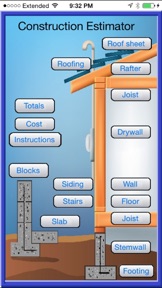
The main menu of construction Estimator shows 14 functions to choose from. Construction Estimator does not have a set beginning point, you can start with any function. Each function has inputs that relate to the area to be calculated. After inputting the measurements press the calculate button. This will calculate and display the cost and the materials. These totals are remembered and saved in memory. Totals are also displayed in the totals form. After completing a function you can press the EXIT button. This will return you to the main menu..
Accuracy
Of course, the degree of your estimates accuracy depends on a number of factors. A small project, such as an addition, will likely produce a very close estimate. A bigger project, such as an entire home, may incur unexpected costs (such as more joists for support) and unforeseen difficulties (such as hard soil or bad weather). Careful input, along with experience that gives foresight, will yield a more accurate estimate.
Nothing is more critical to the success of a project than accurate measurements. While Construction Estimator can estimate the total lengths of wood and yards of concrete a project may involve, they are only estimates. To this, we offer two critical suggestions:
1. Cut wood to your specific measurements, not to the lengths estimated by this program.
2. Use your own judgment to add to concrete estimates. Unusual ground conditions and irregular dimensions make concrete estimates an imprecise science. It's better to have some left over than to run out in the middle of a project.
COST FILE
Fill in the current costs For your area And press the SAVE button.
This will save the cost file. It will be loaded automatically each time the Estimate program is loaded.
E-MAIL. Your estimate can be e-mailed by pressing the E-mail button in the
totals form. You should save your estimate,
Complete instructions are included within the app. There are no advertisements or extra costs, the app is fully functional.
What's New in Version 2.6.2
This app has been updated by Apple to display the Apple Watch app icon.
Corrected a bug that prevented app from working. Construction Estimator now also works with all versions of iPad. iOS 9 or better is required.
Estimate stairs. This new function will estimate stairs, easy to use, estimate shows stair riser height and tread width, including stringer length and total run. App also now works with iPads.
Information
Developer
Categories
Version
2.6.2
Size
4.8 MB
Game Center
No
VPP Device Licensing
Yes
Rating
Rated: 4+
Compatibility
iOS 8.1 or later
Devices
iPhone 5s, iPhone 6, iPhone 6 Plus, iPhone 6s, iPhone 6s Plus, iPhone SE, iPhone 7, iPhone 7 Plus, iPhone 8, iPhone 8 Plus, iPhone X, iPhone XR, iPhone XS, iPhone XS Max, iPhone 11, iPhone 11 Pro, iPhone 11 Pro Max, iPhone SE (2nd generation), iPhone 12, iPhone 12 Pro, iPhone 12 Pro Max, iPhone 12 mini, iPhone 13, iPhone 13 Pro, iPhone 13 Pro Max, iPhone 13 mini, iPhone SE (3rd generation), iPhone 14, iPhone 14 Plus, iPhone 14 Pro, iPhone 14 Pro Max, iPhone 15, iPhone 15 Plus, iPhone 15 Pro, iPhone 15 Pro Max, iPad (5th Generation) Wi-Fi, iPad (5th Generation) Wi-Fi + Cellular, iPad (6th generation) Wi-Fi, iPad (6th generation) Wi-Fi + Cellular, iPad Pro, iPad Pro (Cellular), iPad Pro (9.7-inch), iPad Pro (9.7-inch) (Cellular), iPad Pro 12.9-inch (2nd generation), iPad Pro 12.9-inch (2nd generation) Wi-Fi + Cellular, iPad Pro (10.5-inch), iPad Pro (10.5-inch) Wi-Fi + Cellular, iPad Pro (11-inch), iPad Pro (11-inch) Wi-Fi + Cellular, iPad Pro 12.9-inch (3rd generation), iPad Pro 12.9-inch (3rd generation) Wi-Fi + Cellular, iPad Air, iPad Air (Cellular), iPad Air 2, iPad Air 2 (Cellular), iPad Air (3rd generation), iPad Air (3rd generation) Wi-Fi + Cellular, iPad mini Retina, iPad mini Retina (Cellular), iPad mini 3, iPad mini 3 (Cellular), iPad mini 4, iPad mini 4 (Cellular), iPad mini (5th Generation), iPad mini (5th Generation) Wi-Fi + Cellular, iPad (7th generation) Wi-Fi + Cellular, iPad Pro 11-inch (2nd generation), iPad Pro 11-inch (2nd generation) Wi-Fi + Cellular, iPad Pro 12.9-inch (4th generation), iPad Pro 12.9-inch (4th generation) Wi-Fi + Cellular, iPad Air (4th Generation) (Wi-Fi), iPad Air (4th Generation) (Wi-Fi + Cellular), iPad (8th generation) Wi-Fi, iPad (8th generation) Wi-Fi + Cellular, iPad Pro 11-inch (3rd generation), iPad Pro 11-inch (3rd generation) Wi-Fi + Cellular, iPad Pro 12.9-inch (5th Generation), iPad Pro 12.9-inch (5th Generation) Wi-Fi + Cellular, iPad (9th Generation), iPad (9th Generation) Wi-Fi + Cellular, iPad mini (6th Generation), iPad mini (6th Generation) Wi-Fi + Cellular, iPad Air (5th generation), iPad Air (5th generation) Wi-Fi + Cellular, iPad Pro 11-inch (4th generation), iPad Pro 11-inch (4th generation) Wi-Fi + Cellular, iPad Pro 12.9-inch (6th generation), iPad Pro 12.9-inch (6th generation) Wi-Fi + Cellular, iPad (10th generation), iPad (10th generation) Wi-Fi + Cellular, iPod touch (6th Generation), iPod touch (7th generation)
Languages
English
App Store: Customer Ratings
Ratings & Reviews
0.0 of 5 (No rating)
App Store: Customer Reviews
No Entry