AboutTermsPrivacyContact
 
Updating
iLogger Pro

iLogger Pro

Released: 2011-11-03
© 2020 JP-Software
iLogger Pro - QR Code
Version 3.11.1
4+
Download on the App Store
Version 3.11.1
4+
Download on the App Store
Released: 2011-11-03
© 2020 JP-Software

iPhone Screenshots

Screenshot
Screenshot
Screenshot
Screenshot
Screenshot

iPad Screenshots

Screenshot
Screenshot
Screenshot
Screenshot
Screenshot

Description

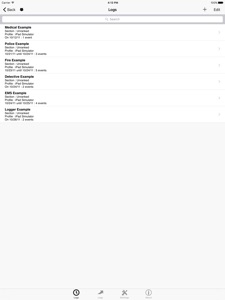
iLogger Pro is a general purpose logging program that lets you keep track of events. You may complete your logs with pictures, voice memos and GPS position with relevant address.
****************************************************
Find our user guide on
http://www.jp-software.fr/en/applications/ilogger-pro/
****************************************************
This app can be used for any activities like detective, investigator, police, EMS personnel, insurance, security, maintenance staff, etc. iLogger Pro est helpful to track calls, incidents, events from start to end without missing anything.
Additionally, thanks to it advanced features of export, find all your log on different file format : email, PDF, CSV and DOC. This last file format is great to achieve your report on your computer.
Features included are :
¤ Settings :
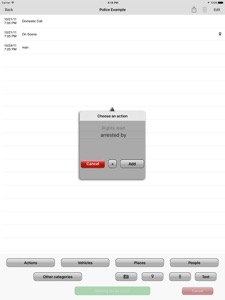
* Create and modify so many categories and actions as wanted
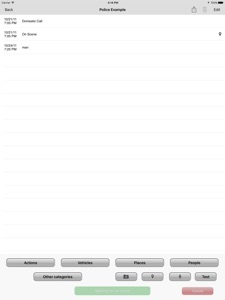
* Configure your own log screen with rapid acces to your categories
* Set reminder to help you to track everything
¤ Logging :
* Keep full list of your logs for reviewing later
* Add, modify and delete easily your logs
* Enrich your logs with pictures and voice memos
* Get with one click your GPS position and relevant address
¤ Exports :
* Create export file to email, PDF, CSV or DOC file format
* Send your exports by email or in another app of your iPhone / iPad
* Your export file are packaged with your pictures and voice memos
   * Protect your export with zip file password protected
¤ Synchronize
   * Sync your devices with iCloud and Dropbox
   * Sync your settings with your friends
iLogger Pro is really easy to learn thanks to an intuitive interface !

What's New in Version 3.11.1

Bug fix

Seller

Name

Julien PIERRE

Information

Developer

Categories

Version

3.11.1

Size

11.8 MB

Game Center

No

VPP Device Licensing

Yes

Rating

Rated: 4+

Compatibility

iOS 12.0 or later

Devices

iPhone 5s, iPhone 6, iPhone 6 Plus, iPhone 6s, iPhone 6s Plus, iPhone SE, iPhone 7, iPhone 7 Plus, iPhone 8, iPhone 8 Plus, iPhone X, iPhone XR, iPhone XS, iPhone XS Max, iPhone 11, iPhone 11 Pro, iPhone 11 Pro Max, iPhone SE (2nd generation), iPhone 12, iPhone 12 Pro, iPhone 12 Pro Max, iPhone 12 mini, iPad (5th Generation) Wi-Fi, iPad (5th Generation) Wi-Fi + Cellular, iPad (6th generation) Wi-Fi, iPad (6th generation) Wi-Fi + Cellular, iPad Pro, iPad Pro (Cellular), iPad Pro (9.7-inch), iPad Pro (9.7-inch) (Cellular), iPad Pro 12.9-inch (2nd generation), iPad Pro 12.9-inch (2nd generation) Wi-Fi + Cellular, iPad Pro (10.5-inch), iPad Pro (10.5-inch) Wi-Fi + Cellular, iPad Pro (11-inch), iPad Pro (11-inch) Wi-Fi + Cellular, iPad Pro 12.9-inch (3rd generation), iPad Pro 12.9-inch (3rd generation) Wi-Fi + Cellular, iPad Air, iPad Air (Cellular), iPad Air 2, iPad Air 2 (Cellular), iPad Air (3rd generation), iPad Air (3rd generation) Wi-Fi + Cellular, iPad mini Retina, iPad mini Retina (Cellular), iPad mini 3, iPad mini 3 (Cellular), iPad mini 4, iPad mini 4 (Cellular), iPad mini (5th Generation), iPad mini (5th Generation) Wi-Fi + Cellular, iPad (7th generation) Wi-Fi + Cellular, iPad Pro 11-inch (2nd generation), iPad Pro 11-inch (2nd generation) Wi-Fi + Cellular, iPad Pro 12.9-inch (4th generation), iPad Pro 12.9-inch (4th generation) Wi-Fi + Cellular, iPad Air (4th Generation) (Wi-Fi), iPad Air (4th Generation) (Wi-Fi + Cellular), iPad (8th generation) Wi-Fi, iPad (8th generation) Wi-Fi + Cellular, iPod touch (6th Generation), iPod touch (7th generation)

Languages

English, French, German, Italian, Portuguese

App Store: Customer Ratings

Ratings & Reviews

4.5 of 5 (3 Ratings)

App Store: Customer Reviews

2012-02-27

Bedfordale Fire Brigade

We are running a trial on this application in one of our fire units. It was relatively easy to configure and hopefully it will prove to be easy to use and provide us with valuable information records. The only concern we have at the moment is the Validate Recording button which needs to be selected to move to a new line can be easily missed at it blends in with the other buttons causing doubling up of entries on a single line. Maybe it needs to be a different colour so that it stands out similar to the Cancel button.
Bedfire
Version 2.0.2