AboutTermsPrivacyContact
 
Updating
Score Recorder

Score Recorder

Released: 2011-08-19
© Godfrey Raftesath (2011 - 2022)
Score Recorder - QR Code
Version 2.19.10
4+
Download on the App Store
Version 2.19.10
4+
Download on the App Store
Released: 2011-08-19
© Godfrey Raftesath (2011 - 2022)

iPhone Screenshots

Screenshot
Screenshot
Screenshot
Screenshot
Screenshot
Screenshot
Screenshot

iPad Screenshots

Screenshot
Screenshot
Screenshot
Screenshot
Screenshot
Screenshot
Screenshot
Screenshot

Description

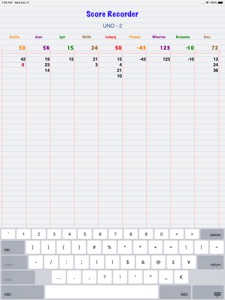
This Universal app enables the scores of games to be recorded simply without needing to use pen and paper, while giving the impression that a piece of ruled paper is being used. It can be used for recording the results of many types of games, for example Scrabble, darts and golf, as well as many card games such as UNO, Hand and Foot, tournaments, the pointy end of sailing regattas etc. It can even be used to simply add up a list of numbers.
Score Recorder displays the running total of each player's scores so they don't have to be added to the previous total after each round, thereby reducing the need for mental arithmetic.
Names of the players or teams or groups are easily entered and their colours changed. Multiple games can be scored at the same time. Each game can have an 'unlimited' number of players. Completed games can be easily deleted using right to left swipe on the Games list screen.
• To start, tap the Games button at the bottom to create a Game and then add some players. Double-tap a player's name to change its colour.
• To enter a score tap the player's name or total score or immediately under the player's last score; enter the score with the keypad that appears and then either tap the OK button on iPhone or return on iPad, or tap another player.
• Negative scores are easily entered with the minus sign at the top left of the iPhone keypad or in the usual position on the iPad keyboard.
• To delete a score or game: long-press on the score to reveal a red minus button alongside the score. Tap that to reveal the red Delete button.
• Games can be sorted by the players' total scores - ascending or descending. When sorting is selected, the columns are sorted by totals left to right as scores are added, modified and deleted.
• Scores can be modified by simply tapping on them
Each player can have a vast number of scores in each game.
A large number of players can be added to each game.
Score Recorder has the capability to record notes about each game.
From the Notes screen use the Action button to send a game as a CSV (Excel-readable) file using email or SMS or to some other available app e.g. Numbers.
Auto-lock can be turned off while Score Recorder is the active application. This setting, available in the iOS Settings app, ensures the device will not go to sleep while Score Recorder is the active application.
Score Recorder has Accessibility (VoiceOver) capabilities to help visually impaired people use it.
Compatible with iOS11.0 through iOS14. Runs on Big Sur.
Please consider leaving a positive review.
If you find _any_ issues, please remember to report them via the developer website link in the App Store so they can be addressed or fixed.

What's New in Version 2.19.10

• Fixes some User Interface anomalies in the vertical positioning of lists of scores
If you find _any_ issues at all eg you experience unexpected behaviour or you have suggestions, please report them via the developer website email link in the App Store, rather than via a review, so they can be considered and/or resolved.

Information

Categories

Version

2.19.10

Size

1 MB

Game Center

No

VPP Device Licensing

Yes

Rating

Rated: 4+

Compatibility

iOS 11.0 or later

Devices

iPhone 5s, iPhone 6, iPhone 6 Plus, iPhone 6s, iPhone 6s Plus, iPhone SE, iPhone 7, iPhone 7 Plus, iPhone 8, iPhone 8 Plus, iPhone X, iPhone XR, iPhone XS, iPhone XS Max, iPhone 11, iPhone 11 Pro, iPhone 11 Pro Max, iPhone SE (2nd generation), iPhone 12, iPhone 12 Pro, iPhone 12 Pro Max, iPhone 12 mini, iPhone 13, iPhone 13 Pro, iPhone 13 Pro Max, iPhone 13 mini, iPhone SE (3rd generation), iPad (5th Generation) Wi-Fi, iPad (5th Generation) Wi-Fi + Cellular, iPad (6th generation) Wi-Fi, iPad (6th generation) Wi-Fi + Cellular, iPad Pro, iPad Pro (Cellular), iPad Pro (9.7-inch), iPad Pro (9.7-inch) (Cellular), iPad Pro 12.9-inch (2nd generation), iPad Pro 12.9-inch (2nd generation) Wi-Fi + Cellular, iPad Pro (10.5-inch), iPad Pro (10.5-inch) Wi-Fi + Cellular, iPad Pro (11-inch), iPad Pro (11-inch) Wi-Fi + Cellular, iPad Pro 12.9-inch (3rd generation), iPad Pro 12.9-inch (3rd generation) Wi-Fi + Cellular, iPad Air, iPad Air (Cellular), iPad Air 2, iPad Air 2 (Cellular), iPad Air (3rd generation), iPad Air (3rd generation) Wi-Fi + Cellular, iPad mini Retina, iPad mini Retina (Cellular), iPad mini 3, iPad mini 3 (Cellular), iPad mini 4, iPad mini 4 (Cellular), iPad mini (5th Generation), iPad mini (5th Generation) Wi-Fi + Cellular, iPad (7th generation) Wi-Fi + Cellular, iPad Pro 11-inch (2nd generation), iPad Pro 11-inch (2nd generation) Wi-Fi + Cellular, iPad Pro 12.9-inch (4th generation), iPad Pro 12.9-inch (4th generation) Wi-Fi + Cellular, iPad Air (4th Generation) (Wi-Fi), iPad Air (4th Generation) (Wi-Fi + Cellular), iPad (8th generation) Wi-Fi, iPad (8th generation) Wi-Fi + Cellular, iPad Pro 11-inch (3rd generation), iPad Pro 11-inch (3rd generation) Wi-Fi + Cellular, iPad Pro 12.9-inch (5th Generation), iPad Pro 12.9-inch (5th Generation) Wi-Fi + Cellular, iPad (9th Generation), iPad (9th Generation) Wi-Fi + Cellular, iPad mini (6th Generation), iPad mini (6th Generation) Wi-Fi + Cellular, iPad Air (5th generation), iPad Air (5th generation) Wi-Fi + Cellular, iPod touch (6th Generation), iPod touch (7th generation)

Languages

English

App Store: Customer Ratings

Ratings & Reviews

4.5 of 5 (4 Ratings)

App Store: Customer Reviews

2013-05-17

Easy to change an incorrect score

I just wanted to post this quick review regarding how much my wife and I really like Record Score. We use it when we play black jack, cribbage, poker, dominos, and Uno. We particularly like the ease with which we can change scores if needed (because one of us stores them incorrectly :0) ). After setting this feature active in Global Settings, it’s very easy to change an already-recorded score by simply tapping on the incorrect number and then replacing it with the correct one.
mdturnerinoz
Version 1.30