AboutTermsPrivacyContact
 
Updating
Doc Scan - PDF Scanner Fax

Doc Scan - PDF Scanner Fax

Released: 2011-08-11
© 2011 IFUNPLAY CO,. LTD.
Doc Scan - PDF Scanner Fax - QR Code
Version 16.7
4+
Download on the App Store
Version 16.7
4+
Download on the App Store
Released: 2011-08-11
© 2011 IFUNPLAY CO,. LTD.

iPhone Screenshots

Screenshot
Screenshot
Screenshot
Screenshot
Screenshot
Screenshot
Screenshot
Screenshot
Screenshot
Screenshot

iPad Screenshots

Screenshot
Screenshot
Screenshot
Screenshot
Screenshot
Screenshot
Screenshot
Screenshot
Screenshot
Screenshot

Description

Scan and OCR documents to produce high-quality images. Enter texts, fill forms, sign, draw, collage, and send.
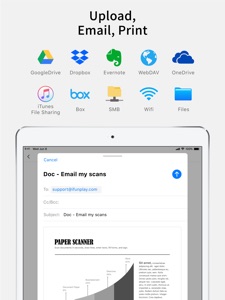
Share as PDF / JPEG / TXT / Docx by email, FAX, SMB, Cloud Services, WebDAV, and iTunes / WiFi file sharing.
Transform your iPhone/iPad into a pocket scanner and photo collage maker.
Instantly scan single/multi-page documents and send them out on the go.
What DocScan can help you:
- Sign and email business contracts and fill forms on the road.
- Archive receipts and coupons.
- Convert notes, sketches, and business cards to digital copies.
- OCR / Recognize text from scanned images and export result as txt or docx files.
- Save books and articles for later reading.
- Create meeting minutes or memo from whiteboard discussion.
- Photo Collage: Combine multiple pages into one sheet. It's very useful especially when you need to print multiple pages (e.g. two sides of ID cards) on one A4/Letter paper.
KEY FEATURES
Experience Fast Scanning with High-quality Images:
- Fast auto-detection: Detect document borders from a picture.
- Correct perspective distortion: Advanced algorithms help you correct perspective distortion, while you can manually adjust the crop area. Makes even curled pages readable.
- Image Edit: Remove shadows and adjust the brightness to produce a high-quality image document, especially useful in a Low-Light environment.
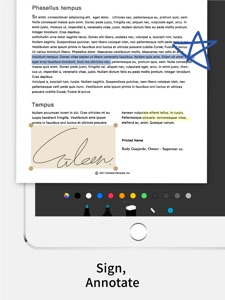
- Text Edit: Enter texts to fill forms, highlight, annotate, or sign on the scanned image.
- File Naming Rules: Save your time to name new files in advnace. Create / edit your own naming rules.
Protect Your Privacy:
- Password Protection: Set a password to protect your documents in a folder from unauthorized view.
Keep Track Of Your Documents:
- Search documents by name.
- Organize documents with folders: Use a Folder List to switch between folders quickly with a single tap.
- Create, merge, delete, duplicate, rename, move, import, and export documents.
Share and Export Your Scans:
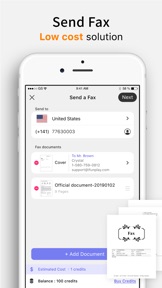
- In-App Fax: Send and receive faxes when you are out of office or have no fax machine at all. Fax documents to over 100 countries instantly (price calculated by the number of pages and recipient country and paid via in-app purchase). ​Perfect for business or personal use. You will receive a push notification to remind you of a fax status: Whether it is sent or received successfully​ or failed to deliver.
- Support upload to iCloud Drive, Dropbox, Evernote, Box, OneDrive, Google Drive with OCR (Optical Character Recognition) option, SMB, and WebDAV.
- Print documents via AirPrint.
- Export documents to Photo Albums.
- "Open In" Other Apps, i.e. iBooks, Kindle ...etc.
- Accessed directly from iTunes file sharing or WiFi file sharing.
- Email documents as PDF or JPEG files.
Import Files:
- Import JPEG from other apps as image source to crop, correct perspective, and enhance.
- Import PDF from other apps as scanned pages.
Backup and Restore Documents: (paid function via in-app purchase)
- Backup your documents safely to Mac / PC. Whenever you buy a new phone or lose access to your old one, you will still be able to restore your files.
- Restore deleted documents manually in case you accidentally delete important documents.
- Restore to any date like a time machine. You can keep multiple backups on different dates.
Receive Faxes: (non-auto-renew subscription)
Support dozens of countries (we kept adding more) for users to subscribe for a number to receive faxes.
Tip: For best border detection, please place your documents against a high contrast background, i.e. put your white paper on a dark table.
Your feedback is very important to us.
Please contact DocScan customer service at support@ifunplay.com for resolving problems before submitting feedback in app store. Most problems can be solved easily, but we cannot help you solve problems from the comments.

What's New in Version 16.7

1. Extend the file naming rules to save users' time for auto naming new files from various file actions.
2. Fix bugs in the photo collage and OCR functions.

Seller

Name

IFUNPLAY CO., LTD.

Information

Categories

Version

16.7

Size

195.4 MB

Game Center

No

VPP Device Licensing

Yes

Rating

Rated: 4+

Compatibility

iOS 11.0 or later

Devices

iPhone 5s, iPhone 6, iPhone 6 Plus, iPhone 6s, iPhone 6s Plus, iPhone SE, iPhone 7, iPhone 7 Plus, iPhone 8, iPhone 8 Plus, iPhone X, iPhone XR, iPhone XS, iPhone XS Max, iPhone 11, iPhone 11 Pro, iPhone 11 Pro Max, iPhone SE (2nd generation), iPad (5th Generation) Wi-Fi, iPad (5th Generation) Wi-Fi + Cellular, iPad (6th generation) Wi-Fi, iPad (6th generation) Wi-Fi + Cellular, iPad Pro, iPad Pro (Cellular), iPad Pro (9.7-inch), iPad Pro (9.7-inch) (Cellular), iPad Pro 12.9-inch (2nd generation), iPad Pro 12.9-inch (2nd generation) Wi-Fi + Cellular, iPad Pro (10.5-inch), iPad Pro (10.5-inch) Wi-Fi + Cellular, iPad Pro (11-inch), iPad Pro (11-inch) Wi-Fi + Cellular, iPad Pro 12.9-inch (3rd generation), iPad Pro 12.9-inch (3rd generation) Wi-Fi + Cellular, iPad Air, iPad Air (Cellular), iPad Air 2, iPad Air 2 (Cellular), iPad Air (3rd generation), iPad Air (3rd generation) Wi-Fi + Cellular, iPad mini Retina, iPad mini Retina (Cellular), iPad mini 3, iPad mini 3 (Cellular), iPad mini 4, iPad mini 4 (Cellular), iPad mini (5th Generation), iPad mini (5th Generation) Wi-Fi + Cellular, iPad (7th generation) Wi-Fi, iPad Pro 11-inch (2nd generation), iPad Pro 11-inch (2nd generation) Wi-Fi + Cellular, iPad Pro 12.9-inch (4th generation), iPad Pro 12.9-inch (4th generation) Wi-Fi + Cellular, iPad Air (4th Generation) (Wi-Fi), iPad Air (4th Generation) (Wi-Fi + Cellular), iPad (8th generation) Wi-Fi, iPad (8th generation) Wi-Fi + Cellular, iPod touch (6th Generation), iPod touch (7th generation)

Languages

English

App Store: Customer Ratings

Ratings & Reviews

4.5 of 5 (532 Ratings)

App Store: Customer Reviews

2019-07-29

New scan

This app used to be so good and so easy
You have changed it
Now it’s gone right down to unusable
Marsh I
Version 15.3
2019-07-10

Love this app so helpful

Been using for years now
Ausnhu
Version 15.0
2019-05-13

So quick, so easy!

I love this app! I no longer have to mess around at all with the unreliable scanner on my printer. The process is seamless and the results are excellent. This is one of my favourite apps.
Hexeyed
Version 14.7
2019-04-02

Great app

No need to keep paper work when travelling.
crispin hull
Version 13.9
2019-02-24

Awesome

👍🏽😐👍🏽👍🏽
dave c lane
Version 13.9
2019-02-22

Best scanner App I’ve seen

Easy to use on iPhone and iPad. Scans can be saved in folders, but I find it easy to save as a PDF and store in Goodreader. I like it.
Pat Hobby
Version 13.9
2019-02-09

Just what I needed

Works great for what I want. Haven't had any glitches so far (been using for over 2months). Thanks guys
Update!
Been using it for almost 3 years now with great success.
Just found you can send existing photos as a PDF.
This is fantastic as photos sent with iPhone alone are hopeless as you can't seem to save or edit them
Nigel61
Version 13.9
2019-02-09

Easy, simple to use

I have been using this app in my class for more than 4 years. It’s quick and easy to use. I use it as a tool to quickly capture a page of my textbook (took less than 5 seconds), then use the editing tools to go through the material on the projector. The eraser works great for partially robbing out a erroneous line. It’s just what I need and it never fails.
The Nguyen's
Version 13.9
2019-02-01

Lost files

Was happily working with this app then lost all my files - very disappointing 😔
Kwally58
Version 13.9
2019-01-20

Mr Maxwell

A very useful and well thought out app, that has many useful features, can strongly endorse. G.M.
Sycamore D
Version 13.9
2019-01-09

Sylvia

Great App easy to use and understand.
Jaene
Version 13.9
2018-09-28

good

good
wenaust
Version 13.1
2018-09-01

Handy way to send docs

Very useful when no scanner or fax is available.
Oceanfruit
Version 12.9
2018-08-16

Use it every week

I use this for my business to send receipts back to head office. So easy
Falconie111
Version 12.8
2018-08-13

Best

This is the best scan app. I love it.
Tuitavuki
Version 12.8
2018-06-22

DocScan

Great little app that can do big things.
Essential business tool, that allows you flexibility on the run.
Shorto1970
Version 12.6
2018-05-26

Recommended

Really easy - I can scan/photograph, save and file pretty much any doc or photo, then get easy access when needed eg tax time, warranty claims, travel documents, work docs (I use a password protection for a bit of extra security), time sheets (when out of office) and training materials. Automatically backed up with my phone.
Nickerbocker2
Version 12.4
2018-03-10

Very useful

Have been using for years to scan and file tax receipts.
Lisa1927
Version 11.1
2017-11-12

Great program

Works when you need it. Does what it is supposed to.
Slyvester1966
Version 10.7
2017-07-30

Simple to use

Simple to use with all features that are needed to correct shooting angle and "folds".
3002elks
Version 9.6
2017-06-13

Great No nonsense App

Easy to use and produces great results.
Kanaka@work
Version 9.9.7
2017-05-18

Very useful & robust

Love that I can photograph a document & email it as a PDF. Very useful in lieu of a scanner or fax machine.
Zuhra Liz
Version 9.6
2016-11-14

Handy tool

I was looking for an app to help me scan docs while away from home base. This fits the bill really well and I can scan and email easily
Margie.au
Version 9.6
2016-10-22

Great App

I've been a user of this app for a few years now and find it easy to use and would recommend it to others without hesitation. It's integration to email and other apps is good. Highly recommended. Thank you.
Mr Hare
Version 9.6
2016-10-17

Exceptional

I have been using it for years now and it's perfect for times when your on the road. Best app ever!!!
DJ PimpL
Version 9.6
2016-08-16

Great app - works wonders

I rely on this app quite heavily for my business travels so I can safely digitise my invoices. It has worked very reliably and the Dropbox integration is excellent.
Poolchipmunk
Version 9.4
2016-05-11

Excellent- have used DocScan for a number of years

Excellent- have used DocScan for a number of years when I can't get to / can't be bothered to get to, my scanner. It's great the way it 'flattens out' curved images and also creates sharp images.
Rooster0001
Version 9.2
2016-04-22

Very handy tool

This is a great tool to help me keep organised. Cropping is easy. Even if there is warping it will straighten out the document. Can group into folders.
amylu01
Version 9.3
2016-03-20

Just works

It's not perfect, but it's pretty close!
Mountanalogue
Version 9.1
2016-03-10

Good App

Easy to use
F.Fxxk
Version 9.2
2016-02-15

Great app

Very useful - just like having a scanner available wherever you go and whenever needed.
Great for taking a snapshot of stuff you may need later. Can email or share etc from a link in the app.
Kennyh55
Version 9.2
2016-01-19

Never failed me!

I have been using docscan for over a year and have NEVER had an issue. Most handy app I've got on my phone! 10/10
shannmurph
Version 9.2
2016-01-17

Great

Terrific app! Just like a scanner in your pocket.
Charlietou2
Version 9.2
2015-12-10

Great app

Great app does what it promises to do but the ONLY small things that are a little annoying;
The picture can only be taken in 'landscape'.
However the range of the picture doesn't match the viewing window. When you take a picture of a document you think you have filled the screen but turns out it didn't and is a little far away. Not a big deal.
The default setting is saving the file in black & white I'd prefer it was original colour or give me a setting to adjust the default.
It's an amazing app to have while you're on the road to be able to save and email a PDF. Saves quickly and easily and straight to folder or photos folder on the iPhone.
Tamer68
Version 9.2
2015-10-20

Great app

I find myself receiving mail for my son interstate, and it is great to send a pdf of bills, notices etc that he needs to act upon. Very simple to use, gr8 quality with the i5, and simple to email directly from the app. Only part that is not so intuitive is the groupings of scans to be sent together, such as a doc of several pages...can be done though. Great app & one I have recommended to others!
Gundy1
Version 8.9
2015-08-09

Brilliant app

I love this app because it is so convenient to be able to PDF a document wherever you are.
WellHeeledThrift
Version 8.9
2015-07-12

Awesome App

Just excellent
Laurie Graham
Version 8.9
2015-06-24

Love docscan, even upgraded to paid version

Hi even using this app for a year or so now. It's helped me with providing documents to conveyancer said for interstate house purchase, it preserves all those important little mangled receipts for tax deductible items in an easy to retrieve format. And more... Really legible.
Lomandralisa
Version 8.9
2015-05-03

Very handy scanning app

Love being able to scan/copy using my phone
Calzie T
Version 8.9
2014-11-11

Love this!!

Great features, inc cropping your image before conversion to PDF, recording important doc's- Only gripe is that is a little clunky for me to move in & out of files.
Melbourne Rebecca
Version 8.8
2014-10-26

Like the curve needs OCR

The curved adjustment is great. OCR would be great. I was looking for OCR and not sure how this one was included.
In a search of OCR it was 40, amongst these it was the 17th free app, and amongst those 40 it was the 5th free app for OCR when it is only OCR in the pro app when exported to google docs - dodgy!
therese73
Version 8.8
2014-09-07

Great App

Does exactly what you expect with the minimum of fuss. I can't fault it in any way.
Paildolphin
Version 8.5
2014-08-14

Powerful little app

Great useful app which I use regularly. Intuitive and converts to PDF well. Easy to send and save! Surprised there have been no reviews.
Jeeevess
Version 8.5
2014-05-15

Useful

The app is really useful and handy, by means of that no need to use a scanner
Ramin
Ramkal2
Version 8.3
2014-04-01

Jefro

A very good easy to use application that saves a lot of time rather than scanning to a computer then finding the file and so forth. Love it thank you
G&Teeeeeeri
Version 8.2
2013-09-25

Excellent!!!!

Must have!
Lara Virk
Version 7.3
2013-05-20

Easy and quick

Nice and easy to use.
Owlwine
Version 6.4
2013-05-09

Decent, but no in-app purchase

Does an decent job of the basics, but is completely failing when I try to do an in-app purchase to upgrade to the full version.
Endareth
Version 6.4
2013-04-13

Best download ever!

So worth downloading! Has saved me so much time and effort! Absolutely priceless!
Abbie-Clare
Version 6.1