AboutTermsPrivacyContact
 
Updating
SOLight - Sun & Light

SOLight - Sun & Light

Released: 2010-12-22
© anvartec
SOLight - Sun & Light - QR Code
Version 1.83
4+
Download on the App Store
Version 1.83
4+
Download on the App Store
Released: 2010-12-22
© anvartec

iPhone Screenshots

Screenshot
Screenshot
Screenshot
Screenshot

iPad Screenshots

Screenshot
Screenshot
Screenshot

Description

Where is the sun now – SOLight will show you the way!
Find the position of the sun and its track through the sky by simply pointing your iPhone/iPad at the sky!
###### „Really good – Highly recommended!“ ######
TOP 10 App in category Business in Germany and Austria!
> You are going to view an apartment on a rainy day – and want to know if it has a sunny terrace?
> Photographers who need natural light to get their subject or scene properly framed can use SOLight to find the best time or location to get those perfect shots.
> Film Production. Film production is expensive and time is of the essence so using a SOLight, directors, set builders and lighting crew are able to synchronize the best daylight and know the direction of the sun or its current position.
> Solar Energy Installers (DIY and professional) – Figuring out the optimum position for solar energy collection is crucial for installers to make the most of the solar energy available.
> Builders/Upgraders – Adding to an existing building can be made easier as knowing how to track the sun means finding out where light and solar heat or shade is available and at what times of the day.
> Architects and Planners – Visit your target development location and quickly record the direction of the sun from any point.
Using SOLight, see the exact track of the sun live or for any chosen day from any location on the planet, all shown conveniently as an image on your screen!
Sunlight is a commodity we can all do with or without depending on the circumstances – those with too much need to know how to find the shade and those with too little need to maximize the amount they can access. Using SOLight it is possible to accurately determine the amount of available light (or shade) and the length of time it is incident!
> LIVE VIEW
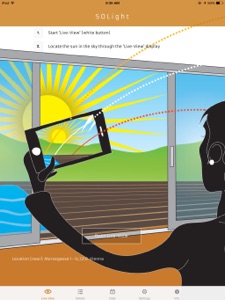
This mode is an instant way of seeing the position of the sun relative to wherever the device is pointed. If the sun is not in view of the device, an animated sun arrow helpfully points the way to the current sun position, realigning itself in real-time as the device is re-oriented.
Built in compass display shows the precise direction the device is pointed at so when sun track images are recorded.
> SUN PATHS
Automatically displayed Winter/Summer Paths– In the display, the red and yellow lines above and below the suns current (white) track indicate where the sun tracks at the highest and lowest points of its seasonal travel.
Sun tracking curves are displayed with an easy to read timeline so the time of day when the sun passes a particular point, or the time shading starts/ends can be read by simply looking along the sun track.
> COMPARE
Date View – Set a new date. The display will update to show data about the position of the sun and its track relevant to that date.
Detailed information about the track of the sun and its position at any time is available right on the screen or in the Detail View.
> SUN PICS
Save your sun track image or share the picture instantly via email – location scouts and realtors can send an image of their screen containing all the sun position, sun track, time and location information to an email address or save the taken picture on the device for later use.
--- PRODUCT FEATURES ---
# Current sun track
# Sun track for the summer solstice (peak)
# Sun track for the winter solstice (lowest point)
# Current sun position
# Peak time and precise daylight length for all calculated sun tracks
# Every full hour is marked on the sun tracks
# Positioning with digital compass and integrated gyroscope
# Compass direction and elevation for the viewing direction
# Crosshair and horizon line
# Operates worldwide with GPS data
### Download SOLight and transform your iPad/iPhone into an instant solar calculator! ###
We appreciate any feedback, questions or tips. Please contact us: office@anvartec.com
Or use our contact sheet on http://www.anvartec.com

What's New in Version 1.83

Bugfixes

Seller

Name

Bernd Ruprechter

URL

Information

Developer

Categories

Version

1.83

Size

10.7 MB

Game Center

No

VPP Device Licensing

Yes

Rating

Rated: 4+

Compatibility

iOS 13.0 or later

Devices

iPhone 5s, iPhone 6, iPhone 6 Plus, iPhone 6s, iPhone 6s Plus, iPhone SE, iPhone 7, iPhone 7 Plus, iPhone 8, iPhone 8 Plus, iPhone X, iPhone XR, iPhone XS, iPhone XS Max, iPhone 11, iPhone 11 Pro, iPhone 11 Pro Max, iPhone SE (2nd generation), iPhone 12, iPhone 12 Pro, iPhone 12 Pro Max, iPhone 12 mini, iPhone 13, iPhone 13 Pro, iPhone 13 Pro Max, iPhone 13 mini, iPhone SE (3rd generation), iPhone 14, iPhone 14 Plus, iPhone 14 Pro, iPhone 14 Pro Max, iPhone 15, iPhone 15 Plus, iPhone 15 Pro, iPhone 15 Pro Max, iPhone 16, iPhone 16 Plus, iPhone 16 Pro, iPhone 16 Pro Max, iPhone 16e, iPhone 17, iPhone 17 Pro, iPhone 17 Pro Max, iPhone Air, iPhone 17e, iPad (5th Generation) Wi-Fi, iPad (5th Generation) Wi-Fi + Cellular, iPad (6th generation) Wi-Fi, iPad (6th generation) Wi-Fi + Cellular, iPad Pro, iPad Pro (Cellular), iPad Pro (9.7-inch), iPad Pro (9.7-inch) (Cellular), iPad Pro 12.9-inch (2nd generation), iPad Pro 12.9-inch (2nd generation) Wi-Fi + Cellular, iPad Pro (10.5-inch), iPad Pro (10.5-inch) Wi-Fi + Cellular, iPad Pro (11-inch), iPad Pro (11-inch) Wi-Fi + Cellular, iPad Pro 12.9-inch (3rd generation), iPad Pro 12.9-inch (3rd generation) Wi-Fi + Cellular, iPad Air, iPad Air (Cellular), iPad Air 2, iPad Air 2 (Cellular), iPad Air (3rd generation), iPad Air (3rd generation) Wi-Fi + Cellular, iPad mini Retina, iPad mini Retina (Cellular), iPad mini 3, iPad mini 3 (Cellular), iPad mini 4, iPad mini 4 (Cellular), iPad mini (5th Generation), iPad mini (5th Generation) Wi-Fi + Cellular, iPad (7th generation) Wi-Fi + Cellular, iPad Pro 11-inch (2nd generation), iPad Pro 11-inch (2nd generation) Wi-Fi + Cellular, iPad Pro 12.9-inch (4th generation), iPad Pro 12.9-inch (4th generation) Wi-Fi + Cellular, iPad Air (4th Generation) (Wi-Fi), iPad Air (4th Generation) (Wi-Fi + Cellular), iPad (8th generation) Wi-Fi, iPad (8th generation) Wi-Fi + Cellular, iPad Pro 11-inch (3rd generation), iPad Pro 11-inch (3rd generation) Wi-Fi + Cellular, iPad Pro 12.9-inch (5th Generation), iPad Pro 12.9-inch (5th Generation) Wi-Fi + Cellular, iPad (9th Generation), iPad (9th Generation) Wi-Fi + Cellular, iPad mini (6th Generation), iPad mini (6th Generation) Wi-Fi + Cellular, iPad Air (5th generation), iPad Air (5th generation) Wi-Fi + Cellular, iPad Pro 11-inch (4th generation), iPad Pro 11-inch (4th generation) Wi-Fi + Cellular, iPad Pro 12.9-inch (6th generation), iPad Pro 12.9-inch (6th generation) Wi-Fi + Cellular, iPad (10th generation), iPad (10th generation) Wi-Fi + Cellular, iPad Air 11-inch (M2) Wi-Fi, iPad Air 13-inch (M2) Wi-Fi, iPad Air 13-inch (M2) Wi-Fi + Cellular, iPad Pro 11-inch (M4) Wi-Fi, iPad Pro 11-inch (M4) Wi-Fi + Cellular, iPad Pro 13-inch (M4) Wi-Fi, iPad Pro 13-inch (M4) Wi-Fi + Cellular, iPad mini (A17 Pro) Wi-Fi, iPad mini (A17 Pro) Wi-Fi + Cellular, iPad (A16) Wi-Fi, iPad (A16) Wi-Fi + Cellular, iPad Air 11-inch (M3) Wi-Fi, iPad Air 11-inch (M3) Wi-Fi + Cellular, iPad Air 13-inch (M3) Wi-Fi, iPad Air 13-inch (M3) Wi-Fi + Cellular, iPad Pro 11-inch (M5) Wi-Fi, iPad Pro 11-inch (M5) Wi-Fi + Cellular, iPad Pro 13-inch (M5) Wi-Fi, iPad Pro 13-inch (M5) Wi-Fi + Cellular, iPad Air 11-inch (M4) Wi-Fi, iPad Air 11-inch (M4) Wi-Fi + Cellular, iPad Air 13-inch (M4) Wi-Fi, iPad Air 13-inch (M4) Wi-Fi + Cellular

Languages

English, French, German, Italian, Spanish

App Store: Customer Ratings

Ratings & Reviews

4.0 of 5 (1 Rating)

App Store: Customer Reviews

2011-09-28

It's good but...

It just needs to let you calibrate where the sun is. Often if i point it at the sun, it says the sun, according to the crosshairs, is a bit below where i'm pointing. Obviously this wrecks viewing the actual path taken by the sun. Still this app is the only one like it that i've seen and does a reasonably good job.
Nathanh29
Version 1.2