AboutTermsPrivacyContact
 
Updating
MATLAB Mobile

MATLAB Mobile

Released: 2010-05-22
© 2019 The MathWorks, Inc.
MATLAB Mobile - QR Code
Version 8.2
4+
Download on the App Store
Version 8.2
4+
Download on the App Store
Released: 2010-05-22
© 2019 The MathWorks, Inc.

iPhone Screenshots

Screenshot
Screenshot
Screenshot
Screenshot
Screenshot
Screenshot

iPad Screenshots

Screenshot
Screenshot
Screenshot
Screenshot
Screenshot

Description

Connect to MATLAB® from your iPhone or iPad.
Evaluate MATLAB commands, create and edit files, view results, acquire data from sensors, and visualize data – from the convenience of your mobile device.
CONNECT TO THE CLOUD
Use your MathWorks Account to connect to MathWorks Cloud from MATLAB Mobile™. Linking a license that is current on MathWorks Software Maintenance Service to your MathWorks Account to a license increases your storage quota and unlocks access to other add-on products on the license.
With your MathWorks Account, you can:
• Access MATLAB from the command-line
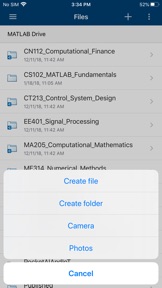
• View, run, edit and create files from the Editor
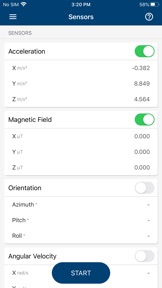
• Acquire data from device sensors
• Store your files and data on MATLAB Drive (you receive 250 MB of cloud storage)
Link a license that is current on MathWorks Software Maintenance Service to your MathWorks Account to unlock the following features:
• Access to other add-on products on your license
• 5 GB of cloud storage on MATLAB Drive
FEATURES
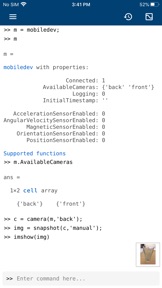
• Command-line access to MATLAB and add-on products
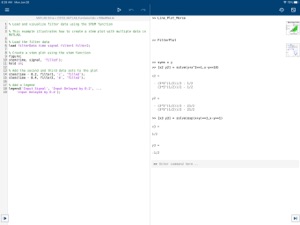
• 2D and 3D plots to visualize data
• Editor to view, run, edit and create MATLAB files
• Data acquisition from device sensors
• Image and video acquisition from the camera
• Cloud storage and synchronization with MATLAB Drive
• Custom keyboard to enter typical MATLAB syntax
LIMITATIONS
The following features are not supported:
• Using MATLAB Apps, such as Curve Fitting
• Creating apps with App Designer
• Interacting with 3D figures
• Opening or creating models using the Simulink graphical environment
Note: Continued use of GPS running in the background can dramatically decrease battery life.
ABOUT MATLAB 
MATLAB is the leading technical computing software for algorithm development, data visualization, data analysis, and numeric computation. MATLAB is used in a wide range of applications, including signal and image processing, communications, control design, test and measurement, financial modeling and analysis, and computational biology.

What's New in Version 8.2

- Stream sensor data from multiple devices to MATLAB Online
- Support for MATLAB sessions on multiple devices with your account
- Acquire sensor data from devices with your MathWorks Account
- New symbolic math examples
- Bug fixes

Information

Developer

Categories

Version

8.2

Size

16 MB

Game Center

No

VPP Device Licensing

Yes

Rating

Rated: 4+

Compatibility

iOS 13.0 or later

Devices

iPhone 5s, iPhone 6, iPhone 6 Plus, iPhone 6s, iPhone 6s Plus, iPhone SE, iPhone 7, iPhone 7 Plus, iPhone 8, iPhone 8 Plus, iPhone X, iPhone XR, iPhone XS, iPhone XS Max, iPhone 11, iPhone 11 Pro, iPhone 11 Pro Max, iPhone SE (2nd generation), iPad (5th Generation) Wi-Fi, iPad (5th Generation) Wi-Fi + Cellular, iPad (6th generation) Wi-Fi, iPad (6th generation) Wi-Fi + Cellular, iPad Pro, iPad Pro (Cellular), iPad Pro (9.7-inch), iPad Pro (9.7-inch) (Cellular), iPad Pro 12.9-inch (2nd generation), iPad Pro 12.9-inch (2nd generation) Wi-Fi + Cellular, iPad Pro (10.5-inch), iPad Pro (10.5-inch) Wi-Fi + Cellular, iPad Pro (11-inch), iPad Pro (11-inch) Wi-Fi + Cellular, iPad Pro 12.9-inch (3rd generation), iPad Pro 12.9-inch (3rd generation) Wi-Fi + Cellular, iPad Air, iPad Air (Cellular), iPad Air 2, iPad Air 2 (Cellular), iPad Air (3rd generation), iPad Air (3rd generation) Wi-Fi + Cellular, iPad mini Retina, iPad mini Retina (Cellular), iPad mini 3, iPad mini 3 (Cellular), iPad mini 4, iPad mini 4 (Cellular), iPad mini (5th Generation), iPad mini (5th Generation) Wi-Fi + Cellular, iPad (7th generation) Wi-Fi + Cellular, iPad Pro 11-inch (2nd generation), iPad Pro 11-inch (2nd generation) Wi-Fi + Cellular, iPad Pro 12.9-inch (4th generation), iPad Pro 12.9-inch (4th generation) Wi-Fi + Cellular, iPad Air4, iPad Air4Cellular, iPad EighthGen, iPad EighthGenCellular, iPod touch (6th Generation), iPod touch (7th generation)

Languages

English, Chinese, Japanese, Korean, Spanish

App Store: Customer Ratings

Ratings & Reviews

2.5 of 5 (4 Ratings)

App Store: Customer Reviews

2018-08-01

A bit buggy, but worth having

I can’t find anything equivalent to the Workspace in the app. There seems to be occasional bugs (some of my programs don’t run identically every time?) but it’s nice to be able to write and run simple programs on the go.
Doug@basslemon
Version 7.2
2016-08-10

It could easily be much better

Ok, so you want to use Matlab online for light use.
This has some rough edges, yet you can do it.
Here are workarounds for the missing features of no upload & no editor.
type('filename')
% displays the contents of the specified file for Matlab mobile
atext={'paste stuff'
'More stuff'
'Yet more'};
fid = fopen('test.m','w');
fprintf(fid,'%s\n',atext{:});
fclose(fid)
% upload a file to Matlab mobile
You get the idea.
Also, it crashes incessantly. Please fix it... Has great potential.
Fsweb
Version 5.4
2011-04-06

OTT

Overly complicated to download connector software
jttaufatofua
Version 1.2.1
2010-08-23

Excellent tool

This is a great tool that allows me to remotely work and achieve the solutions to the worlds problems!
Junior wizard