AboutTermsPrivacyContact
 
Updating
iPractice Verbs

iPractice Verbs

Released: 2010-03-18
© All rights reserved to Smarty Ears, 2011
iPractice Verbs - QR Code
Version 6.0
4+
Download on the App Store
Version 6.0
4+
Download on the App Store
Released: 2010-03-18
© All rights reserved to Smarty Ears, 2011

iPhone Screenshots

Screenshot
Screenshot
Screenshot
Screenshot
Screenshot
Screenshot
Screenshot

iPad Screenshots

Screenshot
Screenshot
Screenshot
Screenshot
Screenshot

Description

*iPractice Verbs was featured at Macworld.com Magazine in 2011.
**iPractice Verbs was amongst the top 200 Educational iPad apps on iTunes in September, 2011.
iPractice Verbs is an app developed to help children learn and practice basic English verbs in a variety of levels (word, phrase, sentence) and tense forms (present, present progressive & past tense). iPractice Verbs was designed by a licensed and certified Speech-Language Pathologist to serve as a tool for children with language delays and as a tool for children and adults learning English as a second language. iPractice Verbs is very intuitive to use and it is compatible with the Therapy Report Center ( A FREE caseload management application).
iPractice Verbs allows for multiplayer activities and it contains two activities: Flashcard & Find it. This app contains over 158 regular & irregular verbs in the present, present progressive, and past tense with corresponding high quality images and audio (totaling to over 1000 stimuli). Practicing verbs and verb tenses has never been so easy or intuitive.
iPractice Verbs also allows for practice at different levels: word, phrase, and sentence levels with the flexibility to select which verbs are to be practiced. There are two modes on iPractice verbs: “Flashcards” and “Find it”.
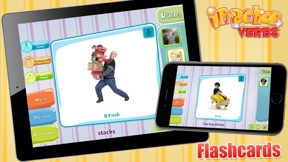
The primary purpose of “Flashcards” is to practice learning the verbs at the word, phrase or sentence level.
“Find it” on the other hand, is a multiple choice game for selecting corresponding images. When playing practice Verbs on Find it mode, children must select the correct corresponding image in order to advance to the next word/phrase/sentence. If the incorrect image is selected the choices are narrowed and the student is encouraged to “try again”; this way we maximize student success and learning. The "find it" activity was designed to help students practice the techniques of listening in a variety of situations (e.g., focusing attention, reflecting, interpreting, analyzing, responding to messages).
iPractice Verbs also includes two features that will keep students motivated: a built-in reward system that give student cards as they practice and a certificate of mastery.
Practicing verbs is a standard for children from Kindergarten through third grade (Texas State Standard). iPractice Verbs contains verbs at the word, phrase and sentence levels and it can be used with children to gain/increase of "grammar when speaking such as using subject-verb agreement, complete sentences, and correct tense" (Texas State Standard). Practicing verbs and using correct verb tense is a state standard for all grade levels in Virginia (Language Arts SOLS K.2, 1.2, 2.1, 3.2, 3,11, 4.8, 5.9, 6.7, 7.9, 8.8, 9.7, 10.8, and 11.8). Using a developmentally appropriate vocabulary including verbs and verb tenses is a North Dakota Standard of Learning for Kindergarten through fifth grade (Language Arts: K.4.1, 1.6.2, 2.6.2, 3.6.3, 4.6.3, 5.6.3). Using correct grammar in writing is a North Dakota Standard of Learning for sixth through ninth grade (Language Arts: 6.3.10, 7.3.9, 8.3.11, 9.6.2, 9.3.10).
Features:
1.Contains regular and irregular verbs
2.158 verbs at the word, phrase & sentence level
3.It includes present, present progressive & past tense options
4.Voice recording available
5.Built-in audio for all verbs
6.Compatible with the Therapy Report Center
7.Multi-player
8.Track correct & incorrect responses
9.Players are advanced manually to give user flexibility
10.Generate certificates
11.Built-in homework sheets
12.Print, email or export results
13.Built-in reward system with prizes
14.Backup and restore data via iTunes file sharing

What's New in Version 6.0

Update to iOS 12

Information

Developer

Categories

Version

6.0

Size

74.1 MB

Game Center

No

VPP Device Licensing

Yes

Rating

Rated: 4+

Compatibility

iOS 8.0 or later

Devices

iPhone 4S, iPhone 5, iPhone 5c, iPhone 5s, iPhone 6, iPhone 6 Plus, iPhone 6s, iPhone 6s Plus, iPhone SE, iPhone 7, iPhone 7 Plus, iPhone 8, iPhone 8 Plus, iPhone X, iPhone XR, iPhone XS, iPhone XS Max, iPhone 11, iPhone 11 Pro, iPhone 11 Pro Max, iPhone SE (2nd generation), iPhone 12, iPhone 12 Pro, iPhone 12 Pro Max, iPhone 12 mini, iPhone 13, iPhone 13 Pro, iPhone 13 Pro Max, iPhone 13 mini, iPhone SE (3rd generation), iPhone 14, iPhone 14 Plus, iPhone 14 Pro, iPhone 14 Pro Max, iPhone 15, iPhone 15 Plus, iPhone 15 Pro, iPhone 15 Pro Max, iPad 2 (Wi-Fi), iPad 2 (3G), iPad (3rd Generation) (Wi-Fi), iPad (3rd Generation) (4G), iPad (4th Generation) (Wi-Fi), iPad (4th Generation) (4G), iPad (5th Generation) Wi-Fi, iPad (5th Generation) Wi-Fi + Cellular, iPad (6th generation) Wi-Fi, iPad (6th generation) Wi-Fi + Cellular, iPad Pro, iPad Pro (Cellular), iPad Pro (9.7-inch), iPad Pro (9.7-inch) (Cellular), iPad Pro 12.9-inch (2nd generation), iPad Pro 12.9-inch (2nd generation) Wi-Fi + Cellular, iPad Pro (10.5-inch), iPad Pro (10.5-inch) Wi-Fi + Cellular, iPad Pro (11-inch), iPad Pro (11-inch) Wi-Fi + Cellular, iPad Pro 12.9-inch (3rd generation), iPad Pro 12.9-inch (3rd generation) Wi-Fi + Cellular, iPad Air, iPad Air (Cellular), iPad Air 2, iPad Air 2 (Cellular), iPad Air (3rd generation), iPad Air (3rd generation) Wi-Fi + Cellular, iPad mini (Wi-Fi), iPad mini (4G), iPad mini Retina, iPad mini Retina (Cellular), iPad mini 3, iPad mini 3 (Cellular), iPad mini 4, iPad mini 4 (Cellular), iPad mini (5th Generation), iPad mini (5th Generation) Wi-Fi + Cellular, iPad (7th generation) Wi-Fi + Cellular, iPad Pro 11-inch (2nd generation), iPad Pro 11-inch (2nd generation) Wi-Fi + Cellular, iPad Pro 12.9-inch (4th generation), iPad Pro 12.9-inch (4th generation) Wi-Fi + Cellular, iPad Air (4th Generation) (Wi-Fi), iPad Air (4th Generation) (Wi-Fi + Cellular), iPad (8th generation) Wi-Fi, iPad (8th generation) Wi-Fi + Cellular, iPad Pro 11-inch (3rd generation), iPad Pro 11-inch (3rd generation) Wi-Fi + Cellular, iPad Pro 12.9-inch (5th Generation), iPad Pro 12.9-inch (5th Generation) Wi-Fi + Cellular, iPad (9th Generation), iPad (9th Generation) Wi-Fi + Cellular, iPad mini (6th Generation), iPad mini (6th Generation) Wi-Fi + Cellular, iPad Air (5th generation), iPad Air (5th generation) Wi-Fi + Cellular, iPad Pro 11-inch (4th generation), iPad Pro 11-inch (4th generation) Wi-Fi + Cellular, iPad Pro 12.9-inch (6th generation), iPad Pro 12.9-inch (6th generation) Wi-Fi + Cellular, iPad (10th generation), iPad (10th generation) Wi-Fi + Cellular, iPod touch (5th generation), iPod touch (6th Generation), iPod touch (7th generation)

Languages

English

App Store: Customer Ratings

Ratings & Reviews

4.0 of 5 (1 Rating)

App Store: Customer Reviews

2011-06-20

Happy with this

While a little pricey, this app has been useful. Some of the images used to demonstrate the words are a bit odd and could be a bit less random, but enough work to make it worthwhile. My only complaint is that there is only one image per word, so there's no help generalizing the concept out, past that picture. Would be great to see an update, with this taken into consideration.
Btrigwel
Version 2.0