AboutTermsPrivacyContact
 
Updating
Photo-Sort

Photo-Sort

Released: 2010-01-07
Copyright © Romain HENRY. All rights reserved.
Photo-Sort - QR Code
Version 2.5.1
4+
Download on the App Store
Version 2.5.1
4+
Download on the App Store
Released: 2010-01-07
Copyright © Romain HENRY. All rights reserved.

iPhone Screenshots

Screenshot
Screenshot
Screenshot
Screenshot
Screenshot

iPad Screenshots

Screenshot
Screenshot
Screenshot
Screenshot
Screenshot

Description

Organize your photos and videos into folders and subfolders.
Photo-Sort enables you to:
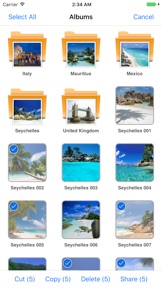
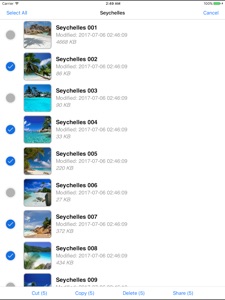
• Import photos and videos from your device's photo library or from a computer.
• Create albums and nested albums.
• Organize and reorganize your photos, videos, and albums as you wish, using controls such as cut, copy, paste, delete and rename.
• View your photos and videos with a photo viewer and run a slideshow.
• Share them either by message or email, or by posting them to Twitter, Facebook, Flickr, or Vimeo.
• Copy them to the clipboard.
• Save them back to the camera roll.
• Print photos wirelessly (requires an AirPrint compatible printer).
• Prevent accessing the app using a passcode protection.
• Export your photos, videos, and albums to a computer.
• Mirror the app on an external display (requires an AV or VGA cable).
• Use iCloud to wirelessly push your photos, videos, and albums to all your other iOS devices (requires to be logged in to the same iCloud account on all these devices).

What's New in Version 2.5.1

Compatibilty updates with latest iOS.

Seller

Name

Romain HENRY

Information

Developer

Categories

Version

2.5.1

Size

27.1 MB

Game Center

No

VPP Device Licensing

Yes

Rating

Rated: 4+

Compatibility

iOS 8.0 or later

Devices

iPhone 4S, iPhone 5, iPhone 5c, iPhone 5s, iPhone 6, iPhone 6 Plus, iPhone 6s, iPhone 6s Plus, iPhone SE, iPhone 7, iPhone 7 Plus, iPhone 8, iPhone 8 Plus, iPhone X, iPhone XR, iPhone XS, iPhone XS Max, iPhone 11, iPhone 11 Pro, iPhone 11 Pro Max, iPhone SE (2nd generation), iPhone 12, iPhone 12 Pro, iPhone 12 Pro Max, iPhone 12 mini, iPad 2 (Wi-Fi), iPad 2 (3G), iPad (3rd Generation) (Wi-Fi), iPad (3rd Generation) (4G), iPad (4th Generation) (Wi-Fi), iPad (4th Generation) (4G), iPad (5th Generation) Wi-Fi, iPad (5th Generation) Wi-Fi + Cellular, iPad (6th generation) Wi-Fi, iPad (6th generation) Wi-Fi + Cellular, iPad Pro, iPad Pro (Cellular), iPad Pro (9.7-inch), iPad Pro (9.7-inch) (Cellular), iPad Pro 12.9-inch (2nd generation), iPad Pro 12.9-inch (2nd generation) Wi-Fi + Cellular, iPad Pro (10.5-inch), iPad Pro (10.5-inch) Wi-Fi + Cellular, iPad Pro (11-inch), iPad Pro (11-inch) Wi-Fi + Cellular, iPad Pro 12.9-inch (3rd generation), iPad Pro 12.9-inch (3rd generation) Wi-Fi + Cellular, iPad Air, iPad Air (Cellular), iPad Air 2, iPad Air 2 (Cellular), iPad Air (3rd generation), iPad Air (3rd generation) Wi-Fi + Cellular, iPad mini (Wi-Fi), iPad mini (4G), iPad mini Retina, iPad mini Retina (Cellular), iPad mini 3, iPad mini 3 (Cellular), iPad mini 4, iPad mini 4 (Cellular), iPad mini (5th Generation), iPad mini (5th Generation) Wi-Fi + Cellular, iPad (7th generation) Wi-Fi, iPad Pro 11-inch (2nd generation), iPad Pro 11-inch (2nd generation) Wi-Fi + Cellular, iPad Pro 12.9-inch (4th generation), iPad Pro 12.9-inch (4th generation) Wi-Fi + Cellular, iPad Air (4th Generation) (Wi-Fi), iPad Air (4th Generation) (Wi-Fi + Cellular), iPad (8th generation) Wi-Fi, iPad (8th generation) Wi-Fi + Cellular, iPod touch (5th generation), iPod touch (6th Generation), iPod touch (7th generation)

Languages

English

App Store: Customer Ratings

Ratings & Reviews

2.0 of 5 (3 Ratings)

App Store: Customer Reviews

2018-12-24

Love this app

This app is easy to use and I love that you can put an album within an album. I would love the ability to add an index though.
Also having an issue with sharing photos. When ever I click on the button the whole app shuts down and your webpage does offer support
aztil
Version 2.5
2018-05-10

After emailing photos name change doesn't work

Since updating when I email photos now the name change is gone! Thought this was whole point of app?
Jdjehdhjdjdjdhbf
Version 2.5
2012-10-19

I love this app

The app is great for iPhone and iPad. It allows you to upload your photos straight to PC via FTP server, excellent if you want to share with someone who doesn't have iTunes. Good usability, very easy to sort and rename photos.
Have used this app from iPhone 3G all the way to 4S and iPad2, never needed to look for anything else.
OpalNera64
Version 2.3.6
2011-04-23

Not worth it

Imports from the camera roll into it's own hierachy. Renames the photos depending on the folder you imported to and chenges the date to show "last modified" as the day you imported it, NOT the day it was taken!
What a waste.
Vendril123
Version 2.2
2011-02-15

One of the best

I highly recommend this app. Not only does it accept pictures but also videos and there is no problems to create folders and sunflowers but on top of all, you can upload and transfer pictures and videos directly from PC by WiFe without any other programs and entry is password protected.
Bayshark Cz
Version 2.0.1
2010-12-20

Complete trash

I need an application that organizes the photos for the built in iPhone photos application. All this app does is allow you import FROM that application and create folders as such in a completely separate place. When you attach an photo to an email or MMS, it has to be done through the built in application. So this is completely pointless.
Chambem9
Version 2.0.1
2010-09-19

Works well

Works fine. Easy user interface. Would like to see security lock option for selected folder.
mpcsm
2010-09-16

Not worth it!

Thumbnail views of photos are low resolution! and there is no 'set as wallpaper' option. Better to arrange photos into folders in iTunes.
VN king
2010-09-08

Photo-Sort

A useless app! Cannot sync with iPhone. No ability to drag/drop photos from Finder in Mac. Lots of other apps have magaed this facility. Not worth the money
Lichmann
2010-07-13

Great!!

Does everything i wanted....the 1 thing that made me buy it was the ability 2shift photos back to my camera roll....can you make an app that is exactly the same but for videos,again,i would only buy it if i was given the choice to transfer the video BACK to my camera roll (so video can be edited & added to if i choose) so far NO other video storage app has this feature,once videos are transfered into the app they must stay ther.
Great job on this app *thumbs up*
Pro game reviewer
2010-04-28

Photographer

Works well. Does what I was looking for. Simple to setup and use. Give it a try
MR2448
2010-04-26

Great app- very easy wish found it sooner

I love this app. I recently gave up on another one (called photo albums).
I like this app for 5 reasons:
- bulk load of photos is very easy. Auto naming. Other apps are 1 at a time and too cumbersome with 20+ photos a week (there does appear to be a limit around 70-80 in bulk but wasn't a biggy)
- ability to have sub folders
- very simple to cut and paste to move folders and multiple photos at one time around
- 1 button save back to camera roll
- 1 button email (max 5 at one time)
To get 5 stars
- grid layout
- ability to drag and drop in grid formation
To improve as annoying
- tick to show as in camera roll to confirm you have selected it. Currently lightly shades so easy to miss
- option up display as 1 line as in iPhone email app (folder view takes up alot of room)
Xxcv
2010-03-10

Good idea, but...

The concept's great, but it stores the photos in a seperate location & they must be imported from your normal photo reel anyway. It'd get a much higher rating if it simply let you manage folders in the iPhone's already existing album.
Sai1
2010-03-05

Update

This app suits me down to the ground. It is easy to use and quick.
I had a small problem with folders but within a couple of hours the developer contacted me with a resolution. Excellent.
Redsails