AboutTermsPrivacyContact
 
Updating
Budget Touch

Budget Touch

Released: 2009-12-19
© 2019 Snowmint Creative Solutions LLC
Budget Touch - QR Code
Version 1.7.0
4+
Download on the App Store
Version 1.7.0
4+
Download on the App Store
Released: 2009-12-19
© 2019 Snowmint Creative Solutions LLC

iPhone Screenshots

Screenshot
Screenshot
Screenshot

iPad Screenshots

Screenshot
Screenshot

Description

Budget Touch uses the envelope model of budgeting. Set aside money for your standard expenses, then know how much you have left to enjoy.
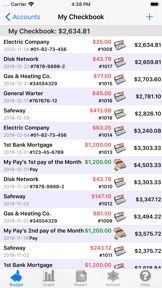
Enter your expenses, and view your account and envelope balances while on the go. You can also get reports, see graphs, list your transactions, and much more.
Budget Touch can be used stand alone or synced with the desktop version of Budget (Mac or Windows) via WiFi. When used together Budget and Budget Touch are an unbeatable combination to help you manage your money, stay out of debt, and save for the fun things in life.
Features:
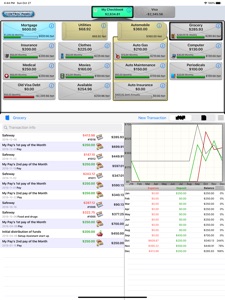
- Beautiful and fluid interface on iPad takes full advantage of the large screen.
- Password protected with strong AES-128 encryption of your data.
- Fast transaction entry: Select from a list of previous entries or type a new entry, enter an amount, and touch save. It's that simple.
- Transaction support for deposits, checks, debits, ATM, charges, refunds, and credit card payments.
- Create transactions in single envelopes or split them between multiple envelopes.
- Enter your income to a single envelope or use the split deposit to manually distribute it.
- Transfer money between envelopes or accounts.
- View transactions in accounts or envelopes.
- Organize your transactions by month, quarter, or year.
- Create as many bank accounts, credit card accounts, envelopes and envelope groups as you want to categorize your expenses.
- Customize your accounts and envelopes with built in icons.
- Set spending limits for your envelopes and see graphically how you are doing.
- See account balances, envelope balances, net balances, and a running balance with your transactions.
- Bank accounts can be reconciled (balanced) against bank statements.
- Get graphs and reports for expenses, deposits, budgets, and many more.
- Export your data via email in either tab-separated, QIF or OFX format.
- Export reports in HTML format.
- Print reports on iOS 4.2 or later.
Pay Source System (Paid Add On)
- Define your income and have Budget Touch calculate how much to put towards each envelope.
- Automatically distribute your income to your envelopes.
Recurring Transactions (Paid Add On)
- Schedule future transactions and be reminded when they are due.
- App icon is badged to show the number of due or overdue transactions. On iOS 4 and later, the badge is updated even when Budget Touch is not running.
Languages:
US English, British English, partial German translation
Requirements:
Compatible with iPad, iPhone and iPod Touch
Requires iOS 4.3 or later
Sync with Mac requires Budget v6.3 or later
Sync with Windows requires Budget v5.0 or later

What's New in Version 1.7.0

Support for iOS 13 and dark mode.
Fixed a crash while trying to export if no mail accounts are set up on the device.
Fixed some memory leaks and other minor issues.

Seller

Name

Snowmint Creative Solutions LLC

Information

Categories

Version

1.7.0

Size

7.2 MB

Game Center

No

VPP Device Licensing

Yes

Rating

Rated: 4+

Compatibility

iOS 8.0 or later

Devices

iPhone 4S, iPhone 5, iPhone 5c, iPhone 5s, iPhone 6, iPhone 6 Plus, iPhone 6s, iPhone 6s Plus, iPhone SE, iPhone 7, iPhone 7 Plus, iPhone 8, iPhone 8 Plus, iPhone X, iPhone XR, iPhone XS, iPhone XS Max, iPhone 11, iPhone 11 Pro, iPhone 11 Pro Max, iPhone SE (2nd generation), iPad 2 (Wi-Fi), iPad 2 (3G), iPad (3rd Generation) (Wi-Fi), iPad (3rd Generation) (4G), iPad (4th Generation) (Wi-Fi), iPad (4th Generation) (4G), iPad (5th Generation) Wi-Fi, iPad (5th Generation) Wi-Fi + Cellular, iPad (6th generation) Wi-Fi, iPad (6th generation) Wi-Fi + Cellular, iPad Pro, iPad Pro (Cellular), iPad Pro (9.7-inch), iPad Pro (9.7-inch) (Cellular), iPad Pro 12.9-inch (2nd generation), iPad Pro 12.9-inch (2nd generation) Wi-Fi + Cellular, iPad Pro (10.5-inch), iPad Pro (10.5-inch) Wi-Fi + Cellular, iPad Pro (11-inch), iPad Pro (11-inch) Wi-Fi + Cellular, iPad Pro 12.9-inch (3rd generation), iPad Pro 12.9-inch (3rd generation) Wi-Fi + Cellular, iPad Air, iPad Air (Cellular), iPad Air 2, iPad Air 2 (Cellular), iPad Air (3rd generation), iPad Air (3rd generation) Wi-Fi + Cellular, iPad mini (Wi-Fi), iPad mini (4G), iPad mini Retina, iPad mini Retina (Cellular), iPad mini 3, iPad mini 3 (Cellular), iPad mini 4, iPad mini 4 (Cellular), iPad mini (5th Generation), iPad mini (5th Generation) Wi-Fi + Cellular, iPad (7th generation) Wi-Fi, iPad Pro 11-inch (2nd generation), iPad Pro 11-inch (2nd generation) Wi-Fi + Cellular, iPad Pro 12.9-inch (4th generation), iPad Pro 12.9-inch (4th generation) Wi-Fi + Cellular, iPod touch (5th generation), iPod touch (6th Generation), iPod touch (7th generation), Apple Watch Series 4, Apple Watch Series 5

Languages

English, German

App Store: Customer Ratings

Ratings & Reviews

2.5 of 5 (2 Ratings)

App Store: Customer Reviews

2012-01-23

Rubbish

Downloaded this app what a mistake jammed within first minute Don't buy
Tilesss
Version 1.5
2010-09-22

NOW I GET IT!

Initially I gave this app a bad review saying it was too hard it use. I gave it another shot after reading all the instructions (which I hate to do) but if u are going to use this app and understand how it works u have to read the instructions. It is actually a good app which does what it says:)
AMC1981
2010-08-24

Still having syncing problems

App is still having problems when syncing, recording transactions twice and things like that. When it is working it is great but it's frustrating my budget gets put out with these problems.
Person148
2010-01-20

Great only if you have the desktop app

If you have the OSX budget app and love it, then you'll love having all your balances and budget info with you.
jezbon83