AboutTermsPrivacyContact
 
Updating
X-Watch

X-Watch

Released: 2009-11-23
© Pocketkai.de
X-Watch - QR Code
Version 2.4
4+
Download on the App Store
Version 2.4
4+
Download on the App Store
Released: 2009-11-23
© Pocketkai.de

iPhone Screenshots

Screenshot
Screenshot
Screenshot
Screenshot
Screenshot

iPad Screenshots

Screenshot
Screenshot
Screenshot
Screenshot
Screenshot
Screenshot

Description

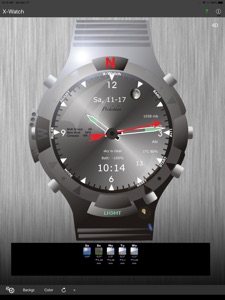
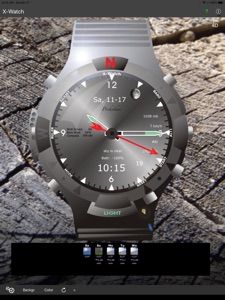
X-Watch is a professional Outdoor-Watch and uses all available Sensors and Data and includes more functions as every expensive Outdoor-Watch. Time, date, weather data, compass, goniometer, bubble level, ruler, stop-watch, motion alarm, moonphases and more functions. The main functions can called separately and are showed clearly on the screen.
New:
- Voice output: date, time, battery level
Functions (Mode):
- Time, Date (analog/digital)
- Motion alarm (when the iPhone lies on the table)
- Stop watch
- Barometer (in mb or hPa)
- Altimeter (GPS)
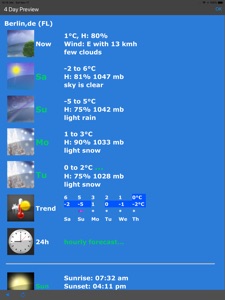
- Temperature, Air humidity (on your location)
- Wind speed
- GPS speed
- Goniometer
- Bubble Level (horizontal, plain)
More Functions:
- Light
- Ruler
- Compass (outer circle)
- Backgrund changeable (metal, wood, tree)
- Color of the watch changeable (grey, blue, green, brown)
- moonphase
- Shake-function: clock hands etc. get mixed up
- Updating-Buttontaste for weather data
- Turn the watch (animated)
- Battery view
- GPS Ready view
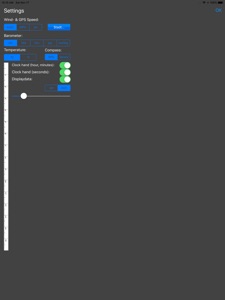
Settings:
- Temperature in °C or °F
- Barometer in mb or hPa
- Wind speed in kph or mph or kts
- Compass (GPS or Sensor)
- Clock hands hide/show
- Data-display hide/show
- City: for Weather
Buttons:
- Adjust (Settings)
- Mode (toggle functions)
- Baro (call Barometer)
- Alti (GPS-altimeter)
- Start (Stop watch: start, stop, reset)
- Start (motion alarm: on)
- Reset (back to Mode1: Time)
- Reset (Bubble Level: calibrate)
- Light (dim down the housing and switches the color of the display to bright green)
- Updating the weather data (Button with half-rounded arrow)
- Test/Presentation mode: push the buttons Baro, Alti, Start in a row. Time will be set to 10:10. back with Reset.
- Ruler: left button
Hints:
- Displayin actual weather data, means at the moment of calling the data.
- Compass bases on GPS (at motion) or the internal Compass-sensor of the iPhone
- Internet connection needed fpr weather data and moonphase
Systemreqirements:
- iPhone or iPod Touch with iOS 8.x or higher
- Internetconnection for weatherdata
Apple watch:
- Workout mode for longer display on the screen
- Display: time, date, day of the week
- Pedometer, Battery %
- Altitude, barometer, heart rate
- Voice output: battery, date, time

What's New in Version 2.4

- Update Speech Output for iOS 16 and watchOS 9

Seller

Name

Kai Bruchmann

Information

Developer

Categories

Version

2.4

Size

17 MB

Game Center

No

VPP Device Licensing

Yes

Rating

Rated: 4+

Compatibility

iOS 8.0 or later

Devices

iPhone 5s, iPhone 6, iPhone 6 Plus, iPhone 6s, iPhone 6s Plus, iPhone SE, iPhone 7, iPhone 7 Plus, iPhone 8, iPhone 8 Plus, iPhone X, iPhone XR, iPhone XS, iPhone XS Max, iPhone 11, iPhone 11 Pro, iPhone 11 Pro Max, iPhone SE (2nd generation), iPhone 12, iPhone 12 Pro, iPhone 12 Pro Max, iPhone 12 mini, iPhone 13, iPhone 13 Pro, iPhone 13 Pro Max, iPhone 13 mini, iPhone SE (3rd generation), iPhone 14, iPhone 14 Plus, iPhone 14 Pro, iPhone 14 Pro Max, iPhone 15, iPhone 15 Plus, iPhone 15 Pro, iPhone 15 Pro Max, iPhone 16, iPhone 16Plus, iPhone 16Pro, iPhone 16ProMax, iPhone 16e, iPad (5th Generation) Wi-Fi, iPad (5th Generation) Wi-Fi + Cellular, iPad (6th generation) Wi-Fi, iPad (6th generation) Wi-Fi + Cellular, iPad Pro, iPad Pro (Cellular), iPad Pro (9.7-inch), iPad Pro (9.7-inch) (Cellular), iPad Pro 12.9-inch (2nd generation), iPad Pro 12.9-inch (2nd generation) Wi-Fi + Cellular, iPad Pro (10.5-inch), iPad Pro (10.5-inch) Wi-Fi + Cellular, iPad Pro (11-inch), iPad Pro (11-inch) Wi-Fi + Cellular, iPad Pro 12.9-inch (3rd generation), iPad Pro 12.9-inch (3rd generation) Wi-Fi + Cellular, iPad Air, iPad Air (Cellular), iPad Air 2, iPad Air 2 (Cellular), iPad Air (3rd generation), iPad Air (3rd generation) Wi-Fi + Cellular, iPad mini Retina, iPad mini Retina (Cellular), iPad mini 3, iPad mini 3 (Cellular), iPad mini 4, iPad mini 4 (Cellular), iPad mini (5th Generation), iPad mini (5th Generation) Wi-Fi + Cellular, iPad (7th generation) Wi-Fi + Cellular, iPad Pro 11-inch (2nd generation), iPad Pro 11-inch (2nd generation) Wi-Fi + Cellular, iPad Pro 12.9-inch (4th generation), iPad Pro 12.9-inch (4th generation) Wi-Fi + Cellular, iPad Air (4th Generation) (Wi-Fi), iPad Air (4th Generation) (Wi-Fi + Cellular), iPad (8th generation) Wi-Fi, iPad (8th generation) Wi-Fi + Cellular, iPad Pro 11-inch (3rd generation), iPad Pro 11-inch (3rd generation) Wi-Fi + Cellular, iPad Pro 12.9-inch (5th Generation), iPad Pro 12.9-inch (5th Generation) Wi-Fi + Cellular, iPad (9th Generation), iPad (9th Generation) Wi-Fi + Cellular, iPad mini (6th Generation), iPad mini (6th Generation) Wi-Fi + Cellular, iPad Air (5th generation), iPad Air (5th generation) Wi-Fi + Cellular, iPad Pro 11-inch (4th generation), iPad Pro 11-inch (4th generation) Wi-Fi + Cellular, iPad Pro 12.9-inch (6th generation), iPad Pro 12.9-inch (6th generation) Wi-Fi + Cellular, iPad (10th generation), iPad (10th generation) Wi-Fi + Cellular, iPad Air 11-inch (M2) Wi-Fi, iPad Air 13-inch (M2) Wi-Fi, iPad Air 13-inch (M2) Wi-Fi + Cellular, iPad Pro 11-inch (M4) Wi-Fi, iPad Pro 11-inch (M4) Wi-Fi + Cellular, iPad Pro 13-inch (M4) Wi-Fi, iPad Pro 13-inch (M4) Wi-Fi + Cellular, iPad A16, iPad A16Cellular, iPad Air11M3, iPad Air11M3Cellular, iPad Air13M3, iPad Air13M3Cellular, iPad MiniA17Pro, iPad MiniA17ProCellular, iPod touch (6th Generation), iPod touch (7th generation), Apple Watch Series 4

Languages

English, German

App Store: Customer Ratings

Ratings & Reviews

1.0 of 5 (1 Rating)

App Store: Customer Reviews

2011-10-05

Doesnot work

Comes up with error message from their info provider all the time. I'm in mountains in Switzerland now in a village that is 1050m high and it tells me my height is 4m and barometer is 1024 whilst in fact it is 860 at this height. If no internet connection you will not get it to work at all. WAste of money
Ricomuchacho
Version 1.3