AboutTermsPrivacyContact
 
Updating
Go Calc

Go Calc

Released: 2019-02-08
© 2023 Apps On The Move Limited
Go Calc - QR Code
Version 4.2.0
4+
Download on the App Store
Version 4.2.0
4+
Download on the App Store
Released: 2019-02-08
© 2023 Apps On The Move Limited

iPhone Screenshots

Screenshot
Screenshot
Screenshot
Screenshot
Screenshot

iPad Screenshots

Screenshot
Screenshot
Screenshot
Screenshot

Description

EMPOWER YOUR BUSINESS - Throw away your old calculators. Transform everyday calculations. Create calculators for your business right on your iPhone or iPad.
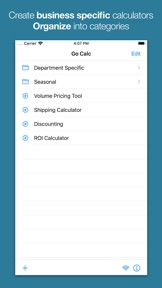
Create your own calculator apps right on your iPhone or iPad. In minutes your business specific calculations become a breeze. Create a calculator for each type of problem you need to solve using formula similar to those found in spreadsheets.
Go Calc has been helping businesses like yours get the right answers since 2008:
"It turned into a mission-critical app when I created a set of formulas for all my estimating and billing."
"I own a Retail store and have to work out margins every day."
"I use this app nearly every day for scuba gas blending. It saves a huge amount of time."
"I have several elaborate pricing formulas that I use at work. ... I can quickly adjust two simple numbers, my price and my markup ... and give me a suggested price."
"I created several functions that make it easier to interpret logistic regression results, and it works like a charm!"
"I work in the Road Construction industry and have not found anything close to this app."
"This app has made my job so much easier and almost fun."
Examples of calculators you could create:
* Quickly work out potential profit when negotiating with a customer
* Estimate costs using a set of business specific variables
* Determine how much of a consumable you need
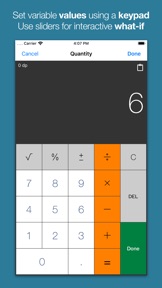
Go Calc allows you to quickly create new calculations by setting up variables and formulas on your iPhone or iPad.
Creating a new calculator is easy:
1. Tap to add a new calculator
2. Give it a name
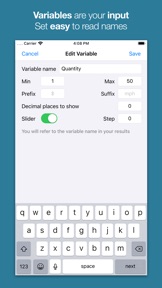
3. Add some variables (the inputs to the calculations)
4. Create one or more formulas to get your results
5. Go Calc!
Each calculator you create can be reused again and again. Calculators can be easily found by filing them into categories.
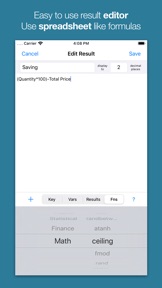
Formulas in Go Calc share much with the formulas you write in your favorite spreadsheet. Over 50 functions can be used including IF, MAX, SIN, LOG, IPMT, RANDBETWEEN.
Import and export your calculations. Backup all your calculations easily and without the need to install any software on your PC or Mac. Create calculators and then share them with other Go Calc users in your business.

What's New in Version 4.2.0

You can now duplicate calculators. When using a calculator just tap the button next to Edit, set the name of the new calculator and tap Duplicate.
This release also updates the built-in help, and has some fixes for dark mode.

Seller

Name

Apps On The Move Limited

Information

Categories

Version

4.2.0

Size

1.7 MB

Game Center

No

VPP Device Licensing

Yes

Rating

Rated: 4+

Compatibility

iOS 13.0 or later

Devices

iPhone 5s, iPhone 6, iPhone 6 Plus, iPhone 6s, iPhone 6s Plus, iPhone SE, iPhone 7, iPhone 7 Plus, iPhone 8, iPhone 8 Plus, iPhone X, iPhone XR, iPhone XS, iPhone XS Max, iPhone 11, iPhone 11 Pro, iPhone 11 Pro Max, iPhone SE (2nd generation), iPhone 12, iPhone 12 Pro, iPhone 12 Pro Max, iPhone 12 mini, iPhone 13, iPhone 13 Pro, iPhone 13 Pro Max, iPhone 13 mini, iPhone SE (3rd generation), iPhone 14, iPhone 14 Plus, iPhone 14 Pro, iPhone 14 Pro Max, iPhone 15, iPhone 15 Plus, iPhone 15 Pro, iPhone 15 Pro Max, iPhone 16, iPhone 16Plus, iPhone 16Pro, iPhone 16ProMax, iPad (5th Generation) Wi-Fi, iPad (5th Generation) Wi-Fi + Cellular, iPad (6th generation) Wi-Fi, iPad (6th generation) Wi-Fi + Cellular, iPad Pro, iPad Pro (Cellular), iPad Pro (9.7-inch), iPad Pro (9.7-inch) (Cellular), iPad Pro 12.9-inch (2nd generation), iPad Pro 12.9-inch (2nd generation) Wi-Fi + Cellular, iPad Pro (10.5-inch), iPad Pro (10.5-inch) Wi-Fi + Cellular, iPad Pro (11-inch), iPad Pro (11-inch) Wi-Fi + Cellular, iPad Pro 12.9-inch (3rd generation), iPad Pro 12.9-inch (3rd generation) Wi-Fi + Cellular, iPad Air, iPad Air (Cellular), iPad Air 2, iPad Air 2 (Cellular), iPad Air (3rd generation), iPad Air (3rd generation) Wi-Fi + Cellular, iPad mini Retina, iPad mini Retina (Cellular), iPad mini 3, iPad mini 3 (Cellular), iPad mini 4, iPad mini 4 (Cellular), iPad mini (5th Generation), iPad mini (5th Generation) Wi-Fi + Cellular, iPad (7th generation) Wi-Fi + Cellular, iPad Pro 11-inch (2nd generation), iPad Pro 11-inch (2nd generation) Wi-Fi + Cellular, iPad Pro 12.9-inch (4th generation), iPad Pro 12.9-inch (4th generation) Wi-Fi + Cellular, iPad Air (4th Generation) (Wi-Fi), iPad Air (4th Generation) (Wi-Fi + Cellular), iPad (8th generation) Wi-Fi, iPad (8th generation) Wi-Fi + Cellular, iPad Pro 11-inch (3rd generation), iPad Pro 11-inch (3rd generation) Wi-Fi + Cellular, iPad Pro 12.9-inch (5th Generation), iPad Pro 12.9-inch (5th Generation) Wi-Fi + Cellular, iPad (9th Generation), iPad (9th Generation) Wi-Fi + Cellular, iPad mini (6th Generation), iPad mini (6th Generation) Wi-Fi + Cellular, iPad Air (5th generation), iPad Air (5th generation) Wi-Fi + Cellular, iPad Pro 11-inch (4th generation), iPad Pro 11-inch (4th generation) Wi-Fi + Cellular, iPad Pro 12.9-inch (6th generation), iPad Pro 12.9-inch (6th generation) Wi-Fi + Cellular, iPad (10th generation), iPad (10th generation) Wi-Fi + Cellular, iPad Air 11-inch (M2) Wi-Fi, iPad Air 13-inch (M2) Wi-Fi, iPad Air 13-inch (M2) Wi-Fi + Cellular, iPad Pro 11-inch (M4) Wi-Fi, iPad Pro 11-inch (M4) Wi-Fi + Cellular, iPad Pro 13-inch (M4) Wi-Fi, iPad Pro 13-inch (M4) Wi-Fi + Cellular, iPad MiniA17Pro, iPad MiniA17ProCellular, iPod touch (6th Generation), iPod touch (7th generation)

Languages

English

App Store: Customer Ratings

Ratings & Reviews

4.5 of 5 (5 Ratings)

App Store: Customer Reviews

2012-09-19

Where have you been all my life?

This app is fantastic. i have been looking for something like this for ages, and have finally found it.
it beats the hell out of any of the conversion apps out there, because you can make your own conversions rather than relying on the developers to understand what you're talking about and add it in themselves. And you can make quite complex conversion formulas, with functional UI.
THANK YOU!!!
Additional feature request: is there any chance of being able to make text values available as potential results (eg for IF functions, as in IF(a>b,"YES","CUSTARD"))?
Oh, and is there an iPad version planned? that would be the icing on the cake for me
SVBWright
Version 1.9.7
2010-08-21

Great application

Really like this application. It seems that it is the closest thing to Excel on the iPhone at the moment. Found entering the formulas very easy. There are some great features like cursor left and right which make it easier to move around in complex equations. Only thing missing is that I would like to see the ability in future updates to use time in calculations such as adding or subtracting hours and minutes [hh:mm].
92degrees