AboutTermsPrivacyContact
 
Updating
My Lists

My Lists

Released: 2019-02-12
© 2008 Paze, Inc.
My Lists - QR Code
Version 3.1
4+
Download on the App Store
Version 3.1
4+
Download on the App Store
Released: 2019-02-12
© 2008 Paze, Inc.

iPhone Screenshots

Screenshot
Screenshot
Screenshot
Screenshot
Screenshot
Screenshot
Screenshot
Screenshot

iPad Screenshots

Screenshot
Screenshot
Screenshot
Screenshot
Screenshot
Screenshot
Screenshot
Screenshot

Description

Proudly NOT collecting your private data for over a decade — We debuted on the App Store on July 13th, 2008. Not once have we asked users to sign away data about themselves or their lists.
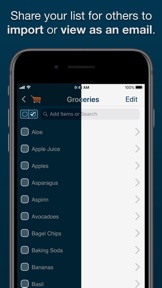
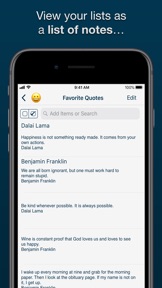
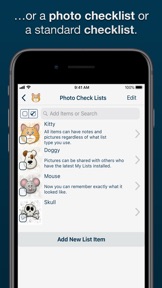
Make lists for anything you need from shopping lists to movies to ideas for your novel, notes for a class to restaurants to try. Add images to your list items with the Photo Checklists option or keep track of notes with the Notes View to help manage larger amounts of data. You can keep track of additional information by adding images to the details view of an item in ANY list type. My Lists contains many great tools which allow you to share, sort, and reorder your lists and items the way that you need in order to effectively manage your daily life.
Features:
- NEW easier User Interface
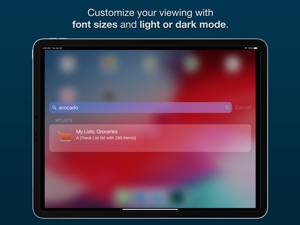
- NEW Search for list items in Spotlight
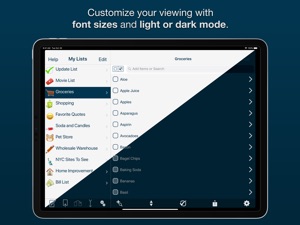
- NEW Light and Dark Themes
- NEW icons and latest Emoji
- NEW Random sort method
- NEW Support for Files app and any Cloud services it supports
- iOS 12 and 2018 Device support
- Retina Display-worthy list icons
- Add PHOTOS to any list item
- 3 List View: Checklist, Photo Checklist and Notes
- Updated Visual Help System
- Automatically group checked items
- Show count of unchecked items on Main List View
- Search functionality which searches both item titles and descriptions.
- Search based on status by searching for the terms "checked" and "unchecked"
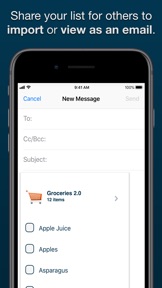
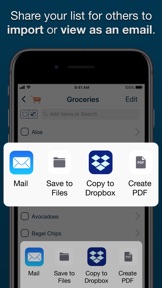
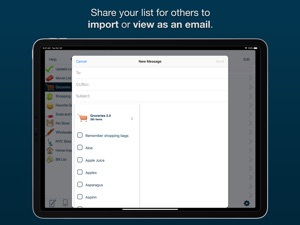
- Email backup of individual lists
- Email visual versions of individual lists
- Export or backup any or all lists
- Visual count of checked items in list title (optional)
- Reorder lists alphabetically or based on checked/unchecked
- Manually order list items in "Edit" mode
- Check or uncheck all items
- Delete lists or items with a swipe

What's New in Version 3.1

Small stability changes to support the latest versions of iOS

Seller

Information

Developer

Categories

Version

3.1

Size

24.5 MB

Game Center

No

VPP Device Licensing

Yes

Rating

Rated: 4+

Compatibility

iOS 15.6 or later

Devices

iPhone 5s, iPhone 6, iPhone 6 Plus, iPhone 6s, iPhone 6s Plus, iPhone SE, iPhone 7, iPhone 7 Plus, iPhone 8, iPhone 8 Plus, iPhone X, iPhone XR, iPhone XS, iPhone XS Max, iPhone 11, iPhone 11 Pro, iPhone 11 Pro Max, iPhone SE (2nd generation), iPhone 12, iPhone 12 Pro, iPhone 12 Pro Max, iPhone 12 mini, iPhone 13, iPhone 13 Pro, iPhone 13 Pro Max, iPhone 13 mini, iPhone SE (3rd generation), iPhone 14, iPhone 14 Plus, iPhone 14 Pro, iPhone 14 Pro Max, iPhone 15, iPhone 15 Plus, iPhone 15 Pro, iPhone 15 Pro Max, iPad (5th Generation) Wi-Fi, iPad (5th Generation) Wi-Fi + Cellular, iPad (6th generation) Wi-Fi, iPad (6th generation) Wi-Fi + Cellular, iPad Pro, iPad Pro (Cellular), iPad Pro (9.7-inch), iPad Pro (9.7-inch) (Cellular), iPad Pro 12.9-inch (2nd generation), iPad Pro 12.9-inch (2nd generation) Wi-Fi + Cellular, iPad Pro (10.5-inch), iPad Pro (10.5-inch) Wi-Fi + Cellular, iPad Pro (11-inch), iPad Pro (11-inch) Wi-Fi + Cellular, iPad Pro 12.9-inch (3rd generation), iPad Pro 12.9-inch (3rd generation) Wi-Fi + Cellular, iPad Air, iPad Air (Cellular), iPad Air 2, iPad Air 2 (Cellular), iPad Air (3rd generation), iPad Air (3rd generation) Wi-Fi + Cellular, iPad mini Retina, iPad mini Retina (Cellular), iPad mini 3, iPad mini 3 (Cellular), iPad mini 4, iPad mini 4 (Cellular), iPad mini (5th Generation), iPad mini (5th Generation) Wi-Fi + Cellular, iPad (7th generation) Wi-Fi + Cellular, iPad Pro 11-inch (2nd generation), iPad Pro 11-inch (2nd generation) Wi-Fi + Cellular, iPad Pro 12.9-inch (4th generation), iPad Pro 12.9-inch (4th generation) Wi-Fi + Cellular, iPad Air (4th Generation) (Wi-Fi), iPad Air (4th Generation) (Wi-Fi + Cellular), iPad (8th generation) Wi-Fi, iPad (8th generation) Wi-Fi + Cellular, iPad Pro 11-inch (3rd generation), iPad Pro 11-inch (3rd generation) Wi-Fi + Cellular, iPad Pro 12.9-inch (5th Generation), iPad Pro 12.9-inch (5th Generation) Wi-Fi + Cellular, iPad (9th Generation), iPad (9th Generation) Wi-Fi + Cellular, iPad mini (6th Generation), iPad mini (6th Generation) Wi-Fi + Cellular, iPad Air (5th generation), iPad Air (5th generation) Wi-Fi + Cellular, iPad Pro 11-inch (4th generation), iPad Pro 11-inch (4th generation) Wi-Fi + Cellular, iPad Pro 12.9-inch (6th generation), iPad Pro 12.9-inch (6th generation) Wi-Fi + Cellular, iPad (10th generation), iPad (10th generation) Wi-Fi + Cellular, iPad Air11M2, iPad Air11M2Cellular, iPad Air13M2, iPad Air13M2Cellular, iPad Pro11M4, iPad Pro11M4Cellular, iPad Pro13M4, iPad Pro13M4Cellular, iPod touch (6th Generation), iPod touch (7th generation)

Languages

English

App Store: Customer Ratings

Ratings & Reviews

1.0 of 5 (1 Rating)

App Store: Customer Reviews

2012-10-07

Not that good

Have been researching a few of these types of apps tonight and the free paperless one is the way to go. If app creators all made a lite version you wouldn't need to give bad ratings. The my list app is lacking good gui as usability. It would also be good to have a feed back option in the app so i could request changes. It would be good to get my money back.
Nathan Kennedy
Version 2.25
2012-04-27

BEST LIST APP 👍

I didn't buy this app at first because of all the bad reviews even though it looked the best one. So I wasted my money on others that had excellent reviews and wasn't happy with any of them. So came back to this one and took the chance now wish I had of went with this one in the first place.
artisticwitch
Version 2.0.3
2010-07-17

Used to work

So i paid and used this app...not perfect but okay but now they release updates without testing and all the hours of work I've got trapped in my lists cannot be accessed because of crashes
wolfduke
2010-07-16

Wish I could use it

Update causes app to crash every time on opening.
elykrm
2009-02-10

Brilliant!

I'm such a list person and this is the most used and useful application I've bought!
Really easy to use, great interface, I love that you can add extra detailed notes under each item in each list....I'd be lost without it!
Kates_Aust
2009-02-08

This app has changed my life

This app is so easy to use and nice to look at. I am so organized now.
Lara Lane
2009-02-06

Dont bother

The worst app I’ve purchased. Hard to use, hard to edit. Have not received any updates for it since I purchased 3 mths ago and it desperately needs one. Trying to edit a list or add notes to an old list is painful. You go around in circles (checking, deleting etc) but never actually get to add something to your list.
Don’t buy it til they sort out the bugs!!
Busy Jane Sydney
2008-10-21

hoping for sync

Love the latest update, especially the tool bar at the bottom, makes it so much easier to use. Still hoping for sync to desktop function which becomes more and more important as my lists increasing in numbers and length.
JCSpace
2008-08-19

Great!

This is really useful app. It has a nice and clean interface and is very easy to use. This app has never crashed on my iPhone, and I am very happy with it. Thanks!
The person of myself
2008-08-15

Good start, bad ending

Seemed great at first, but after a few days application now crashes EVERY time I open it. Disappointing really. An app is no use if it refuses to run.
tibbarder
2008-07-31

Excellent!

Ive tried a few list applicatons and this one comes up on top, its easy to use, looks nice, clean and you can create as many lists as you like. The email function is handy and the application has never crashed on me.
If there was an option to apply due dates then this would be perfect.
xleopard