Updating


iPhone Screenshots


iPad Screenshots




Description
Bright Filters is a powerful and easy to use editor that allows you to take your photos to the next level.
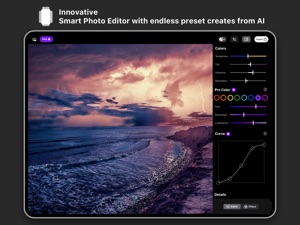
The AI engine can create infinite filters generated by analysing any photo.
You can also use Music Filters function to create stunning effects based on the song that you are currently listening.
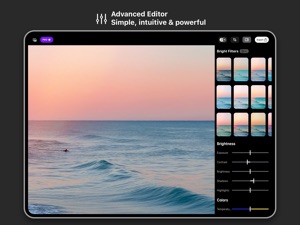
Bright Filters offers advanced editing tools to retouch your photos and a collection of presets to quickly apply unique adjustments to deliver stunning results.
BRIGHT FILTERS feature
The Bright Filters feature, automatically analyses the shot that you want to edit, and suggests a collection of filters based on our advanced algorithm.
We really care about your privacy and therefore every image analysis operation is performed directly on the device, to ensure that no information is collected.
• Infinite filters created from AI
• A unique and innovative user experience to apply filters
MUSIC FILTERS
The app analyzes music and creates filters based on the song recognized.
• "Album Cover Filter" is a smart filter generated by using the album cover, to give a unique style to your photo.
• "Music Genre Filter" is a collection based on the kind of music you are currently listening, to adapt your photos perfectly to your mood.
• Apply a text sticker inspired by the song recognized
ADVANCED PHOTO EDITOR
• Use precision sliders to adjust all your settings like exposure, contrast, highlights, shadow, tint, temperature
• Improve the look of your photo with clarity, dehaze, grain functions.
• HSL independently adjust the hue, saturation, and luminance of eight different colors red, orange, yellow, green, aqua, blue, purple, and magenta
• Crop and rotate to improve the composition
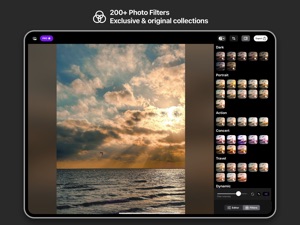
• 200+ photo filters designed for every kind of photo
• Use curves to edit highlights, midtones, shadow
PHOTO FILTERS COLLECTIONS
Here is a list of some of the filter collections in the app
• Sunset
• Professional
• Cinematic
• Black & White
• Dark
• Portrait
• Action
• Concert
• Travel
• Dynamic
• Look
• Acid
• Retro
• Snow
• Duotone
• Fade
• Indie
• Infrared
PRO MEMBERSHIP
• New Filters every month
• All the filters collections
• HSL tool
• Curve tool
• Advanced correction tools
- Terms of use : https://www.apple.com/legal/internet-services/itunes/dev/stdeula/
- Privacy Policy : https://www.fulvioscichilone.it/privacy-policy-bright-filters/
What's New in Version 2.2
Welcome to the new update that leverages all the features of the new iOS and new devices, to improve the app even more.
• Updated Widgets
The widgets have been refined to integrate the capabilities of iOS: advanced interaction, standby mode, smooth animations, and multi-device compatibility. The artificial intelligence models used for selecting and filtering images are now more efficient and faster.
• TipKit
TipKit is your personal assistant guiding you to discover all the functions of the app.
• Subject Detection Function for Sticker Creation
Now you have the ability to easily convert subjects into stickers, bringing your creative projects to life.
• Visual Search
The app is now compatible with the Visual Search feature introduced with iOS.
• AI-Based Processes
The features utilizing Vision technology have been enhanced, offering more powerful image segmentation, body pose recognition, hand pose recognition, and more.
• Improved HDR Support:
All views have been optimized to take advantage of iOS 17's new HDR system.
• Asynchronous Operation for CoreML Implementation
The app has integrated asynchronous operations into its CoreML functionality, improving performance and responsiveness when utilizing machine learning capabilities.
• Integration of New SF Symbols
The user interface has been renewed with the inclusion of new symbols, making the user experience even more pleasant.
[Previous update]
Welcome to Bright Filters 2!
The app is now optimized for iPad.
With an innovative UI and UX style, all the features of the iOS version are now available for iPadOS.
All AI processes, the editor, the filters, and performance have been significantly improved, offering an experience like never before.
Bright Filters 2 introduces new levels of quality and versatility, with a unprecedented level of freedom in editing their photographs.
It is perfect for both professional users and those who simply enjoy photography.
Bright Filters provides a unique experience to apply filters and edit every style of photos.
Information
Developer
Categories
Version
2.2
Size
115.4 MB
Game Center
No
VPP Device Licensing
Yes
Rating
Rated: 4+
Compatibility
iOS 16.0 or later
Devices
iPhone 5s, iPhone 6, iPhone 6 Plus, iPhone 6s, iPhone 6s Plus, iPhone SE, iPhone 7, iPhone 7 Plus, iPhone 8, iPhone 8 Plus, iPhone X, iPhone XR, iPhone XS, iPhone XS Max, iPhone 11, iPhone 11 Pro, iPhone 11 Pro Max, iPhone SE (2nd generation), iPhone 12, iPhone 12 Pro, iPhone 12 Pro Max, iPhone 12 mini, iPhone 13, iPhone 13 Pro, iPhone 13 Pro Max, iPhone 13 mini, iPhone SE (3rd generation), iPhone 14, iPhone 14 Plus, iPhone 14 Pro, iPhone 14 Pro Max, iPhone 15, iPhone 15 Plus, iPhone 15 Pro, iPhone 15 Pro Max, iPhone 16, iPhone 16Plus, iPhone 16Pro, iPhone 16ProMax, iPad (5th Generation) Wi-Fi, iPad (5th Generation) Wi-Fi + Cellular, iPad (6th generation) Wi-Fi, iPad (6th generation) Wi-Fi + Cellular, iPad Pro, iPad Pro (Cellular), iPad Pro (9.7-inch), iPad Pro (9.7-inch) (Cellular), iPad Pro 12.9-inch (2nd generation), iPad Pro 12.9-inch (2nd generation) Wi-Fi + Cellular, iPad Pro (10.5-inch), iPad Pro (10.5-inch) Wi-Fi + Cellular, iPad Pro (11-inch), iPad Pro (11-inch) Wi-Fi + Cellular, iPad Pro 12.9-inch (3rd generation), iPad Pro 12.9-inch (3rd generation) Wi-Fi + Cellular, iPad Air, iPad Air (Cellular), iPad Air 2, iPad Air 2 (Cellular), iPad Air (3rd generation), iPad Air (3rd generation) Wi-Fi + Cellular, iPad mini Retina, iPad mini Retina (Cellular), iPad mini 3, iPad mini 3 (Cellular), iPad mini 4, iPad mini 4 (Cellular), iPad mini (5th Generation), iPad mini (5th Generation) Wi-Fi + Cellular, iPad (7th generation) Wi-Fi + Cellular, iPad Pro 11-inch (2nd generation), iPad Pro 11-inch (2nd generation) Wi-Fi + Cellular, iPad Pro 12.9-inch (4th generation), iPad Pro 12.9-inch (4th generation) Wi-Fi + Cellular, iPad Air (4th Generation) (Wi-Fi), iPad Air (4th Generation) (Wi-Fi + Cellular), iPad (8th generation) Wi-Fi, iPad (8th generation) Wi-Fi + Cellular, iPad Pro 11-inch (3rd generation), iPad Pro 11-inch (3rd generation) Wi-Fi + Cellular, iPad Pro 12.9-inch (5th Generation), iPad Pro 12.9-inch (5th Generation) Wi-Fi + Cellular, iPad (9th Generation), iPad (9th Generation) Wi-Fi + Cellular, iPad mini (6th Generation), iPad mini (6th Generation) Wi-Fi + Cellular, iPad Air (5th generation), iPad Air (5th generation) Wi-Fi + Cellular, iPad Pro 11-inch (4th generation), iPad Pro 11-inch (4th generation) Wi-Fi + Cellular, iPad Pro 12.9-inch (6th generation), iPad Pro 12.9-inch (6th generation) Wi-Fi + Cellular, iPad (10th generation), iPad (10th generation) Wi-Fi + Cellular, iPad Air 11-inch (M2) Wi-Fi, iPad Air 13-inch (M2) Wi-Fi, iPad Air 13-inch (M2) Wi-Fi + Cellular, iPad Pro 11-inch (M4) Wi-Fi, iPad Pro 11-inch (M4) Wi-Fi + Cellular, iPad Pro 13-inch (M4) Wi-Fi, iPad Pro 13-inch (M4) Wi-Fi + Cellular, iPad MiniA17Pro, iPad MiniA17ProCellular, iPod touch (6th Generation), iPod touch (7th generation)
Languages
English, Italian
App Store: Customer Ratings
Ratings & Reviews
4.5 of 5 (5 Ratings)
App Store: Customer Reviews
No Entry