Updating


iPhone Screenshots



iPad Screenshots


Description
AngelNav is a brand new app for iOS developed in collaboration with Tom Cunliffe. Primarily it is a full chart plotter currently favouring raster charts, but it has many additional features including the ability to carry out traditional navigation directly on the screen.
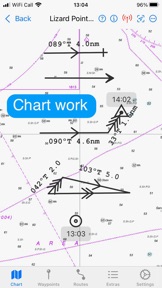
The capacity to generate classical chart work is vitally important in the event of a GPS failure, but hitherto has required pencil, plotters, and paper charts. AngelNav allows traditional techniques to be carried out using an iPad or iPhone screen instead of a paper chart. An estimated position can be plotted, position lines drawn from sighted bearings and fixes recorded. Course-to-steer diagrams are readily constructed.
AngelNav can read most types of raster chart including the UKHO subscription charts, as well as KAP/BSB files and GeoTIFF files. Like its sister application for macOS, AngelPilot, it can easily create and read its own satellite charts.
AngelNav can take satellite navigation data from a variety of sources, including the device's stand-alone GPS, the boat's NMEA over WiFi, and SignalK. It will also display AIS information if available.
Annual subscriptions are available as in-app purchases for UKHO charts covering the whole of the UK. These are divided into 8 folios so that you can subscribe only to the charts that you need.
The app is free to use in its basic form, with additional functions and charts available as in-app purchases. This allows a user to fully evaluate the app without charge, and then to purchase the features and charts required.
Free features:
Chart plotter (Demo chart included)
Traditional navigation techniques
Waypoints and Routes
Track recording and display
Reads navigational data
Simulation mode
Paid for features (in-app purchases):
Open KAP/BSB files
Open GeoTIFF files
Open Satellite charts
Display AIS targets (if AIS information is available)
Subscription Charts:
Charts of UK coastal waters derived from UKHO data divided into 8 folios
Key features:
Brand new app written from the ground up
Carry out traditional navigation techniques on screen
Free to download to for evaluation, with in-app purchases to add only the features required
Custom keyboard for entry of waypoint latitude and longitude
Subscribe to and display charts derived from UKHO dat
Open KPA/BSB and GeoTIFF files (in-app purchase required)
Create Satellite charts for off line use (in-app purchase required)
Display AIS targets on the chart (in-app purchase required)
NOTE: The continued use of GPS running in the background can dramatically decrease battery life
What's New in Version 1.0.17
Added setting to hide waypoints of inactive routes
Improved detection of data source changes
Modified waypoint delete dialog
Seller
Name
SailTrack Limited
Information
Developer
Categories
Version
1.0.17
Size
48 MB
Game Center
No
VPP Device Licensing
Yes
Rating
Rated: 4+
Compatibility
iOS 15.0 or later
Devices
iPhone 5s, iPhone 6, iPhone 6 Plus, iPhone 6s, iPhone 6s Plus, iPhone SE, iPhone 7, iPhone 7 Plus, iPhone 8, iPhone 8 Plus, iPhone X, iPhone XR, iPhone XS, iPhone XS Max, iPhone 11, iPhone 11 Pro, iPhone 11 Pro Max, iPhone SE (2nd generation), iPhone 12, iPhone 12 Pro, iPhone 12 Pro Max, iPhone 12 mini, iPhone 13, iPhone 13 Pro, iPhone 13 Pro Max, iPhone 13 mini, iPhone SE (3rd generation), iPhone 14, iPhone 14 Plus, iPhone 14 Pro, iPhone 14 Pro Max, iPad (5th Generation) Wi-Fi, iPad (5th Generation) Wi-Fi + Cellular, iPad (6th generation) Wi-Fi, iPad (6th generation) Wi-Fi + Cellular, iPad Pro, iPad Pro (Cellular), iPad Pro (9.7-inch), iPad Pro (9.7-inch) (Cellular), iPad Pro 12.9-inch (2nd generation), iPad Pro 12.9-inch (2nd generation) Wi-Fi + Cellular, iPad Pro (10.5-inch), iPad Pro (10.5-inch) Wi-Fi + Cellular, iPad Pro (11-inch), iPad Pro (11-inch) Wi-Fi + Cellular, iPad Pro 12.9-inch (3rd generation), iPad Pro 12.9-inch (3rd generation) Wi-Fi + Cellular, iPad Air, iPad Air (Cellular), iPad Air 2, iPad Air 2 (Cellular), iPad Air (3rd generation), iPad Air (3rd generation) Wi-Fi + Cellular, iPad mini Retina, iPad mini Retina (Cellular), iPad mini 3, iPad mini 3 (Cellular), iPad mini 4, iPad mini 4 (Cellular), iPad mini (5th Generation), iPad mini (5th Generation) Wi-Fi + Cellular, iPad (7th generation) Wi-Fi + Cellular, iPad Pro 11-inch (2nd generation), iPad Pro 11-inch (2nd generation) Wi-Fi + Cellular, iPad Pro 12.9-inch (4th generation), iPad Pro 12.9-inch (4th generation) Wi-Fi + Cellular, iPad Air (4th Generation) (Wi-Fi), iPad Air (4th Generation) (Wi-Fi + Cellular), iPad (8th generation) Wi-Fi, iPad (8th generation) Wi-Fi + Cellular, iPad Pro 11-inch (3rd generation), iPad Pro 11-inch (3rd generation) Wi-Fi + Cellular, iPad Pro 12.9-inch (5th Generation), iPad Pro 12.9-inch (5th Generation) Wi-Fi + Cellular, iPad (9th Generation), iPad (9th Generation) Wi-Fi + Cellular, iPad mini (6th Generation), iPad mini (6th Generation) Wi-Fi + Cellular, iPad Air (5th generation), iPad Air (5th generation) Wi-Fi + Cellular, iPad Pro 11-inch (4th generation), iPad Pro 11-inch (4th generation) Wi-Fi + Cellular, iPad Pro 12.9-inch (6th generation), iPad Pro 12.9-inch (6th generation) Wi-Fi + Cellular, iPad (10th generation), iPad (10th generation) Wi-Fi + Cellular, iPod touch (6th Generation), iPod touch (7th generation)
Languages
English
App Store: Customer Ratings
Ratings & Reviews
0.0 of 5 (No rating)
App Store: Customer Reviews
No Entry