AboutTermsPrivacyContact
 
Updating
Session: Pomodoro Focus Timer

Session: Pomodoro Focus Timer

Released: 2020-07-30
© 2021 Philip Young
Session: Pomodoro Focus Timer - QR Code
Version 2.2.9
4+
Download on the App Store
Version 2.2.9
4+
Download on the App Store
Released: 2020-07-30
© 2021 Philip Young

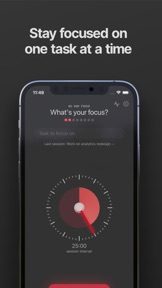
iPhone Screenshots

Screenshot
Screenshot
Screenshot
Screenshot
Screenshot
Screenshot
Screenshot

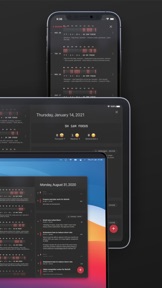
iPad Screenshots

Screenshot
Screenshot
Screenshot
Screenshot
Screenshot
Screenshot
Screenshot

Description

- Do you procrastinate and spend your time mindlessly?
- have problem with focusing?
- often get distracted while trying to focus?
- maybe you are burned out because you worked too much and forget to take necessary break?
- or, maybe have an ADHD?
Session can help you with your focus problem.
Trusted daily by tens of thousands of engineer in Silicon Valley, independent studios in Madrid, writers in Netherlands, and creative worker + freelancer all over the world.
It helps you be more productive by guiding you to work in sessions, block distractions, track your time, and remind you to rest.
GET INTO HABIT OF WORKING IN TIME BLOCK
Inspired by Pomodoro technique, Session helps you block your time for focus. 25 minutes or 45 minutes is all you need to get closer to your goal
KEEP YOUR FOCUS BY BLOCKING WEBSITES AND APPS THAT DISTRACT YOU (MAC ONLY)
Session block distracting website and apps when you started a Session. It'll automatically restore your website when you are on rest / session has ended.
BLOCK SLACK TEAM
Session will automatically mute Slack team you choose when Session has started and open them up again when Session has stopped working.
DON'T FORGET TO TAKE A REST
Forcing yourself to work on long period of time is ineffective. Rest is as important as work / study. Why? Because rest is a crucial time where you:
- store what you have learned in your head, and where
- your brain solve difficult problem on the background.
Notice that you usually get a new idea and solves problem when you're on walk and shower. Or anywhere where you're away from "work".
AUTOMATE YOUR WORKFLOW (AUTOMATIC DO NOT DISTURB, PLAY MUSIC)
Imagine having no distracting notifications while working on. It's possible by turning on Do Not Disturb. What if you can turn it on when you started your Session, and disable it after Session ends—all automatically? Or maybe change bulb color, play Apple music when Session has started? Different playlist on break? It's possible with Session.
Automate it with AppleScript on MacOS and Apple Shortcut on iOS
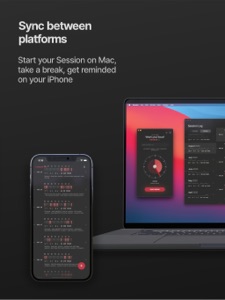
SEE YOUR SESSIONS ON APPLE CALENDAR WITH ONE WAY SYNC.
See automatically create Sessions on Apple Calendar to review how your day has progressed.
REVIEW YOUR SESSIONS
Are you spending more time on a task than it's worth? Session keep you mindful by tracking your work and ask what you have learned after Session has ended.
Session tracks what you have worked on, what have you learned, and for how long. Review your progress and journey that you have made.
Need support? Contact philip@stayinsession.com for assistance!
Learn about what Session can do here: https://www.stayinsession.com/learn
Join our Discord community channel here: https://discord.com/invite/5KASx2T4RU

—
Terms: https://www.stayinsession.com/terms
Privacy policy: https://www.stayinsession.com/privacy-policy
What's New in Version 2.2.9

- Make Buttons tap area bigger for accessibility

Seller

Name

Philip Young Gunawan

Information

Categories

Version

2.2.9

Size

27.4 MB

Game Center

No

VPP Device Licensing

Yes

Rating

Rated: 4+

Compatibility

iOS 13.4 or later

Devices

iPhone 5s, iPhone 6, iPhone 6 Plus, iPhone 6s, iPhone 6s Plus, iPhone SE, iPhone 7, iPhone 7 Plus, iPhone 8, iPhone 8 Plus, iPhone X, iPhone XR, iPhone XS, iPhone XS Max, iPhone 11, iPhone 11 Pro, iPhone 11 Pro Max, iPhone SE (2nd generation), iPhone 12, iPhone 12 Pro, iPhone 12 Pro Max, iPhone 12 mini, iPad (5th Generation) Wi-Fi, iPad (5th Generation) Wi-Fi + Cellular, iPad (6th generation) Wi-Fi, iPad (6th generation) Wi-Fi + Cellular, iPad Pro, iPad Pro (Cellular), iPad Pro (9.7-inch), iPad Pro (9.7-inch) (Cellular), iPad Pro 12.9-inch (2nd generation), iPad Pro 12.9-inch (2nd generation) Wi-Fi + Cellular, iPad Pro (10.5-inch), iPad Pro (10.5-inch) Wi-Fi + Cellular, iPad Pro (11-inch), iPad Pro (11-inch) Wi-Fi + Cellular, iPad Pro 12.9-inch (3rd generation), iPad Pro 12.9-inch (3rd generation) Wi-Fi + Cellular, iPad Air, iPad Air (Cellular), iPad Air 2, iPad Air 2 (Cellular), iPad Air (3rd generation), iPad Air (3rd generation) Wi-Fi + Cellular, iPad mini Retina, iPad mini Retina (Cellular), iPad mini 3, iPad mini 3 (Cellular), iPad mini 4, iPad mini 4 (Cellular), iPad mini (5th Generation), iPad mini (5th Generation) Wi-Fi + Cellular, iPad (7th generation) Wi-Fi + Cellular, iPad Pro 11-inch (2nd generation), iPad Pro 11-inch (2nd generation) Wi-Fi + Cellular, iPad Pro 12.9-inch (4th generation), iPad Pro 12.9-inch (4th generation) Wi-Fi + Cellular, iPad Air (4th Generation) (Wi-Fi), iPad Air (4th Generation) (Wi-Fi + Cellular), iPad (8th generation) Wi-Fi, iPad (8th generation) Wi-Fi + Cellular, iPad Pro 11-inch (3rd generation), iPad Pro 11-inch (3rd generation) Wi-Fi + Cellular, iPad Pro 12.9-inch (5th Generation), iPad Pro 12.9-inch (5th Generation) Wi-Fi + Cellular, iPod touch (6th Generation), iPod touch (7th generation), Mac Desktop

Languages

English

App Store: Customer Ratings

Ratings & Reviews

5.0 of 5 (4 Ratings)

App Store: Customer Reviews

2021-08-04

Only Pomodoro app that actually works for me

I’ve tried a few different pomodoro timers and always abandoned them. Session is the only one I’ve kept using as it combines scheduling features that I can adjust to my particuar needs, like longer focus sessions than the ‘average’ user, odd schedules, etc. Session is customisable enough to fit my work style effectively without beccoming intrusive and overy complicated.
SMacK Daddy Hey You
Version 2.2.9
2021-07-12

Actually really good

Heaps of critical features that take it above and beyond any other timer app I’ve used.
Zildoger12321
Version 2.2.9
2021-06-06

Perfection

Absolutly the best Tomato timer I have ever used, simple, elegant interface, but still with all the functions. Staple app for all my work and study. Good job.
(I have trouble finding the ios counterpart in Australia store, but found it in the U.S. store, yet the Mac version is avaliable in the AU store. Bit confusing, and unable to utilize the subscribtion at this point.)
Suggestions for future development:
1. Watch app, especially for some one like me that doesn't bring phone and laptop everywhere.
2. Give the option to turn off the Notes section, I don't use it but it takes up space.
3. Make it functional in the menu bar drop down, and assign a hot key, like what Fantastical, Day one does. Now I use a manual hotkey on my keyboard to use it, but its not intuitive, and its a big window. everytime it pops up I get a a jump scare.
4. The way we select tasks can be more intuitive, and possibly faster, but it's a minor thing.
NotJohnSmith99
Version 2.2.9
2021-05-05

A great tool

Well thought out tool that has really helped me focus and keep on task. Love it!
__:p
Version 2.2.9
2021-02-16

Excellent tool for increasing focus and discipline!

Great and simple to use product which dramatically helped improve my focus and discipline. Great features lacking from other pomodoro style timers. And some added bonus features to boot.
Damnfoolish
Version 1.11
2021-01-07

Great tool

Love working with this to keep me focused.
PatrickJustin
Version 1.8.4