Updating


iPhone Screenshots



iPad Screenshots


Description
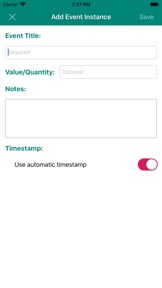
Easily make note of anything you want to keep a log/track of. Simply create an event for actions you want to track and tap a button to record a new instance of that event every time you do it again. Create any user-defined event you like, look at all past instances of a particular event, add optional notes or amounts to each event. Swipe to delete events.
Access your data from any iOS device. Never lose your data and no need to back-up manually with full privacy and control over your data.
Export event data as CSV files
Simple and lightweight app with low battery and data usage.
Keep track of events like
Car maintenance: Track how often you fill petrol/gas in your car, track when you changed wiper blades, brake pads, tyres etc.
Kitchen/Diet logs: Track how often you dine out, record the date you started a new can of cooking oil to track how long it lasts, how often you ate unhealthy food cakes, doughnuts etc.
Baby Logs: Record sleep times, feed times, nappy times
Health logs: how often you had cold, flu or headache, keep daily log of your blood sugar levels, medicine intakes, blood pressure, chest pains etc
Garden maintenance: last time you put weed killer, fertiliser to your lawn
Home/Utilities Log: Electricity Recharge, Bus Pass, Cleaned bathrooms, Washed driveway etc
Features:
+ Log any of your activity or event quickly with automatic timestamp
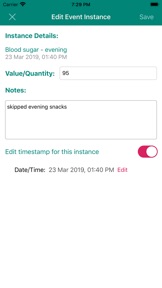
+ Add optional text notes, amounts or values with each event
+ Syncs event data in real-time across all your iOS devices
+ See full history of all instances of an event and time interval between instances.
+ Sort events alphabetically or by date
+ Swipe left to delete entire events
+ Simple and easy to use user interface
+ Never lose your data even if you lose or damage your phone/tablet, all event data is stored securely in cloud servers
+ Option to enter or edit past occurrences of an event
+ Easy one-time sign in with Apple, Google, Facebook or Email account
+ Lightweight and efficient app to minimise battery, data and device resources usage
Useful to anyone who wants to quickly log / record / note an event with automatic timestamps. Especially helpful for seniors, who may find it difficult to recollect past instances of any activity/actions. Rather than trying to remember when you last did an activity or jot it on a wall calendar, easily record them and get the history with this simple and efficient app.
What's New in Version 1.2.0
Quicker way to create instances.
UI/UX improvements.
Information
Developer
Categories
Version
1.2.0
Size
18.9 MB
Game Center
No
VPP Device Licensing
Yes
Rating
Rated: 4+
Compatibility
iOS 13.0 or later
Devices
iPhone 5s, iPhone 6, iPhone 6 Plus, iPhone 6s, iPhone 6s Plus, iPhone SE, iPhone 7, iPhone 7 Plus, iPhone 8, iPhone 8 Plus, iPhone X, iPhone XR, iPhone XS, iPhone XS Max, iPhone 11, iPhone 11 Pro, iPhone 11 Pro Max, iPhone SE (2nd generation), iPhone 12, iPhone 12 Pro, iPhone 12 Pro Max, iPhone 12 mini, iPad (5th Generation) Wi-Fi, iPad (5th Generation) Wi-Fi + Cellular, iPad (6th generation) Wi-Fi, iPad (6th generation) Wi-Fi + Cellular, iPad Pro, iPad Pro (Cellular), iPad Pro (9.7-inch), iPad Pro (9.7-inch) (Cellular), iPad Pro 12.9-inch (2nd generation), iPad Pro 12.9-inch (2nd generation) Wi-Fi + Cellular, iPad Pro (10.5-inch), iPad Pro (10.5-inch) Wi-Fi + Cellular, iPad Pro (11-inch), iPad Pro (11-inch) Wi-Fi + Cellular, iPad Pro 12.9-inch (3rd generation), iPad Pro 12.9-inch (3rd generation) Wi-Fi + Cellular, iPad Air, iPad Air (Cellular), iPad Air 2, iPad Air 2 (Cellular), iPad Air (3rd generation), iPad Air (3rd generation) Wi-Fi + Cellular, iPad mini Retina, iPad mini Retina (Cellular), iPad mini 3, iPad mini 3 (Cellular), iPad mini 4, iPad mini 4 (Cellular), iPad mini (5th Generation), iPad mini (5th Generation) Wi-Fi + Cellular, iPad (7th generation) Wi-Fi + Cellular, iPad Pro 11-inch (2nd generation), iPad Pro 11-inch (2nd generation) Wi-Fi + Cellular, iPad Pro 12.9-inch (4th generation), iPad Pro 12.9-inch (4th generation) Wi-Fi + Cellular, iPad Air (4th Generation) (Wi-Fi), iPad Air (4th Generation) (Wi-Fi + Cellular), iPad (8th generation) Wi-Fi, iPad (8th generation) Wi-Fi + Cellular, iPod touch (6th Generation), iPod touch (7th generation)
Languages
English
App Store: Customer Ratings
Ratings & Reviews
4.0 of 5 (1 Rating)
App Store: Customer Reviews
No Entry