Updating

PianoRemote
Released: 2020-04-10
© 2020 Kawai Musical Instruments Manufacturing Co., Ltd.


iPhone Screenshots




iPad Screenshots



Description
PianoRemote is a control app developed for Kawai digital pianos, allowing players to change sounds, adjust settings, and enjoy the wide variety of built-in music.[*1]
■ Supported Kawai digital piano models: CA99, CA79, CA59, CA49, ES920, ES520
■ Please note that PianoRemote requires Bluetooth permission in order to scan for Bluetooth MIDI devices. Please approve the Bluetooth permission request to ensure that PianoRemote functions correctly.
・ Easy operation of your Kawai digital piano using a smartphone or tablet
PianoRemote allows various functions of the digital piano to be easily selected.
・ Consistent UI design with Kawai digital piano touch panel
PianoRemote is designed to allow easy, intuitive operation via a smartphone or tablet.
The user interface is standardised, meaning there is no need to learn new operations.
・ Music player feature that can be used like a music app
PianoRemote includes a wide variety of songs and classical pieces that are built-in to Kawai digital pianos.[*2]
This music can be controlled in the same way as regular music app. However, it’s also possible to change the sound used for playback, allowing songs and classical to be enjoyed with a different tonal character and atmosphere.
・ Interact with music using “Lesson” and “Concert Magic” modes
In addition to listening to the built-in songs and classical pieces, the additional “Lesson” and “Concert Magic” modes allow musicians to practice the music, and non-musicians to enjoy playing pieces and learning rhythm with a single finger.[*3]
・ Control various built-in functions
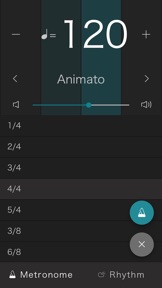
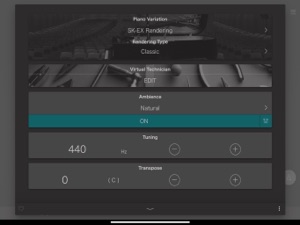
PianoRemote can be used to control various functions of the Kawai digital piano. For example, the Metronome is an essential aid for practise, the Virtual Technician allows the sound and other aspects of the piano to be adjusted to suit one’s person preference, while the Dual and Split functions allow different sounds to be combined for more engaging performances.[*4]
・ Straightforward connection using Bluetooth MIDI
PianoRemote supports Bluetooth MIDI wireless communication, allowing immediate connection to the Kawai digital piano without the need for additional cables.[*5]
*1 A compatible Kawai Digital Piano must be connected to a smartphone or tablet.
*2 Copyrighted songs are not included among the piano’s built-in songs.
*3 Some songs do not support “Lesson” and “Concert Magic” modes due to the composition of the data.
*4 “Recorder” and “USB Memory Player” function control is not supported.
*5 Connection via USB cable or a Bluetooth MIDI adapter such as the QuiccoSound mi.1 also supported.
What's New in Version 1.0.2
・ Added support for CA49/CA59, ES520/ES920.
・ Show notification screen when piano does not support PianoRemote.
・ Show notification screen when piano requires software update.
・ Implemented Bluetooth MIDI firmware update function.
・ Improved sound matching process, fixed bug related to sounds being added to “Recently Played” list unnecessarily.
・ Fixed bug that could cause left/right swiping to lock under some iOS environments.
・ Added gesture to select next/previous content by tapping right/left edge of the screen instead of swiping.
・ Various other minor improvements and bug fixes.
Information
Categories
Version
1.0.2
Size
74.2 MB
Game Center
No
VPP Device Licensing
Yes
Rating
Rated: 4+
Compatibility
iOS 11.0 or later
Devices
iPhone 5s, iPhone 6, iPhone 6 Plus, iPhone 6s, iPhone 6s Plus, iPhone SE, iPhone 7, iPhone 7 Plus, iPhone 8, iPhone 8 Plus, iPhone X, iPhone XR, iPhone XS, iPhone XS Max, iPhone 11, iPhone 11 Pro, iPhone 11 Pro Max, iPhone SE (2nd generation), iPhone 12, iPhone 12 Pro, iPhone 12 Pro Max, iPhone 12 mini, iPad (5th Generation) Wi-Fi, iPad (5th Generation) Wi-Fi + Cellular, iPad (6th generation) Wi-Fi, iPad (6th generation) Wi-Fi + Cellular, iPad Pro, iPad Pro (Cellular), iPad Pro (9.7-inch), iPad Pro (9.7-inch) (Cellular), iPad Pro 12.9-inch (2nd generation), iPad Pro 12.9-inch (2nd generation) Wi-Fi + Cellular, iPad Pro (10.5-inch), iPad Pro (10.5-inch) Wi-Fi + Cellular, iPad Pro (11-inch), iPad Pro (11-inch) Wi-Fi + Cellular, iPad Pro 12.9-inch (3rd generation), iPad Pro 12.9-inch (3rd generation) Wi-Fi + Cellular, iPad Air, iPad Air (Cellular), iPad Air 2, iPad Air 2 (Cellular), iPad Air (3rd generation), iPad Air (3rd generation) Wi-Fi + Cellular, iPad mini Retina, iPad mini Retina (Cellular), iPad mini 3, iPad mini 3 (Cellular), iPad mini 4, iPad mini 4 (Cellular), iPad mini (5th Generation), iPad mini (5th Generation) Wi-Fi + Cellular, iPad (7th generation) Wi-Fi + Cellular, iPad Pro 11-inch (2nd generation), iPad Pro 11-inch (2nd generation) Wi-Fi + Cellular, iPad Pro 12.9-inch (4th generation), iPad Pro 12.9-inch (4th generation) Wi-Fi + Cellular, iPad Air (4th Generation) (Wi-Fi), iPad Air (4th Generation) (Wi-Fi + Cellular), iPad (8th generation) Wi-Fi, iPad (8th generation) Wi-Fi + Cellular, iPod touch (6th Generation), iPod touch (7th generation)
Languages
English, Japanese
App Store: Customer Ratings
Ratings & Reviews
3.0 of 5 (3 Ratings)
App Store: Customer Reviews
No Entry