Updating


iPhone Screenshots



iPad Screenshots


Description
DR PDF Scanner is a powerful and easy-to-use scanner app that will turn your mobile into a scanner. You can easily scan various documents, notes, and certificates and share any document in PDF or JPG format to various platforms via WeChat, email, etc. Download DR PDF Scanner and enjoy one-click scanning, smart detection and HD effect!
Key features
Smart scan
- Smartly detect the page edges and automatically remove the background
- Automatically optimize the scan quality and make the scanned contents look clear and sharp
- Support single page mode/multiple page mode
- Take pictures and scan/upload pictures from your device
- Scan various types of contents, such as documents, contracts, certificates, receipts, invoices, notes, books, business cards, etc.
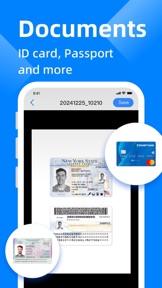
- ID card mode, automatically stitch the front and back of the ID card
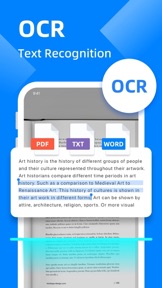
- OCR: Recognize text in pictures, and support editing, copying, exporting as TXT or PDF
Personalized watermark
- Add a single text watermark to indicate the applicable scenarios of the document
- Add full-screen watermark to prevent file theft
E-signature
- Set up your own E-signature
- Add your E-signature to image or PDF to make files more reliable.
Easily share
- Share scanned files in JPG and PDF format
- Share scanned files via WhatsApp or email
- Support wireless connection to printer
File management
- Add more pages to your scanned documents
- Reorder or delete the scanned pages
When you go out for a meeting, DR PDF Scanner can help you scan contracts and share them in real time. In the spare time, you can use PDF Scanner to scan class notes and view at any time. When traveling, you can use PDF Scanner to scan ID cards, passports, and driving licenses in advance in case of emergency. Enjoy and manage your portable documents now!
Subscribe to DR PDF Scanner Premium
- Subscribe to DR PDF Scanner to enjoy all the features
- Subscription fee will be charged monthly or yearly depending on the plan
- Payment will be charged to iTunes Account at confirmation of purchase
- Subscription automatically renews unless auto-renewal is turned off at least 24 hours before the end of the current period
- Your account will be charged for your renewal plan within 24 hours prior to the end of the current period. Subscriptions may be managed by the user and auto-renewal may be turned off by going to the user’s Account Settings after purchase.
For any suggestions and feedback, please contact us via camerascannerpdf@yandex.com. We appreciate your support for DR PDF Scanner.
Privacy Policy: https://sites.google.com/view/camerascannerpdf
User Agreement: https://sites.google.com/view/camerascannerpdfagreement
What's New in Version 1.4.0
Bug fixed.
Information
Developer
Categories
Version
1.4.0
Size
38.6 MB
Game Center
No
VPP Device Licensing
Yes
Rating
Rated: 4+
Compatibility
iOS 15.0 or later
Devices
iPhone 5s, iPhone 6, iPhone 6 Plus, iPhone 6s, iPhone 6s Plus, iPhone SE, iPhone 7, iPhone 7 Plus, iPhone 8, iPhone 8 Plus, iPhone X, iPhone XR, iPhone XS, iPhone XS Max, iPhone 11, iPhone 11 Pro, iPhone 11 Pro Max, iPhone SE (2nd generation), iPhone 12, iPhone 12 Pro, iPhone 12 Pro Max, iPhone 12 mini, iPhone 13, iPhone 13 Pro, iPhone 13 Pro Max, iPhone 13 mini, iPhone SE (3rd generation), iPhone 14, iPhone 14 Plus, iPhone 14 Pro, iPhone 14 Pro Max, iPhone 15, iPhone 15 Plus, iPhone 15 Pro, iPhone 15 Pro Max, iPhone 16, iPhone 16Plus, iPhone 16Pro, iPhone 16ProMax, iPad (5th Generation) Wi-Fi, iPad (5th Generation) Wi-Fi + Cellular, iPad (6th generation) Wi-Fi, iPad (6th generation) Wi-Fi + Cellular, iPad Pro, iPad Pro (Cellular), iPad Pro (9.7-inch), iPad Pro (9.7-inch) (Cellular), iPad Pro 12.9-inch (2nd generation), iPad Pro 12.9-inch (2nd generation) Wi-Fi + Cellular, iPad Pro (10.5-inch), iPad Pro (10.5-inch) Wi-Fi + Cellular, iPad Pro (11-inch), iPad Pro (11-inch) Wi-Fi + Cellular, iPad Pro 12.9-inch (3rd generation), iPad Pro 12.9-inch (3rd generation) Wi-Fi + Cellular, iPad Air, iPad Air (Cellular), iPad Air 2, iPad Air 2 (Cellular), iPad Air (3rd generation), iPad Air (3rd generation) Wi-Fi + Cellular, iPad mini Retina, iPad mini Retina (Cellular), iPad mini 3, iPad mini 3 (Cellular), iPad mini 4, iPad mini 4 (Cellular), iPad mini (5th Generation), iPad mini (5th Generation) Wi-Fi + Cellular, iPad (7th generation) Wi-Fi + Cellular, iPad Pro 11-inch (2nd generation), iPad Pro 11-inch (2nd generation) Wi-Fi + Cellular, iPad Pro 12.9-inch (4th generation), iPad Pro 12.9-inch (4th generation) Wi-Fi + Cellular, iPad Air (4th Generation) (Wi-Fi), iPad Air (4th Generation) (Wi-Fi + Cellular), iPad (8th generation) Wi-Fi, iPad (8th generation) Wi-Fi + Cellular, iPad Pro 11-inch (3rd generation), iPad Pro 11-inch (3rd generation) Wi-Fi + Cellular, iPad Pro 12.9-inch (5th Generation), iPad Pro 12.9-inch (5th Generation) Wi-Fi + Cellular, iPad (9th Generation), iPad (9th Generation) Wi-Fi + Cellular, iPad mini (6th Generation), iPad mini (6th Generation) Wi-Fi + Cellular, iPad Air (5th generation), iPad Air (5th generation) Wi-Fi + Cellular, iPad Pro 11-inch (4th generation), iPad Pro 11-inch (4th generation) Wi-Fi + Cellular, iPad Pro 12.9-inch (6th generation), iPad Pro 12.9-inch (6th generation) Wi-Fi + Cellular, iPad (10th generation), iPad (10th generation) Wi-Fi + Cellular, iPad Air 11-inch (M2) Wi-Fi, iPad Air 13-inch (M2) Wi-Fi, iPad Air 13-inch (M2) Wi-Fi + Cellular, iPad Pro 11-inch (M4) Wi-Fi, iPad Pro 11-inch (M4) Wi-Fi + Cellular, iPad Pro 13-inch (M4) Wi-Fi, iPad Pro 13-inch (M4) Wi-Fi + Cellular, iPad MiniA17Pro, iPad MiniA17ProCellular, iPod touch (6th Generation), iPod touch (7th generation)
Languages
English, Arabic, Chinese, Czech, Dutch, French, German, Greek, Indonesian, Italian, Japanese, Korean, Malay, Polish, Portuguese, Romanian, Russian, Spanish, Thai, Turkish, Ukrainian, Vietnamese
App Store: Customer Ratings
Ratings & Reviews
5.0 of 5 (1 Rating)
App Store: Customer Reviews
No Entry