AboutTermsPrivacyContact
 
Updating
AWS S3 Manager

AWS S3 Manager

Released: 2018-04-02
© 2020 Philipp Gebauer
AWS S3 Manager - QR Code
Version 1.2.3
4+
Download on the App Store
Version 1.2.3
4+
Download on the App Store
Released: 2018-04-02
© 2020 Philipp Gebauer

iPhone Screenshots

Screenshot
Screenshot
Screenshot
Screenshot
Screenshot
Screenshot
Screenshot

iPad Screenshots

Screenshot
Screenshot
Screenshot
Screenshot
Screenshot
Screenshot
Screenshot

Description

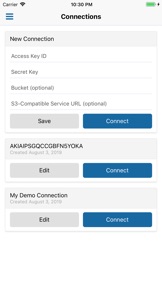
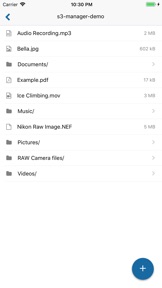
S3 Manager for AWS S3 (Amazon Web Services’ Simple Storage Service) is the simplest way to connect to your S3 buckets and to upload, download and view files on your mobile device.
- View images, documents, and play videos and audio files
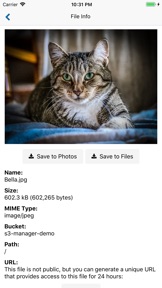
- Download files to your Photo library and to the Files app
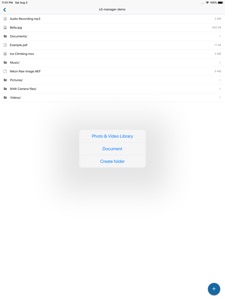
- Upload files from your Photo library and from the Files app
- Upload multiple photos from your Photo library in parallel
- Save connections for easy access
- Connect to any S3-compatible service
A large number of file types can be viewed in the app:
- All standard image formats, plus many RAW camera formats
- Play video and audio files
- All document types supported by iOS can be previewed
You can connect to any S3-compatible storage service, including any that you run on-premise. All you need is the service’s URL to connect to, which you can enter in the connection settings.
To easily share a file, you can copy its URL with a tap of a button. For files that are not public, you can copy a unique URL that is valid for 24 hours.
Security features:
When you save a connection, S3 Manager stores the connection credentials in the device's Keychain, a secure storage with built-in encryption that is managed by the device's operating system (iOS). Your credentials never leave your device, and no other app on your device has access to them.
To further improve security, you can enable authentication to protect your saved connections from unauthorized access. When authentication is enabled, you are prompted to complete Touch ID (or Face ID, if available) when you open the app.
Credits:
Folder icon made by Roundicons Freebies from www.flaticon.com

What's New in Version 1.2.3

This update fixes a bug in which some types of files could not be selected for upload.

Seller

Name

Philipp Gebauer

URL

Information

Categories

Version

1.2.3

Size

22.3 MB

Game Center

No

VPP Device Licensing

Yes

Rating

Rated: 4+

Compatibility

iOS 10.3 or later

Devices

iPhone 5, iPhone 5c, iPhone 5s, iPhone 6, iPhone 6 Plus, iPhone 6s, iPhone 6s Plus, iPhone SE, iPhone 7, iPhone 7 Plus, iPhone 8, iPhone 8 Plus, iPhone X, iPhone XR, iPhone XS, iPhone XS Max, iPhone 11, iPhone 11 Pro, iPhone 11 Pro Max, iPhone SE (2nd generation), iPhone 12, iPhone 12 Pro, iPhone 12 Pro Max, iPhone 12 mini, iPad (4th Generation) (Wi-Fi), iPad (4th Generation) (4G), iPad (5th Generation) Wi-Fi, iPad (5th Generation) Wi-Fi + Cellular, iPad (6th generation) Wi-Fi, iPad (6th generation) Wi-Fi + Cellular, iPad Pro, iPad Pro (Cellular), iPad Pro (9.7-inch), iPad Pro (9.7-inch) (Cellular), iPad Pro 12.9-inch (2nd generation), iPad Pro 12.9-inch (2nd generation) Wi-Fi + Cellular, iPad Pro (10.5-inch), iPad Pro (10.5-inch) Wi-Fi + Cellular, iPad Pro (11-inch), iPad Pro (11-inch) Wi-Fi + Cellular, iPad Pro 12.9-inch (3rd generation), iPad Pro 12.9-inch (3rd generation) Wi-Fi + Cellular, iPad Air, iPad Air (Cellular), iPad Air 2, iPad Air 2 (Cellular), iPad Air (3rd generation), iPad Air (3rd generation) Wi-Fi + Cellular, iPad mini Retina, iPad mini Retina (Cellular), iPad mini 3, iPad mini 3 (Cellular), iPad mini 4, iPad mini 4 (Cellular), iPad mini (5th Generation), iPad mini (5th Generation) Wi-Fi + Cellular, iPad (7th generation) Wi-Fi, iPad Pro 11-inch (2nd generation), iPad Pro 11-inch (2nd generation) Wi-Fi + Cellular, iPad Pro 12.9-inch (4th generation), iPad Pro 12.9-inch (4th generation) Wi-Fi + Cellular, iPad Air (4th Generation) (Wi-Fi), iPad Air (4th Generation) (Wi-Fi + Cellular), iPad (8th generation) Wi-Fi, iPad (8th generation) Wi-Fi + Cellular, iPod touch (6th Generation), iPod touch (7th generation)

Languages

English

App Store: Customer Ratings

Ratings & Reviews

4.0 of 5 (1 Rating)

App Store: Customer Reviews

2018-07-25

Disappointed

I was hoping it would do more than just photos. Eg media file support would be helpful
Mr Yumpy
Version 1.1