AboutTermsPrivacyContact
 
Updating
SSH Client - Secure ShellFish

SSH Client - Secure ShellFish

Released: 2019-06-28
© 2019-2026 Anders Borum
SSH Client - Secure ShellFish - QR Code
Version 2026.13
4+
Download on the App Store
Version 2026.13
4+
Download on the App Store
Released: 2019-06-28
© 2019-2026 Anders Borum

iPhone Screenshots

Screenshot
Screenshot
Screenshot
Screenshot
Screenshot
Screenshot
Screenshot
Screenshot
Screenshot

Description

Lightning fast SSH terminal with remote file access. No other app fuses your SSH servers and iOS devices as well as Secure ShellFish. Tap Get and see for yourself.
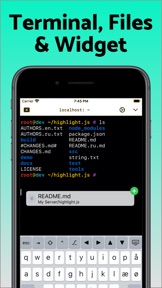
Terminal supports standard text editing gestures for selection, scrolling and copy/paste as well as custom gestures to send arrow keys and tabulator making shell entry and full screen editing with vim or emacs delightful. Bar above the keyboard makes it easy to type special keys and insert snippets.
Select and drag filenames out of the terminal as actual files and drag files from other apps into the terminal to upload. Use built-in tmux support to persist terminal sessions if you lose Internet access, pick existing sessions with thumbnails and Handoff sessions between devices.
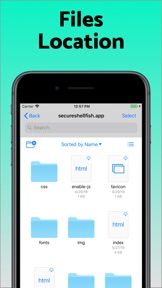
Server file system is available in the Files app and recently accessed files and directories are cached to make them available when offline. Use apps like Textastic and iA Writer for a native editing experience working on your remote server files.
Upload files or entire directories from the share sheet with minimal friction as the last destination directory for each kind of file is remembered or automate file transfers in the Shortcuts app.
Connect to your Mac, Synology NAS and any other SSH server or create new Digital Ocean droplets right from the app.
Secure ShellFish is useful as a free app and paying pro users can disable ads in the terminal, upload through the Files app and configure unlimited number of servers.

What's New in Version 2026.13

Password insertion change from last update has been reverted as it was still essential for some users.
Fixes crash that could happen when showing tmux session picker.

Seller

Name

Anders Borum

Information

Developer

Categories

Version

2026.13

Size

115.3 MB

Game Center

No

VPP Device Licensing

Yes

Rating

Rated: 4+

Compatibility

iOS 17.4 or later

Devices

iPhone 5s, iPhone 6, iPhone 6 Plus, iPhone 6s, iPhone 6s Plus, iPhone SE, iPhone 7, iPhone 7 Plus, iPhone 8, iPhone 8 Plus, iPhone X, iPhone XR, iPhone XS, iPhone XS Max, iPhone 11, iPhone 11 Pro, iPhone 11 Pro Max, iPhone SE (2nd generation), iPhone 12, iPhone 12 Pro, iPhone 12 Pro Max, iPhone 12 mini, iPhone 13, iPhone 13 Pro, iPhone 13 Pro Max, iPhone 13 mini, iPhone SE (3rd generation), iPhone 14, iPhone 14 Plus, iPhone 14 Pro, iPhone 14 Pro Max, iPhone 15, iPhone 15 Plus, iPhone 15 Pro, iPhone 15 Pro Max, iPhone 16, iPhone 16 Plus, iPhone 16 Pro, iPhone 16 Pro Max, iPhone 16e, iPhone 17, iPhone 17 Pro, iPhone 17 Pro Max, iPhone Air, iPhone 17e, iPad (5th Generation) Wi-Fi, iPad (5th Generation) Wi-Fi + Cellular, iPad (6th generation) Wi-Fi, iPad (6th generation) Wi-Fi + Cellular, iPad Pro, iPad Pro (Cellular), iPad Pro (9.7-inch), iPad Pro (9.7-inch) (Cellular), iPad Pro 12.9-inch (2nd generation), iPad Pro 12.9-inch (2nd generation) Wi-Fi + Cellular, iPad Pro (10.5-inch), iPad Pro (10.5-inch) Wi-Fi + Cellular, iPad Pro (11-inch), iPad Pro (11-inch) Wi-Fi + Cellular, iPad Pro 12.9-inch (3rd generation), iPad Pro 12.9-inch (3rd generation) Wi-Fi + Cellular, iPad Air, iPad Air (Cellular), iPad Air 2, iPad Air 2 (Cellular), iPad Air (3rd generation), iPad Air (3rd generation) Wi-Fi + Cellular, iPad mini Retina, iPad mini Retina (Cellular), iPad mini 3, iPad mini 3 (Cellular), iPad mini 4, iPad mini 4 (Cellular), iPad mini (5th Generation), iPad mini (5th Generation) Wi-Fi + Cellular, iPad (7th generation) Wi-Fi + Cellular, iPad Pro 11-inch (2nd generation), iPad Pro 11-inch (2nd generation) Wi-Fi + Cellular, iPad Pro 12.9-inch (4th generation), iPad Pro 12.9-inch (4th generation) Wi-Fi + Cellular, iPad Air (4th Generation) (Wi-Fi), iPad Air (4th Generation) (Wi-Fi + Cellular), iPad (8th generation) Wi-Fi, iPad (8th generation) Wi-Fi + Cellular, iPad Pro 11-inch (3rd generation), iPad Pro 11-inch (3rd generation) Wi-Fi + Cellular, iPad Pro 12.9-inch (5th Generation), iPad Pro 12.9-inch (5th Generation) Wi-Fi + Cellular, iPad (9th Generation), iPad (9th Generation) Wi-Fi + Cellular, iPad mini (6th Generation), iPad mini (6th Generation) Wi-Fi + Cellular, iPad Air (5th generation), iPad Air (5th generation) Wi-Fi + Cellular, iPad Pro 11-inch (4th generation), iPad Pro 11-inch (4th generation) Wi-Fi + Cellular, iPad Pro 12.9-inch (6th generation), iPad Pro 12.9-inch (6th generation) Wi-Fi + Cellular, iPad (10th generation), iPad (10th generation) Wi-Fi + Cellular, iPad Air 11-inch (M2) Wi-Fi, iPad Air 13-inch (M2) Wi-Fi, iPad Air 13-inch (M2) Wi-Fi + Cellular, iPad Pro 11-inch (M4) Wi-Fi, iPad Pro 11-inch (M4) Wi-Fi + Cellular, iPad Pro 13-inch (M4) Wi-Fi, iPad Pro 13-inch (M4) Wi-Fi + Cellular, iPad mini (A17 Pro) Wi-Fi, iPad mini (A17 Pro) Wi-Fi + Cellular, iPad (A16) Wi-Fi, iPad (A16) Wi-Fi + Cellular, iPad Air 11-inch (M3) Wi-Fi, iPad Air 11-inch (M3) Wi-Fi + Cellular, iPad Air 13-inch (M3) Wi-Fi, iPad Air 13-inch (M3) Wi-Fi + Cellular, iPad Pro 11-inch (M5) Wi-Fi, iPad Pro 11-inch (M5) Wi-Fi + Cellular, iPad Pro 13-inch (M5) Wi-Fi, iPad Pro 13-inch (M5) Wi-Fi + Cellular, iPad Air11M4, iPad Air11M4Cellular, iPad Air13M4, iPad Air13M4Cellular, iPod touch (6th Generation), iPod touch (7th generation), Apple Watch Series 4, Mac Desktop

Languages

English

App Store: Customer Ratings

Ratings & Reviews

4.8 of 5 (95 Ratings)

App Store: Customer Reviews

2026-03-26

Don't waste your time or money on anything else

I tried a bunch of other apps and they all suck compared to this one (no offence to the other apps except that big popular one that costs >$100/yr). One click, tailscale/tmux just works, widgets and snippets, intuitive onscreen keyboard, deep Files app integration, and I'm sure I'm forgetting everything else that Just Works™ in the background or that I take for granted. Buy this so Anders Borum can continue to make the best use of iOS files APIs, I wish I'd bought it sooner.
Application_Fan_420
Version 2026.11
2026-02-27

Really good

Tried it for quite some time now, very stable application. Supports SSH tunnels and also proxy sessions. UI is easy to navigate, SSHKey implementation is super simple. Best of all: one purchase unlocks it on all devices. Well done app, use it on a daily basis in a professional setting.
pansophy2021
Version 2026.7
2026-02-27

The only thing that actually worked!

Tried numerous solutions and basic features (like key auth) were paywalled or simply didn't work - shellfish had it on the first try and works exactly as I expected. Can't get better than that!
edit: I got prompted to write another review so here it is: Still the GOAT.
edit: they asked again and I shall deliver. shellfish good
atagen_
Version 2026.9
2026-02-11

Great for use in a homelab

Makes it easy to connect to the loves of your life - all the computers in your home lab.
ColBatGuano
Version 2026.5
2025-10-13

excellent - and cross platform mac/ios

Very nice terminal app, i use it daily, however i have a couple of comments/feature requests (despite these the app is great and i love it!)
1. Sometimes i've had the terminal stop scrolling forward with input after i've either resized or scrolled back into the buffer - despite scrolling to the end. I'm not sure if this is a fixed bug in a prior release or not and not sure how to replicate so maybe this is no longer a thing - it hasn't happened for some time for me.
2. FEATURE REQUEST: for macOS at least (or even iOS?) could we have a configurable log file location to automatically log terminal sessions somewhere? I also use Serial (for serial connections) and the automatic logging has saved my bacon a lot when i have forgotten to take a copy of a switch/router config prior to deployment - i can get a copy out of the show running-config output from when i originally configured it. Hopefully not too tricky to implement (file name of something like hostname-datestamp.txt) - but a life saver.
Cheers for the app! lifetime unlocked
throAU
Version 2025.28
2025-06-25

Simply awesome

Great app, great functionality
MrB~
Version 2025.17
2024-10-24

Simple but effective

What you want in an app
CoreyAU
Version 2024.20
2024-10-03

Great software

Use it everyday and am happy with it.
Patrick4370
Version 2024.18
2024-08-22

Awesome app.

Love his app, well worth the money for the pro version.
Makes accessing remote files and sshing into servers a breeze.
Charlie57648
Version 2024.14
2024-08-15

Best app purchase for a sysadmin - home or pro

Excellent value for money. Tmux integration alone saves me a lot of time and frustration. Lots of goodies and solid features. Clean UI. Efficient. Also the developer is quick to respond if you have questions or suggestions. Would recommend.
bestkeptundersold
Version 2024.14
2024-04-22

Love it

This is a terrific app that provides a lightning fast and easy to navigate interface for remotely accessing devices (in my case a Raspberry Pi). I am currently using the unpaid version but plan to buy outright. This developer also has a great handle on Git repos. If you need something to manage those see his Git management app, Working Copy.
Unstable Confusion
Version 2024.9
2023-11-11

Essential Software

This software gives me excellent SSH and file access to all my connected devices. I use it to access my synology NAS, Rapberry Pis (local and remote) and Proxmox server with Home Assistant. The developer has responded immediately to all q\the questions I've had and goes out of his way to help find solutions. I use this on Mac iPad and iPhone.
John DF
Version 2023.43
2023-08-23

Really nice app

If you're going old school then this is sold, reliable SSH and SFTP across mac and iOS, highly recommended.
RobinTheFrog
Version 2023.33
2023-07-28

More useful the more I use it

I am a systems engineer and have found this app to be nearly indispensable in my line of work.
I have blown some of my sector's finest minds by demonstrating remote SSH terminal sessions from my phone.
I love it this much and I've still barely scratched the surface.
Great work Anders.
App_in_my_appz
Version 2023.32
2023-04-28

Neat piece of software, essential for any sysadmin

Great SSH terminal, and the file access functionality is awesome. Highly recommended to get the pro upgrade
—-
2023 updated review
Utility further improved now that it runs on both Apple Silicon and Intel Macs, and manages ssh keys so effortlessly
klinkers
Version 2023.22
2023-03-13

Great productivity tool

I use this app daily to integrate my Synology NAS into files and also to SSH into remote computers. Great customer support too.
John DF
Version 2023.10
2023-03-04

My goto remote terminal program

I use this app both on my ipad and mac. It works great but I do have a few feature enhancement requests
1) SSH auth server support
2) mosh support (especially on ios/ipados versions)
ivahos
Version 2023.10
2022-11-10

The only Mac alternative to WinSCP

So far the only client I could find that elegantly handles both Terminal & file transfer.
After a short trial had no hesitation paying for lifetime.
Steve2Go
Version 2022.57
2022-10-15

Seems great so far

It has been good to use so far, no issues with it. Just editing files located on my computer through ssh and vim on my ipad
0nakasuita
Version 2022.50
2022-06-01

“Do you like ShellFish?” Revised to 5 Star Rating.

Updated Review -> Developer response has completely resolved below issues with the app. I have changed rating to 5 stars to reflect this. This app is the best you will find on iOS and kicks the pants of the popular ‘Termius’ app!
Please remove this Siri suggestion that always shows up. It always reappears regardless of what I do. I’ve already paid for your app. It’s great and I use it daily. Would be 5 stars except for this annoying and repetitive notification.
LordPistachio182
Version 2022.31
2021-04-01

amazing

Integration with iOS is amazing but that’s gravy, for me this is the first app i’ve used that actually seems to handle ssh keys properly - i.e., generate on device, and install on remote machine rather than screwing around copying private keys about and somehow importing them. Keeps sessions open, runs in the background, share sheet support, in place editing support via textastic or similar.... great!
throAU
Version 2021.12
2020-04-10

Great app for file access over SSH

Works great, super handy for editing or accessing files on remote servers.
kyelewis
Version 2020.12