Updating


iPhone Screenshots


iPad Screenshots

Description
The best companion app for your mechanical watch.
Features
• Set your watch precisely with a full-screen atomic clock.
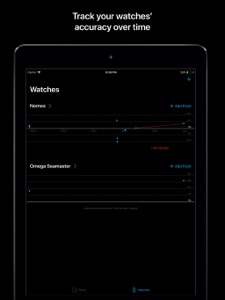
• Track your watches’ accuracy over time with beautiful charts. Trend lines tell you how your watch is performing and let you know when it’s time for service.
Atomic Clock
The “Atomic Clock” tab is a precise clock you can use to set your mechanical watch to the second.
Watches
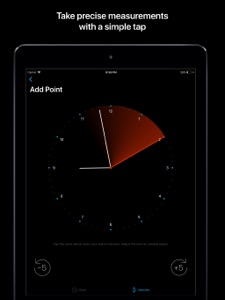
On the “Watches” tab, add and name each of the watches you want to track. Tap “Add Point” to add a measurement. Wait until your watch’s hands match what’s shown on the screen, then tap the screen. This will add a point to the chart, recording if your watch was ahead or behind, and by how much. Repeat this over time and you will start to see trend lines with an estimate of your watch’s accuracy.
If your watch gains or loses 3s/day or less... congratulations! You have a chronometer-quality piece. If your watch gains or loses more than 60s/day, it might be in need of service.
When adding a measurement, if your watch is ahead of the time shown on the screen, or significantly behind, you can adjust the target time to get closer. Use the -5 and +5 buttons until the hands are slightly ahead compared to your watch, then wait for your watch to catch up, and tap.
Tips
• When you add a point, the hands on the screen automatically jump ahead by 5 seconds. This is so you can add a new point 5 seconds later. Do this a few times in a row to increase the accuracy of your measurements.
• When you reset your watch, our AI will attempt to detect that and start a new trendline for you. However, even though it’s 2020, the AI sometimes gets it wrong. If that happens, not to worry, force-press or long-tap on a point to reveal a “Split Here” or “Do Not Split Here” button. You get to lord over the AI. For now.
• To remove a point, force-press or long-tap on it to bring up a delete button.
• Multiple points taken within 30 seconds of each other will cluster together and their average will count as a single measurement. Long-tap on a cluster to see and edit the individual points within.
• If you have iCloud enabled, you can find raw data, with all your measurements, in your iCloud Drive. The data is in the standard CSV format, supported by Excel, Numbers, Google Sheets, and many other apps.
What's New in Version 2.0
Our top requested feature is here! You can now manually split or join runs.
When you reset your watch, our AI attempts to detect that and start a new trendline for you. However, even though it’s 2020, the AI sometimes gets it wrong. If that happens, not to worry, you can now force-press or long-tap on a point to reveal a “Split Here” or “Do Not Split Here” button. You get to lord over the AI. For now.
Thank you for using Movement. If you like the app and want to see more updates like this, please help spread the word!
Information
Developer
Categories
Version
2.0
Size
18.6 MB
Game Center
No
VPP Device Licensing
Yes
Rating
Rated: 4+
Compatibility
iOS 9.0 or later
Devices
iPhone 4S, iPhone 5, iPhone 5c, iPhone 5s, iPhone 6, iPhone 6 Plus, iPhone 6s, iPhone 6s Plus, iPhone SE, iPhone 7, iPhone 7 Plus, iPhone 8, iPhone 8 Plus, iPhone X, iPhone XR, iPhone XS, iPhone XS Max, iPhone 11, iPhone 11 Pro, iPhone 11 Pro Max, iPhone SE (2nd generation), iPhone 12, iPhone 12 Pro, iPhone 12 Pro Max, iPhone 12 mini, iPhone 13, iPhone 13 Pro, iPhone 13 Pro Max, iPhone 13 mini, iPhone SE (3rd generation), iPhone 14, iPhone 14 Plus, iPhone 14 Pro, iPhone 14 Pro Max, iPad 2 (Wi-Fi), iPad 2 (3G), iPad (3rd Generation) (Wi-Fi), iPad (3rd Generation) (4G), iPad (4th Generation) (Wi-Fi), iPad (4th Generation) (4G), iPad (5th Generation) Wi-Fi, iPad (5th Generation) Wi-Fi + Cellular, iPad (6th generation) Wi-Fi, iPad (6th generation) Wi-Fi + Cellular, iPad Pro, iPad Pro (Cellular), iPad Pro (9.7-inch), iPad Pro (9.7-inch) (Cellular), iPad Pro 12.9-inch (2nd generation), iPad Pro 12.9-inch (2nd generation) Wi-Fi + Cellular, iPad Pro (10.5-inch), iPad Pro (10.5-inch) Wi-Fi + Cellular, iPad Pro (11-inch), iPad Pro (11-inch) Wi-Fi + Cellular, iPad Pro 12.9-inch (3rd generation), iPad Pro 12.9-inch (3rd generation) Wi-Fi + Cellular, iPad Air, iPad Air (Cellular), iPad Air 2, iPad Air 2 (Cellular), iPad Air (3rd generation), iPad Air (3rd generation) Wi-Fi + Cellular, iPad mini (Wi-Fi), iPad mini (4G), iPad mini Retina, iPad mini Retina (Cellular), iPad mini 3, iPad mini 3 (Cellular), iPad mini 4, iPad mini 4 (Cellular), iPad mini (5th Generation), iPad mini (5th Generation) Wi-Fi + Cellular, iPad (7th generation) Wi-Fi + Cellular, iPad Pro 11-inch (2nd generation), iPad Pro 11-inch (2nd generation) Wi-Fi + Cellular, iPad Pro 12.9-inch (4th generation), iPad Pro 12.9-inch (4th generation) Wi-Fi + Cellular, iPad Air (4th Generation) (Wi-Fi), iPad Air (4th Generation) (Wi-Fi + Cellular), iPad (8th generation) Wi-Fi, iPad (8th generation) Wi-Fi + Cellular, iPad Pro 11-inch (3rd generation), iPad Pro 11-inch (3rd generation) Wi-Fi + Cellular, iPad Pro 12.9-inch (5th Generation), iPad Pro 12.9-inch (5th Generation) Wi-Fi + Cellular, iPad (9th Generation), iPad (9th Generation) Wi-Fi + Cellular, iPad mini (6th Generation), iPad mini (6th Generation) Wi-Fi + Cellular, iPad Air (5th generation), iPad Air (5th generation) Wi-Fi + Cellular, iPad Pro11FourthGen, iPad Pro11FourthGenCellular, iPad ProSixthGen, iPad ProSixthGenCellular, iPad TenthGen, iPad TenthGenCellular, iPod touch (5th generation), iPod touch (6th Generation), iPod touch (7th generation)
Languages
English
App Store: Customer Ratings
Ratings & Reviews
0.0 of 5 (No rating)
App Store: Customer Reviews
No Entry