Updating


-10
#19 in Top Grossing iPad Apps > Finance
iPhone Screenshots


iPad Screenshots




Description
MoneyNote is a simple household account book app.
When you enter expense or income on the easy-to-see input screen, it automatically creates calendars and reports. It is easy to grasp the household's expense management.
--------------------
▼ Features
--------------------
1. Simple and Easy!
2. No registration
3. All functions without In-App-purchase
4. You can also enter from the calendar
5. Month / Year / Cumulative report included
6. You can create your own categories
7. Setting fixed income and expense
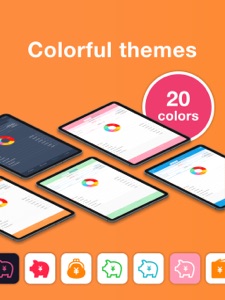
8. Themed color of 20 colors and 25 app icons
9. Supports backup & CSV output
10. Passcode lock (also Face ID & Touch ID)
--------------------
▼ Explanation of each function
--------------------
◆ Input
Tap the category button easy to push and enter the amount of money.
The keyboard has a nice calculator.
It is easy to see with a large number, easy to use button easy to push.
There is also a convenient automatic input mode so that you can input consecutive receipts collectively and continuously.
◆ Calendar
You can easily comprehend the income and expenditure situation on the calendar.
You can also start from the payday because you can change the start day of the week and the beginning and closing dates of the month.
Since you can also input and delete from the calendar, you can also enter receipt etc. together at once.
Since savings and initial balance can be set, carry forward display and cumulative asset and monetary amount can be displayed.
◆ Report
We can chart the monthly income and expenditure as a pie chart and grasp the balance of income and expenditure.
Because you can check the proportion of expenditure and each data for each category, you can see unnecessary expenses or household waste if it is surprising.
◆ Backup · CSV output
The input data can be output as CSV Excel data.
Since this data can also be saved as a backup, you can use the household account book as it is by loading even a new terminal when changing the model of iPhone or iPad.
Also, you can also use the output CSV data on a personal computer, so you can set the category as an account item and use it for final return declaration · blue · white declaration.
◆ Theme color
You can change the theme color of the application.
You can customize it according to your favorite color such as cute pink or chic dark blue.
You can also change the icon of the application according to the theme color.
You can change the theme color to be changed to 20 colors or more, and the icon to 20 designs or more.
◆ Passcode lock
By setting the secret code number, you can lock the browsing of important household account books.
It also supports the latest features of iPhone X such as Touch ID and Face ID.
Of course, these functions can be used for free in other applications as well.
A simple housekeeping book application MoneyNote is a simple new standard household account book made so that anyone can use it. Unlike complicated applications that carry many popular functions, such as receipt shooting and reading every time, it is a provision made easy to understand so that anyone can use the minimum necessary convenience functions. Please download it and try it!
What's New in Version 2.9.2
Fixed some bugs.
Seller
Name
Komorebi Inc.
Information
Developer
Categories
Version
2.9.2
Size
137 MB
Game Center
No
VPP Device Licensing
Yes
Rating
Rated: 4+
Compatibility
iOS 9.0 or later
Devices
iPhone 4S, iPhone 5, iPhone 5c, iPhone 5s, iPhone 6, iPhone 6 Plus, iPhone 6s, iPhone 6s Plus, iPhone SE, iPhone 7, iPhone 7 Plus, iPhone 8, iPhone 8 Plus, iPhone X, iPhone XR, iPhone XS, iPhone XS Max, iPhone 11, iPhone 11 Pro, iPhone 11 Pro Max, iPhone SE (2nd generation), iPad 2 (Wi-Fi), iPad 2 (3G), iPad (3rd Generation) (Wi-Fi), iPad (3rd Generation) (4G), iPad (4th Generation) (Wi-Fi), iPad (4th Generation) (4G), iPad (5th Generation) Wi-Fi, iPad (5th Generation) Wi-Fi + Cellular, iPad (6th generation) Wi-Fi, iPad (6th generation) Wi-Fi + Cellular, iPad Pro, iPad Pro (Cellular), iPad Pro (9.7-inch), iPad Pro (9.7-inch) (Cellular), iPad Pro 12.9-inch (2nd generation), iPad Pro 12.9-inch (2nd generation) Wi-Fi + Cellular, iPad Pro (10.5-inch), iPad Pro (10.5-inch) Wi-Fi + Cellular, iPad Pro (11-inch), iPad Pro (11-inch) Wi-Fi + Cellular, iPad Pro 12.9-inch (3rd generation), iPad Pro 12.9-inch (3rd generation) Wi-Fi + Cellular, iPad Air, iPad Air (Cellular), iPad Air 2, iPad Air 2 (Cellular), iPad Air (3rd generation), iPad Air (3rd generation) Wi-Fi + Cellular, iPad mini (Wi-Fi), iPad mini (4G), iPad mini Retina, iPad mini Retina (Cellular), iPad mini 3, iPad mini 3 (Cellular), iPad mini 4, iPad mini 4 (Cellular), iPad mini (5th Generation), iPad mini (5th Generation) Wi-Fi + Cellular, iPad (7th generation) Wi-Fi, iPad Pro 11-inch (2nd generation), iPad Pro 11-inch (2nd generation) Wi-Fi + Cellular, iPad Pro 12.9-inch (4th generation), iPad Pro 12.9-inch (4th generation) Wi-Fi + Cellular, iPad Air4, iPad Air4Cellular, iPad EighthGen, iPad EighthGenCellular, iPod touch (5th generation), iPod touch (6th Generation), iPod touch (7th generation)
Languages
English, Chinese, French, German, Hindi, Japanese, Korean, Portuguese, Russian, Spanish, Vietnamese
App Store: Customer Ratings
Ratings & Reviews
4.5 of 5 (91 Ratings)
App Store: Customer Reviews
No Entry