Updating


iPhone Screenshots


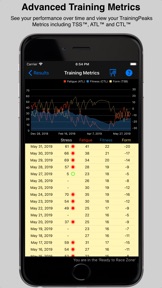

iPad Screenshots


Description
OVERVIEW
Whether you ride on a dedicated Peloton Bike, a third party trainer, or outdoors - mPaceline can be a great tool to support your training.
mPaceline was created out of a love of spinning. The developer and his wife bought a Peloton Bike and loved it from the start. However, like many others, they struggled to demonstrate to themselves that their training was paying off.
Our focus in creating mPaceline was to provide a tool that would demonstrate the hard work you are putting into your training is seen.
Visualize your results
* To show you that all your hard work, sweat and sometimes tears, are paying off.
* To demonstrate that over time you're able to produce a higher average output at a similar effort or average heart rate.
* To compare past workouts that you have done and see improvement across a variety of metrics.
* To highlight the instructors that motivate you to achieve your best efforts.
* To measure and support your heart rate training as you look to improve your overall health.
APP DETAILS
mPaceline is a cycling and running workout App. If you are looking to track results of other workout types, then mPaceline is not for you.
mPaceline works best if your focus is on taking spinning and/or running classes that allow you to capture data from the class to later be entered into the App. If you are a Peloton Bike or Tread owner, then this will perfectly fit your training.
mPaceline is comprised of the iPhone App that allows you to visually see all your workouts as well as an Apple Watch Companion App from which you can begin and monitor workouts on your wrist. While the iPhone App is detailed and will take some time for you to learn all the features, the Watch App is designed to be very straight forward.
You have several options for capturing performance metrics (power, cadence, heart rate, calories, distance, etc..) for a workout:
1) You can take advantage of mPaceline’s Watch App. The watch app offers you a visual of your ride and you can quickly glance at your wrist to see how you are doing. Workouts done on the watch are automatically transferred to the iPhone App when the workout concludes. Here you can view your full workout details. Note - if you choose to, you can stream the workout from your watch to the iPhone app and have both devices showing you your data.
2) You can utilize Bluetooth meters connected to the mPaceline iPhone App (HR, Power, Cadence) to record your performance over a workout period. In this option, you don't need to have an Apple Watch. The workout is automatically saved in mPaceline when it is complete.
3) If you own a Peloton Bike or Tread and don't feel the need to track the ride separately, you can simply download the results of your workout when it's complete.
Apple Health Integration:
Workouts created by mPaceline are automatically saved in Apple Health and these workouts will contribute to your activities rings and be viewable in the Activity App.
PURCHASING "mPaceline Pro"
mPaceline is free to try. You can download and use mPaceline at no charge for up to 25 workouts. Once you have hit the 25 workout limit, you can subscribe to "mPaceline Pro" to gain unlimited workouts.
- MONTHLY and YEARLY auto-renewing mPaceline Pro membership subscription are offered
- Payments will be charged to your iTunes Account at confirmation of purchase
- Monthly and yearly subscriptions automatically renew unless auto-renew is turned off from your iTunes account settings at least 24-hours before the end of the current period. Refunds will not be provided for any unused portion of the term
- Any unused portion of the free trial period will be forfeited if a pro subscription is purchased
- Subscriptions may be managed by the user and auto-renewal may be turned off by going to the user's Account Settings after purchase.
- See our terms and conditions or our privacy policy at:
http://www.megsoftware.com/terms/
http://www.megsoftware.com/privacy/
What's New in Version 3.7.2
Bug fixes and misc changes...
Seller
Name
Paul Ameden
Information
Developer
Categories
Version
3.7.2
Size
49.6 MB
Game Center
No
VPP Device Licensing
Yes
Rating
Rated: 4+
Compatibility
iOS 12.0 or later
Devices
iPhone 5s, iPhone 6, iPhone 6 Plus, iPhone 6s, iPhone 6s Plus, iPhone SE, iPhone 7, iPhone 7 Plus, iPhone 8, iPhone 8 Plus, iPhone X, iPhone XR, iPhone XS, iPhone XS Max, iPhone 11, iPhone 11 Pro, iPhone 11 Pro Max, iPhone SE (2nd generation), iPhone 12, iPhone 12 Pro, iPhone 12 Pro Max, iPhone 12 mini, iPhone 13, iPhone 13 Pro, iPhone 13 Pro Max, iPhone 13 mini, iPhone SE (3rd generation), iPhone 14, iPhone 14 Plus, iPhone 14 Pro, iPhone 14 Pro Max, iPad (5th Generation) Wi-Fi, iPad (5th Generation) Wi-Fi + Cellular, iPad (6th generation) Wi-Fi, iPad (6th generation) Wi-Fi + Cellular, iPad Pro, iPad Pro (Cellular), iPad Pro (9.7-inch), iPad Pro (9.7-inch) (Cellular), iPad Pro 12.9-inch (2nd generation), iPad Pro 12.9-inch (2nd generation) Wi-Fi + Cellular, iPad Pro (10.5-inch), iPad Pro (10.5-inch) Wi-Fi + Cellular, iPad Pro (11-inch), iPad Pro (11-inch) Wi-Fi + Cellular, iPad Pro 12.9-inch (3rd generation), iPad Pro 12.9-inch (3rd generation) Wi-Fi + Cellular, iPad Air, iPad Air (Cellular), iPad Air 2, iPad Air 2 (Cellular), iPad Air (3rd generation), iPad Air (3rd generation) Wi-Fi + Cellular, iPad mini Retina, iPad mini Retina (Cellular), iPad mini 3, iPad mini 3 (Cellular), iPad mini 4, iPad mini 4 (Cellular), iPad mini (5th Generation), iPad mini (5th Generation) Wi-Fi + Cellular, iPad (7th generation) Wi-Fi + Cellular, iPad Pro 11-inch (2nd generation), iPad Pro 11-inch (2nd generation) Wi-Fi + Cellular, iPad Pro 12.9-inch (4th generation), iPad Pro 12.9-inch (4th generation) Wi-Fi + Cellular, iPad Air (4th Generation) (Wi-Fi), iPad Air (4th Generation) (Wi-Fi + Cellular), iPad (8th generation) Wi-Fi, iPad (8th generation) Wi-Fi + Cellular, iPad Pro 11-inch (3rd generation), iPad Pro 11-inch (3rd generation) Wi-Fi + Cellular, iPad Pro 12.9-inch (5th Generation), iPad Pro 12.9-inch (5th Generation) Wi-Fi + Cellular, iPad (9th Generation), iPad (9th Generation) Wi-Fi + Cellular, iPad mini (6th Generation), iPad mini (6th Generation) Wi-Fi + Cellular, iPad Air (5th generation), iPad Air (5th generation) Wi-Fi + Cellular, iPad Pro11FourthGen, iPad Pro11FourthGenCellular, iPad ProSixthGen, iPad ProSixthGenCellular, iPad TenthGen, iPad TenthGenCellular, iPod touch (6th Generation), iPod touch (7th generation), Apple Watch Series 4
Languages
English
App Store: Customer Ratings
Ratings & Reviews
5.0 of 5 (1 Rating)
App Store: Customer Reviews
No Entry