AboutTermsPrivacyContact
 
Updating
TP-Link Deco

TP-Link Deco

Released: 2017-04-12
Copyright © 2013-2019 TP-LINK Technologies Co., Ltd. All rights reserved
TP-Link Deco - QR Code
Version 2.2.2
4+
Download on the App Store
Version 2.2.2
4+
Download on the App Store
Released: 2017-04-12
Copyright © 2013-2019 TP-LINK Technologies Co., Ltd. All rights reserved

iPhone Screenshots

Screenshot
Screenshot
Screenshot
Screenshot
Screenshot

iPad Screenshots

Screenshot
Screenshot
Screenshot
Screenshot
Screenshot

Description

The Deco app allows you to quickly and easily install and manage your Deco Whole Home Mesh Wi-Fi System. Now, you can monitor your home Wi-Fi from anywhere, and make changes right from your smartphone or tablet.
A set of three Deco units covers most homes (up to 5,500 square feet). The units work together to create fast, reliable and seamless Wi-Fi. At last, you can stream, game and browse in any room—even your basement or attic!
Deco features:
- Easy setup
- Antivirus and security
- Parental controls
- Monthly reporting
- QoS (activity and device)
- Guest network
- Remote network management
- Automatic updates
To set up your Deco network, simply plug one of your Deco units into your modem and follow the instructions in the Deco app. The app also helps you find the best spots in your home to place additional Deco units.
Once your Deco network is up and running, you can enjoy faster, stronger Wi-Fi connections that won’t drop out, even when you’re moving from room to room.
Plus, you can manage your entire Deco Whole Home Mesh Wi-Fi System right from the Deco app, including:
- Sharing your guest network with visitors
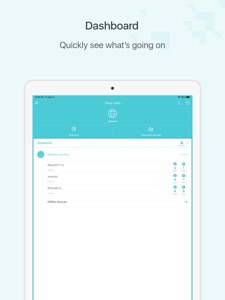
- Viewing which devices are connected to your Wi-Fi
- Running network performance tests
- Restricting access to websites of your choosing
- Setting a time restriction and pause the Wi-Fi on kids’ devices
- Controlling when certain devices have Wi-Fi access
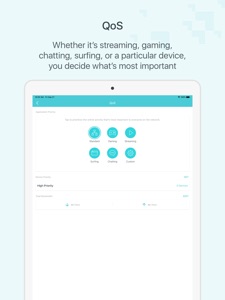
- Picking which activities and devices get Wi-Fi priority
- Adding a family member as a network manager to help you monitor your network
Supported Languages:
English
Deutsch
Português (Portugal)
Português (Brasil)
Dansk
Svenska
Español
Español (Latinoamérica)
Suomi
Italiano
Français
Norsk
Nederlands
日本語
한국어
繁體中文
Русский язык

What's New in Version 2.2.2

Fixed some bugs and improved the stability.

Seller

Name

TP-Link Technologies Co., Ltd.

URL

Information

Developer

Categories

Version

2.2.2

Size

278.5 MB

Game Center

No

VPP Device Licensing

Yes

Rating

Rated: 4+

Compatibility

iOS 9.0 or later

Devices

iPhone 4S, iPhone 5, iPhone 5c, iPhone 5s, iPhone 6, iPhone 6 Plus, iPhone 6s, iPhone 6s Plus, iPhone SE, iPhone 7, iPhone 7 Plus, iPhone 8, iPhone 8 Plus, iPhone X, iPhone XR, iPhone XS, iPhone XS Max, iPhone 11, iPhone 11 Pro, iPhone 11 Pro Max, iPhone SE (2nd generation), iPad 2 (Wi-Fi), iPad 2 (3G), iPad (3rd Generation) (Wi-Fi), iPad (3rd Generation) (4G), iPad (4th Generation) (Wi-Fi), iPad (4th Generation) (4G), iPad (5th Generation) Wi-Fi, iPad (5th Generation) Wi-Fi + Cellular, iPad (6th generation) Wi-Fi, iPad (6th generation) Wi-Fi + Cellular, iPad Pro, iPad Pro (Cellular), iPad Pro (9.7-inch), iPad Pro (9.7-inch) (Cellular), iPad Pro 12.9-inch (2nd generation), iPad Pro 12.9-inch (2nd generation) Wi-Fi + Cellular, iPad Pro (10.5-inch), iPad Pro (10.5-inch) Wi-Fi + Cellular, iPad Pro (11-inch), iPad Pro (11-inch) Wi-Fi + Cellular, iPad Pro 12.9-inch (3rd generation), iPad Pro 12.9-inch (3rd generation) Wi-Fi + Cellular, iPad Air, iPad Air (Cellular), iPad Air 2, iPad Air 2 (Cellular), iPad Air (3rd generation), iPad Air (3rd generation) Wi-Fi + Cellular, iPad mini (Wi-Fi), iPad mini (4G), iPad mini Retina, iPad mini Retina (Cellular), iPad mini 3, iPad mini 3 (Cellular), iPad mini 4, iPad mini 4 (Cellular), iPad mini (5th Generation), iPad mini (5th Generation) Wi-Fi + Cellular, iPad (7th generation) Wi-Fi + Cellular, iPad Pro 11-inch (2nd generation), iPad Pro 11-inch (2nd generation) Wi-Fi + Cellular, iPad Pro 12.9-inch (4th generation), iPad Pro 12.9-inch (4th generation) Wi-Fi + Cellular, iPad Air4, iPad Air4Cellular, iPad EighthGen, iPad EighthGenCellular, iPod touch (5th generation), iPod touch (6th Generation), iPod touch (7th generation)

Languages

English, Bulgarian, Chinese, Czech, Danish, Dutch, Finnish, French, German, Greek, Hebrew, Hungarian, Italian, Japanese, Korean, Malay, Norwegian Bokmål, Polish, Portuguese, Romanian, Russian, Slovak, Spanish, Swedish, Thai, Turkish, Ukrainian, Vietnamese

App Store: Customer Ratings

Ratings & Reviews

4.5 of 5 (127 Ratings)

App Store: Customer Reviews

2020-09-13

Outstanding and solved

Most easiest ever setup without issues and was all done within half hour. It’s loads of easy to use function is amazing. Power of this product is TOPs, having product truely works. Have areas with less signal and this truely changed everything with seamlessly no drop outs when streaming. Very happy and would recommend to others.
aussiehappy
Version 2.2.2
2020-09-10

Can’t get into device settings

Bought the 3 pack deco x20. I wanted to use as a stand alone modem but there’s no option to input connection type, isp settings etc. It gets to checking internet type then fails, obviously because there’s no option to change its settings. The trouble shooting guide says it’s supposed to allow you choose connection type etc but it doesn’t! Very frustrating when other tp-link products in the old tether app works fine.
Radioactive_239
Version 2.2.2
2020-08-12

Simple to setup

App makes setup simple. Now have good WiFi throughout the entire home.
Adam.ob
Version 2.0.16
2020-07-25

Deco M5

Not the latest model but still awesome coverage and the app is easy to use.
Gvalueghg
Version 2.0.16
2020-07-10

Deco M9+ Easiest Set Up Ever

Using the Deco app, it took 10 minutes to set up the router connection and satellite devices, including username and password.
The app lets you check internet speed and quality, it gives options for different floor plans and guides you through the entire process of getting connected.
Miss Tarnia
Version 1.10.9
2020-07-05

The easiest set up ever

So easy to set up and intuitive! I highly recommend it.
Emarinziana
Version 1.10.9
2020-06-13

Easy and intuitive

Loved the ease with which the Deco system sets up. Good clear app design.
NationaIise the telly
Version 1.10.9
2020-06-03

Huge improvement over my ISP modem

I always struggled with low speed and now realise it was the modem all along. The M5 mesh is awesome. The app has great features that allow me to easily set parental controls tome limits bed time etc per device.
newrev01
Version 1.10.9
2020-05-07

Full wifi at last

Purchased the M4 triple pack and was very simple to setup using the app. Now have full wifi throughout the entire house
Oldey but goody
Version 1.10.9
2020-04-16

Good, but could be better

Would be good if there was a default ‘profile’ for devices in the parental controls that applied to all devices not in another profile. Would also really like to be able to specify a parental control profile for anyone on the guest wifi.
The app only works in portrait view (not ideal on iPads), would be great if the developers could update to support landscape as well as enhancing the parental controls as above. Thanks
gpbell
Version 1.10.7
2020-04-04

Solved my problems.

Picked the m9 us as we were having dead spots in our house. Now I can use wifi wherever and get good reasonable speeds everywhere. More than happy. The setup was a breeze took a couple of minutes and I was firing on all 6 cylinders. Very happy.
Benthebearbenthebear
Version 1.9.27
2020-03-12

This app won’t even let me sign on ... tried it on two different phones!

Fix you app please ... it’s a dud ... meanwhile there is no alternative install instructions. Major fail!
cross and fed up
Version 1.9.27
2020-03-10

No speedtests?

They have removed wired in speedtests. A really useful feature.
Allsdeapps
Version 1.9.27
2020-03-07

Wow

For entry eleven and this price- it’s fantastic
beerwbewer
Version 1.9.27
2019-11-07

Needs the ability to set an IPv6 DNS server

In the advanced DHCP server settings, it would be nice if I could define an iPv6 address, not just iPv4.
Unknown0o0
Version 1.9.9
2019-10-04

Adapted to iPad? How exactly?

STILL doesn’t work in landscape mode!!! This is not difficult people!!! Go and find yourself a primary school programmer to show you how it is done........
Michael_Moore_NOT_THAT_ONE!
Version 1.9.9
2018-09-22

No proper QoS controls?

Supports QoS but I can’t actually use any normal functions, but it does support “high priority” which makes some difference I guess. The only reason I dropped so much money on this is because of this function but it’s a huge let down.
Mr Daddddyyyy
Version 1.6.13