Updating


-1
#56 in Top Paid iPad Apps > Lifestyle
iPhone Screenshots




iPad Screenshots


Description
Creative quilters deserve better than 4 squares per inch!
Let QuiltPaper draft your quilt design — Set the number of squares, “pre-draw” lines for half square and quarter square triangles, then just a tap adds borders and sashing. You can even plan an on-point quilt using the included Diagonal paper. Add an inspiration image behind a grid to plan art quilts. Use the Paint tool to color the grid and play with your design and colors.
It’s easy to create graph paper —
1. Choose a type of graph paper
2. Customize the grid, maybe even add an inspiration image
3. Paint the design
4. Save as an image or PDF to Print or Share
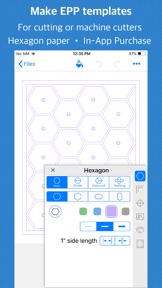
Enjoy English Paper Piecing? Set a grid or shape to an exact size to make it easy to cut out templates for fussy cut or English Paper Piecing. A center mark drawn on each piece marks where to cut a center hole so a small stick can be used to help make removing the paper easier.
NOTE — If you are looking for a quilt block library, you will not find one. QuiltPaper app is for quilters who want to use a grid to plan and design their own block or quilt layout.
BASIC FEATURES
GRID — Classic grid graph paper taken up a notch!
DOT— Make layouts using a choice of 5 dot styles and 2 dot patterns.
DIAGONAL — Create complex on-point designs by dividing & sub-dividing blocks.
FEATURES OF ALL PAPERS —
√ One purchase works on all devices — iPhone, iPad, iPod.
√ Metric (cm or mm) or inches (US units) for grids and paper sizes.
√ Paint your quilt layout! Tap to fill squares with color and pattern.
√ Place an inspiration image under any grid.
√ Choose grid colors from built-in palettes or create you own palette.
√ Put multiple small grids on a page to plan block designs, assembly, etc.
√ Add a title.
√ Print to standard paper sizes (such as 8.5x11 or A4) or set a custom size.
√ Suite of Quick Pick Templates make getting started easier.
ADD MORE PAPERS. In-App Purchases are unlocked at the same cost as the app.
ALL PAPERS FOREVER BUNDLE. For the price of four papers get all the papers! Credit is given for earlier purchases. On purchase of the fourth paper the bundle is instantly purchased.)
HEXAGON — Regular or elongated hexagons to split & sub-divide into shapes such as Tumbling Blocks.
HONEYCOMB — Ideal for planning Lucy Boston style quilt patterns.
8 POINT STAR — Lone Star quilt design with any number of pieces.
TRIANGLE — Choose size, orientation, angle (or set base & height).
TUMBLER — Set size, orientation, angle (or set base & height).
DIAMOND — Set size, orientation, angle (or set width & height) — even add sashing!
6 POINT STAR — 3 unique star patterns and 7 layouts and avoid tedious drafting.
LOG CABIN — Custom or classic layouts using a library of block patterns.
JEWEL — Choice of 7 patterns and sashing to create unique designs.
KITE — Set angles and side length to create unique Kite shapes in choice of 5 patterns.
POLYGON — Make exact sized straight-edged shapes — ideal for English Paper Piecing projects.
BRICK — Set brick size and orient in horizontal or vertical patterns.
SQUARE — Extensive block library and choice of patch patterns.
CIRCLE — Choice of the 5 patterns and circle sizes.
ARC— Unique layout with curves by choosing blocks from the extensive block library.
Tell us if you don’t see the paper you need. Send an email and we’ll see what we can do!
What's New in Version 1.20.1
Fix to color palettes.
Seller
Name
NNN Software LLC
Information
Developer
Categories
Version
1.20.1
Size
70.2 MB
Game Center
No
VPP Device Licensing
Yes
Rating
Rated: 4+
Compatibility
iOS 9.0 or later
Devices
iPhone 4S, iPhone 5, iPhone 5c, iPhone 5s, iPhone 6, iPhone 6 Plus, iPhone 6s, iPhone 6s Plus, iPhone SE, iPhone 7, iPhone 7 Plus, iPhone 8, iPhone 8 Plus, iPhone X, iPhone XR, iPhone XS, iPhone XS Max, iPhone 11, iPhone 11 Pro, iPhone 11 Pro Max, iPhone SE (2nd generation), iPad 2 (Wi-Fi), iPad 2 (3G), iPad (3rd Generation) (Wi-Fi), iPad (3rd Generation) (4G), iPad (4th Generation) (Wi-Fi), iPad (4th Generation) (4G), iPad (5th Generation) Wi-Fi, iPad (5th Generation) Wi-Fi + Cellular, iPad (6th generation) Wi-Fi, iPad (6th generation) Wi-Fi + Cellular, iPad Pro, iPad Pro (Cellular), iPad Pro (9.7-inch), iPad Pro (9.7-inch) (Cellular), iPad Pro 12.9-inch (2nd generation), iPad Pro 12.9-inch (2nd generation) Wi-Fi + Cellular, iPad Pro (10.5-inch), iPad Pro (10.5-inch) Wi-Fi + Cellular, iPad Pro (11-inch), iPad Pro (11-inch) Wi-Fi + Cellular, iPad Pro 12.9-inch (3rd generation), iPad Pro 12.9-inch (3rd generation) Wi-Fi + Cellular, iPad Air, iPad Air (Cellular), iPad Air 2, iPad Air 2 (Cellular), iPad Air (3rd generation), iPad Air (3rd generation) Wi-Fi + Cellular, iPad mini (Wi-Fi), iPad mini (4G), iPad mini Retina, iPad mini Retina (Cellular), iPad mini 3, iPad mini 3 (Cellular), iPad mini 4, iPad mini 4 (Cellular), iPad mini (5th Generation), iPad mini (5th Generation) Wi-Fi + Cellular, iPad (7th generation) Wi-Fi + Cellular, iPad Pro 11-inch (2nd generation), iPad Pro 11-inch (2nd generation) Wi-Fi + Cellular, iPad Pro 12.9-inch (4th generation), iPad Pro 12.9-inch (4th generation) Wi-Fi + Cellular, iPad Air (4th Generation) (Wi-Fi), iPad Air (4th Generation) (Wi-Fi + Cellular), iPad (8th generation) Wi-Fi, iPad (8th generation) Wi-Fi + Cellular, iPod touch (5th generation), iPod touch (6th Generation), iPod touch (7th generation)
Languages
English
App Store: Customer Ratings
Ratings & Reviews
0.0 of 5 (No rating)
App Store: Customer Reviews
No Entry