AboutTermsPrivacyContact
 
Updating
ShutterCount Mobile

ShutterCount Mobile

Released: 2016-04-04
Copyright © 2013-2025 DIRE Studio.
ShutterCount Mobile - QR Code
Version 7.0
4+
Download on the App Store
Version 7.0
4+
Download on the App Store
Released: 2016-04-04
Copyright © 2013-2025 DIRE Studio.

iPhone Screenshots

Screenshot
Screenshot
Screenshot
Screenshot
Screenshot
Screenshot
Screenshot
Screenshot
Screenshot
Screenshot

iPad Screenshots

Screenshot
Screenshot
Screenshot
Screenshot
Screenshot
Screenshot
Screenshot
Screenshot
Screenshot
Screenshot

Description

*** The original, most feature-rich and only iOS shutter count reader that works with all new Canons ***
ShutterCount displays the number of shutter actuations (the shutter count) of your Canon EOS, Nikon or Pentax digital camera - see the complete list of certified models below. The shutter count is read directly from USB or Wi-Fi connected Canons, and from image files for Nikon and Pentax cameras. With ShutterCount you can easily check whether a newly purchased camera is really new, or how heavily used a pre-owned item is. And you can save a trip to a service center by doing the reading for yourself.
BASE FEATURES
• Unlimited readings
• Counter for still photos
• Wear indicator with numeric and graphical rated shutter life percentage display
• History logging to track camera usage; logs are stored in CSV format that can be imported into Numbers or Excel for further processing
• Reports in plain text format
• Wizard to guide you through the reading process
LIVE VIEW PACK (optional in-app purchase supporting select Canon models)
• Counters for live view/videos and electronic shutter
• Distribution chart
PLUS PACK (optional in-app purchase)
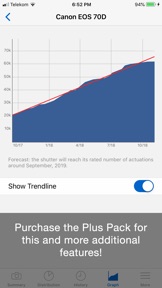
• Graphing
• Shutter life forecasting (not available for some Nikon and Pentax models)
• History deduplication
• Canon EOS camera management (date/time sync, owner name editing, copyright information setting, outdated firmware warning, IPTC export/import)
• Raw copyright information display and secure personal data wiping for Canons
CERTIFIED CAMERAS
USB connection (requires a Lightning to USB Camera Adapter or a USB-C equipped iPad; Wi-Fi on the camera must be disabled):
• Canon 1D4/1DC/1DX/1DX2/1DX3/5D2/5D3/5D4/5DS/5DSR/6D/6D2/7D/7D2/40D/50D/60D/60Da/70D/77D/80D/90D/100D/200D/200D2/250D/450D/500D/550D/600D/650D/700D/750D/760D/800D/850D/1000D/1100D/1200D/1300D/1500D/2000D/3000D/4000D/8000D/9000D/M6II/M50/M50II/R/R1/R3/R5/R5C/R5II/R6/R6II/R7/R8/R10/R50/R100/Ra/RP; Kiss F/M/M2/X2/X3/X4/X5/X6i/X7/X7i/X8i/X9/X9i/X10/X10i/X50/X70/X80/X90; Rebel SL1/SL2/SL3/T1i/T2i/T3/T3i/T4i/T5/T5i/T6/T6i/T6s/T7/T7i/T8i/T100/XS/XSi
Wi-Fi/Ethernet connection is supported using built-in networking or Canon transmitters on the above cameras having the "EOS Utility" function. The camera must be paired directly with ShutterCount using this function.
Image files:
• Nikon D2H/D2X/D2Xs/D3/D3S/D3X/D4/D4S/D5/D6/D40/D40X/D50/D60/D70/D70s/D80/D90/D200/D300/D300S/D500/D600/D610/D700/D750/D780/D800/D800E/D810/D850/D3000/D3100/D3200/D3300/D3400/D3500/D5000/D5100/D5200/D5300/D5500/D5600/D7000/D7100/D7200/D7500/Df/Z5/Z6/Z6II/Z6III/Z7/Z7II/Z8/Z9/Z30/Z50/Zf/Zfc; 1 AW1/J1/J3/J4/J5/V1/V2/V3; Coolpix A
• Pentax *istDL/*istDL2/645D/645Z/K1/K1II/K3/K3II/K3III/K3IIIMono/K5/K5II/K5IIs/K7/K10D/K20D/K30/K50/K70/K100D/K100D Super/K200D/K500/K2000/Km/KP/Kr/KS1/KS2/Kx
Cameras not listed here are not supported.
FOR DETAILED COMPATIBILITY INFORMATION PLEASE VISIT: https://www.direstudio.com/shuttercount/tech-specs
Questions? Problems? Check out the Getting Started Guide (https://www.direstudio.com/shuttercount/getting-started), the FAQ (https://www.direstudio.com/shuttercount/faq), or contact our support by tapping Report a Problem on the More tab!
DISCLAIMER: The app displays the camera's internal counter. DIRE Studio is not responsible for how well and accurately the camera maintains that counter. The forecast is calculated based on your previous usage, and will change if you use the camera differently in the future.

What's New in Version 7.0

New features:
• Improved iOS 26 support.

Seller

Information

Developer

Categories

Version

7.0

Size

4 MB

Game Center

No

VPP Device Licensing

Yes

Rating

Rated: 4+

Compatibility

iOS 15.6 or later

Devices

iPhone 5s, iPhone 6, iPhone 6 Plus, iPhone 6s, iPhone 6s Plus, iPhone SE, iPhone 7, iPhone 7 Plus, iPhone 8, iPhone 8 Plus, iPhone X, iPhone XR, iPhone XS, iPhone XS Max, iPhone 11, iPhone 11 Pro, iPhone 11 Pro Max, iPhone SE (2nd generation), iPhone 12, iPhone 12 Pro, iPhone 12 Pro Max, iPhone 12 mini, iPhone 13, iPhone 13 Pro, iPhone 13 Pro Max, iPhone 13 mini, iPhone SE (3rd generation), iPhone 14, iPhone 14 Plus, iPhone 14 Pro, iPhone 14 Pro Max, iPhone 15, iPhone 15 Plus, iPhone 15 Pro, iPhone 15 Pro Max, iPhone 16, iPhone 16 Plus, iPhone 16 Pro, iPhone 16 Pro Max, iPhone 16e, iPhone 17, iPhone 17 Pro, iPhone 17 Pro Max, iPhone Air, iPad (5th Generation) Wi-Fi, iPad (5th Generation) Wi-Fi + Cellular, iPad (6th generation) Wi-Fi, iPad (6th generation) Wi-Fi + Cellular, iPad Pro, iPad Pro (Cellular), iPad Pro (9.7-inch), iPad Pro (9.7-inch) (Cellular), iPad Pro 12.9-inch (2nd generation), iPad Pro 12.9-inch (2nd generation) Wi-Fi + Cellular, iPad Pro (10.5-inch), iPad Pro (10.5-inch) Wi-Fi + Cellular, iPad Pro (11-inch), iPad Pro (11-inch) Wi-Fi + Cellular, iPad Pro 12.9-inch (3rd generation), iPad Pro 12.9-inch (3rd generation) Wi-Fi + Cellular, iPad Air, iPad Air (Cellular), iPad Air 2, iPad Air 2 (Cellular), iPad Air (3rd generation), iPad Air (3rd generation) Wi-Fi + Cellular, iPad mini Retina, iPad mini Retina (Cellular), iPad mini 3, iPad mini 3 (Cellular), iPad mini 4, iPad mini 4 (Cellular), iPad mini (5th Generation), iPad mini (5th Generation) Wi-Fi + Cellular, iPad (7th generation) Wi-Fi + Cellular, iPad Pro 11-inch (2nd generation), iPad Pro 11-inch (2nd generation) Wi-Fi + Cellular, iPad Pro 12.9-inch (4th generation), iPad Pro 12.9-inch (4th generation) Wi-Fi + Cellular, iPad Air (4th Generation) (Wi-Fi), iPad Air (4th Generation) (Wi-Fi + Cellular), iPad (8th generation) Wi-Fi, iPad (8th generation) Wi-Fi + Cellular, iPad Pro 11-inch (3rd generation), iPad Pro 11-inch (3rd generation) Wi-Fi + Cellular, iPad Pro 12.9-inch (5th Generation), iPad Pro 12.9-inch (5th Generation) Wi-Fi + Cellular, iPad (9th Generation), iPad (9th Generation) Wi-Fi + Cellular, iPad mini (6th Generation), iPad mini (6th Generation) Wi-Fi + Cellular, iPad Air (5th generation), iPad Air (5th generation) Wi-Fi + Cellular, iPad Pro 11-inch (4th generation), iPad Pro 11-inch (4th generation) Wi-Fi + Cellular, iPad Pro 12.9-inch (6th generation), iPad Pro 12.9-inch (6th generation) Wi-Fi + Cellular, iPad (10th generation), iPad (10th generation) Wi-Fi + Cellular, iPad Air 11-inch (M2) Wi-Fi, iPad Air 13-inch (M2) Wi-Fi, iPad Air 13-inch (M2) Wi-Fi + Cellular, iPad Pro 11-inch (M4) Wi-Fi, iPad Pro 11-inch (M4) Wi-Fi + Cellular, iPad Pro 13-inch (M4) Wi-Fi, iPad Pro 13-inch (M4) Wi-Fi + Cellular, iPad mini (A17 Pro) Wi-Fi, iPad mini (A17 Pro) Wi-Fi + Cellular, iPad (A16) Wi-Fi, iPad (A16) Wi-Fi + Cellular, iPad Air 11-inch (M3) Wi-Fi, iPad Air 11-inch (M3) Wi-Fi + Cellular, iPad Air 13-inch (M3) Wi-Fi, iPad Air 13-inch (M3) Wi-Fi + Cellular, iPad Pro 11-inch (M5) Wi-Fi, iPad Pro 11-inch (M5) Wi-Fi + Cellular, iPad Pro 13-inch (M5) Wi-Fi, iPad Pro 13-inch (M5) Wi-Fi + Cellular, iPod touch (6th Generation), iPod touch (7th generation)

Languages

English, French

App Store: Customer Ratings

Ratings & Reviews

3.0 of 5 (16 Ratings)

App Store: Customer Reviews

2024-12-22

Works well

It took less than 5 minutes and boom. Very satisfied Canon 5D mk iv
Wineoooo111
Version 6.7
2024-07-23

The app worked well for my Canon M6 Mkii

I read a few bad reviews before purchasing so I was skeptical but I had no problems. The instructions require a bit of concentration but it worked well for me as soon as I had the phone and camera on the same wifi.
Sgra star
Version 6.5.1
2023-05-02

Satisfied

I am very satisfied with this app . I was trying to find my shutter count because i bought used camera but they are not using much so i just wanted to know and this helps me to find the camera shutter count thank you for this product.
David Sharma1
Version 6.3
2023-03-12

Works perfectly

After messing about with other canon shutter count software for my Canon 6D MKII and getting no results I can highly recommend this one.
It’s a simple matter of connecting both camera and iPad to your local network, pairing and bam the info is immediately available.
Some people may not be aware that you have to remove the SD card for this to work.
Worked for my 6D MKII’s and my 80D’s
Brilliant and worth the 10 bucks.
Abitflash
Version 5.1
2023-01-17

Worked for me

I was very hesitant to buy this for $10.99 AUD, because of the multiple bad reviews.
I checked online for alternatives, but saw forum posts recommending this app so I took a chance.
I looked up the website with the “getting started” instructions, and followed them to the letter.
It worked, my EOS 800D was found and the shutter count was read.
Taking a star off my review because this app is not documented clearly enough, and instructions need to be read VERY carefully. Read them once, then read them again, and only then attempt to use this app.
ATHSWILL
Version 4.7
2022-11-12

Great App

Having limited options for my Canon camera, I was a little apprehensive about spending $10+ in case it didn’t work on my iPad. No need to worry, as it worked so easily and I had a shutter count in no time. I only used a USB connection, so cannot vouch for any other connection method. Based on my experience it comes highly recommended.
Corespec2
Version 2.0
2022-08-16

Waste of money

Unable to connect so cannot actually review the app.
Inreality
Version 4.9
2022-06-04

It’s working for EOS R

You guys have to connect as remote control from your camera to your ios, not as normal connect wifi and read the instructions
Daing Sofri
Version 4.3
2021-05-02

Works fine

Connect to your camera as you would using the canon camera connect. I cleared all my wifi settings on the camera when it didn’t work the first time. After I cleared setting went to iPad wifi found camera, paired with it again and the app worked perfectly. Instructions could be clearer on the app page.
Coffeesam13
Version 6.1
2021-02-05

Works well on Canon 5D4

Just have to make sure that you connect the camera to your wifi network.
Wiltshire.R
Version 6.3
2020-12-04

This app does not work please refund !

This app does not work !
Please reconsider !
Version 4.6
2020-11-04

Way too difficult

Difficult to connect, lengthy instructions followed, after many attempts I gave up.
$9.99 spent with no result
Annieoc747
Version 6.2
2020-01-26

Won’t connect + overly expensive

And the instructions make no sense what so ever!
I have read and reread the instructions but nothing I do works. I completely agree with the other comment on here. RUBBISH! Also COMPLETELY RUDE and and the developers do not apologise at any point of time. My camera, a canon 80D is on the list of cameras that should be able to connect to both the wifi and USB yet they automatically assume that this is the issue and judge your capabilities of knowing your camera. They claim to have millions of successful users and if that is the case, why are there only two reviews and both negative?
KathnKim
2016-11-16

Ripoff

Don't waste your money. Wont connect with my Canon 70D at all. Complete waste of money for an app that doesn't work. Camera will connect to phone via wifi with normal canon app for remote transfer and shutter trigger, but this app doesn't connect at all via wifi.
adam1987_
Version 2.0