AboutTermsPrivacyContact
 
Updating
Off Book! Pro

Off Book! Pro

Released: 2016-01-14
© 2014 The Lyoness Group, Inc.
Off Book! Pro - QR Code
Version 4.7
4+
Download on the App Store
Version 4.7
4+
Download on the App Store
Released: 2016-01-14
© 2014 The Lyoness Group, Inc.

iPhone Screenshots

Screenshot
Screenshot
Screenshot
Screenshot
Screenshot

Description

*** Off Book! PRO is the AD FREE version of Off Book! for actors! ***
** Please note: there is currently no way to import lines from the Free version of OffBook!, but I am working on a converter **
Off Book! is an app designed by an actor for actors. I perform regularly and designed this app for myself to assist in script memorization.
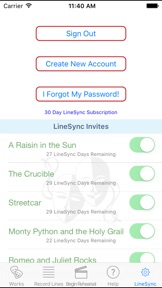
New for version 4.0 - LineSync! will enable you to share your lines with other performers (available through in-app purchase)
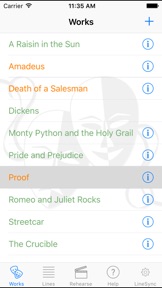
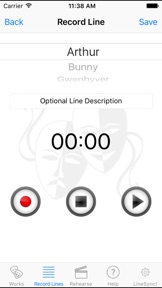
It's really simple to use. You basically create your Works, Scenes, add Characters, and Record Lines! Should you accidentally record a 30+ line scene and realize that you have one of the lines out of order, you don't have to start over! Either hit the line "plus" signet insert a new line immediately after, or simply press on the offending line, and drag it to a new position! Voilà! You are all set.
If your scenes are out of order: same deal. Long press on the scene and move it to the position you like.
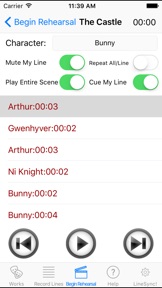
Once you are done recording the lines for the scene you wish to rehearse, tap on the rehearse icon and you are presented with the rehearse screen. From here you can choose to play through the entire scene, as well as mute/cue your line. To mute your line, simply select the character you will be playing by tapping the "down arrow", and then clicking the "Mute My Line" switch so that it shows green. The scene will play through and when it gets to your line, it will pause for the line length...giving you time to say it and wait for your next cue. The "Cue My Line" switch will cue the line for you by providing an audible "ding" immediately prior.
Please see the *INSTRUCTIONAL VIDEOS* in the app, or on my website, and if you have any neat feature requests or (gasp!) bug reports, please don't hesitate to contact me about them.
Please do NOT hesitate to contact me at the support web link listed here. There is an email box there at the bottom of the page for you to mail me should you experience any bugs you may need fixed!
Enjoy
--Steve
*************** PRO TIPS ***************
FOR THE PEOPLE WHO SAY IT WON'T SAVE YOUR LINES: It is possible you did not accept the "Let Off Book! have access to your Microphone" permission. If this is a first time install, just uninstall the app, and reinstall. When the popup asks for permissions, approve them.
Alternatively you can go into the iPhone settings, scroll down until you find the Off Book! app, click it, and ensure that the microphone switch is turned ON.
To DELETE Lines, Characters, Scenes, or Works: Simply swipe your finger from right to left on the entry and a "Delete" button will pop up. Be careful with this, because if you delete a character in a work, you will also delete all of its Lines.
TO REORDER Lines: (in case you have one out of order and don't feel like deleting and recording all over again) hold your finger down on the line you want to move and then drag it into the proper position. You can see this demonstrated on the instructional videos I have included.
FOR LONG SCENES: Where you will leave the iPhone unattended, set your sleep timer/auto lock to either off, or maximum length so the phone doesn't go to sleep while you're rehearsing! (I am currently working to see if there is a way around this)
Wagon Wheel - Electronic Kevin MacLeod (incompetech.com)
Licensed under Creative Commons: By Attribution 3.0 License
http://creativecommons.org/licenses/by/3.0/

What's New in Version 4.7

This app has been updated by Apple to display the Apple Watch app icon.
Various Update for iPhone X

Seller

Information

Categories

Version

4.7

Size

22.9 MB

Game Center

No

VPP Device Licensing

Yes

Rating

Rated: 4+

Compatibility

iOS 11.0 or later

Devices

iPhone 5s, iPhone 6, iPhone 6 Plus, iPhone 6s, iPhone 6s Plus, iPhone SE, iPhone 7, iPhone 7 Plus, iPhone 8, iPhone 8 Plus, iPhone X, iPhone XR, iPhone XS, iPhone XS Max, iPhone 11, iPhone 11 Pro, iPhone 11 Pro Max, iPhone SE (2nd generation), iPhone 12, iPhone 12 Pro, iPhone 12 Pro Max, iPhone 12 mini, iPhone 13, iPhone 13 Pro, iPhone 13 Pro Max, iPhone 13 mini, iPhone SE (3rd generation), iPhone 14, iPhone 14 Plus, iPhone 14 Pro, iPhone 14 Pro Max, iPhone 15, iPhone 15 Plus, iPhone 15 Pro, iPhone 15 Pro Max, iPad (5th Generation) Wi-Fi, iPad (5th Generation) Wi-Fi + Cellular, iPad (6th generation) Wi-Fi, iPad (6th generation) Wi-Fi + Cellular, iPad Pro, iPad Pro (Cellular), iPad Pro (9.7-inch), iPad Pro (9.7-inch) (Cellular), iPad Pro 12.9-inch (2nd generation), iPad Pro 12.9-inch (2nd generation) Wi-Fi + Cellular, iPad Pro (10.5-inch), iPad Pro (10.5-inch) Wi-Fi + Cellular, iPad Pro (11-inch), iPad Pro (11-inch) Wi-Fi + Cellular, iPad Pro 12.9-inch (3rd generation), iPad Pro 12.9-inch (3rd generation) Wi-Fi + Cellular, iPad Air, iPad Air (Cellular), iPad Air 2, iPad Air 2 (Cellular), iPad Air (3rd generation), iPad Air (3rd generation) Wi-Fi + Cellular, iPad mini Retina, iPad mini Retina (Cellular), iPad mini 3, iPad mini 3 (Cellular), iPad mini 4, iPad mini 4 (Cellular), iPad mini (5th Generation), iPad mini (5th Generation) Wi-Fi + Cellular, iPad (7th generation) Wi-Fi + Cellular, iPad Pro 11-inch (2nd generation), iPad Pro 11-inch (2nd generation) Wi-Fi + Cellular, iPad Pro 12.9-inch (4th generation), iPad Pro 12.9-inch (4th generation) Wi-Fi + Cellular, iPad Air (4th Generation) (Wi-Fi), iPad Air (4th Generation) (Wi-Fi + Cellular), iPad (8th generation) Wi-Fi, iPad (8th generation) Wi-Fi + Cellular, iPad Pro 11-inch (3rd generation), iPad Pro 11-inch (3rd generation) Wi-Fi + Cellular, iPad Pro 12.9-inch (5th Generation), iPad Pro 12.9-inch (5th Generation) Wi-Fi + Cellular, iPad (9th Generation), iPad (9th Generation) Wi-Fi + Cellular, iPad mini (6th Generation), iPad mini (6th Generation) Wi-Fi + Cellular, iPad Air (5th generation), iPad Air (5th generation) Wi-Fi + Cellular, iPad Pro 11-inch (4th generation), iPad Pro 11-inch (4th generation) Wi-Fi + Cellular, iPad Pro 12.9-inch (6th generation), iPad Pro 12.9-inch (6th generation) Wi-Fi + Cellular, iPad (10th generation), iPad (10th generation) Wi-Fi + Cellular, iPad Air11M2, iPad Air11M2Cellular, iPad Air13M2, iPad Air13M2Cellular, iPad Pro11M4, iPad Pro11M4Cellular, iPad Pro13M4, iPad Pro13M4Cellular, iPod touch (6th Generation), iPod touch (7th generation)

Languages

English

App Store: Customer Ratings

Ratings & Reviews

3.5 of 5 (2 Ratings)

App Store: Customer Reviews

2018-11-05

Great design but buggy

Fantastic design but buggy - my longer recorded lines have started disappearing/not playing.
The support site link doesn’t work and “contact Steve” button in Help does nothing.
Is this app no longer supported?
Chris from Point Cook
Version 4.7
2016-09-11

Great app

Very user friendly app. Excellent customer service - very quick and friendly response to query I had. Highly recommend to those facing the hard slog of learning lots of lines. Especially for group scenes.
JXM6
Version 4.0.2