Updating


iPhone Screenshots



iPad Screenshots



Description
Projects 2 is a powerful project management application for planning, updating and reporting project progress. It provides Task List, Gantt and Calendar views that make is easy to visualize a project.
Projects 2 has been designed for ease of use in the office using an iPad and when mobile using an iPhone. It is easy to update during a meeting and report progress to team members.
It has many features that simplify and help manage a project:
• Working & Non-Working Time : The duration of a task can be scheduled as ‘Elapsed’ for continuous activity or ‘Working Time’ for activity that occurs during working hours. Working and non-working days can be specified, including the start and end time for the working day.
• Batch Editing : Allows multiple tasks to be modified at once to update status, start date, end date, duration, flag and percent complete.
• Linked Tasks : Establish parent-child relationships and have the child tasks update automatically when a parent task changes.
• Filter : Filter the Task, Gantt and Calendar views to show tasks of interest. Filter by Flag, Milestone, Status, Phase, Resource.
• Sort : Tasks can be sorted manually or automatically by name, start date and end date and grouped by status.
• Resources : Create and assign resources to tasks. Filter and search by resource in Task, Calendar and Gantt views.
• Search : Find tasks easily with keyword search for tasks and notes. This will filter Task and Gantt views to show the tasks which meet the search criteria.
• Dashboard : A Dashboard gives a quick overview of your project showing key dates, task counts, status, task duration and completion.
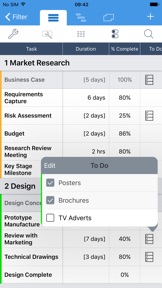
• To Do List : Add a checklist of To Do items to task to keep track of key deliverables and tick them off as they are completed. The task’s percent complete will update automatically.
— TASK VIEW —
• The Task view is great for listing the tasks within a project.
• Customize the appearance to simply/expand the information displayed.
• Show/hide notes and completed tasks.
• Color code a task to identify it’s status.
• Identify tasks as milestones.
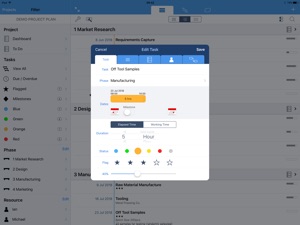
• Single tap on a task to edit it’s properties:
- Description, notes, dates, duration, status, flag, percent complete and resource.
- Edit to do items.
- Establish parent/child relationships.
— GANTT VIEW —
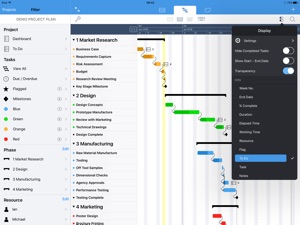
• The Gantt view is great for viewing project timescales.
• Adjust the time scale to show days/weeks/months/quarters.
• Zoom, Pan and Scroll the view to see all tasks in a Project.
• Tap on the task name to scroll the task into view.
• Long press on a task to establish parent/child relationships.
• Customize the information displayed next to the Gantt bar.
— CALENDAR —
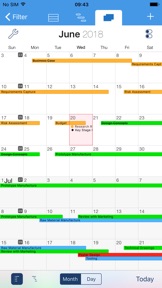
• View tasks on a Month and Day Calendar.
• Scroll/Swipe to change the displayed date.
• Select a date on the month calendar to view a specific date.
• Adjust task time and duration on the day calendar with interactive touch controls.
• Customize the appearance of the calendars to show/hide notes and completed tasks.
• View tasks in a Gantt format or time based format.
— REPORTS —
• There are 3 templates for reporting project status:
- Gantt Report showing the Gantt chart.
- Task & Notes Report showing tasks, notes, date and duration.
- To Do List Report showing tasks with to do items.
• Customize what is included in the report and preview before sending
• Send report by Email in PDF format
• Print a hardcopy using a wireless printer with AirPrint.
— OTHER —
• Use iCloud to store project files and keep up to date on all your devices
• Export in PJ2 format to backup or share a project with other Projects 2 users
• Import a project file created in Projects PJ1 format
• Set the project time zone
For more information, visit our website
What's New in Version 2.4.1
Updated color of date-time picker in task editor.
Seller
Name
Thomas Blackburn
Information
Developer
Categories
Version
2.4.1
Size
26.7 MB
Game Center
No
VPP Device Licensing
Yes
Rating
Rated: 4+
Compatibility
iOS 9.0 or later
Devices
iPhone 4S, iPhone 5, iPhone 5c, iPhone 5s, iPhone 6, iPhone 6 Plus, iPhone 6s, iPhone 6s Plus, iPhone SE, iPhone 7, iPhone 7 Plus, iPhone 8, iPhone 8 Plus, iPhone X, iPhone XR, iPhone XS, iPhone XS Max, iPhone 11, iPhone 11 Pro, iPhone 11 Pro Max, iPhone SE (2nd generation), iPhone 12, iPhone 12 Pro, iPhone 12 Pro Max, iPhone 12 mini, iPad 2 (Wi-Fi), iPad 2 (3G), iPad (3rd Generation) (Wi-Fi), iPad (3rd Generation) (4G), iPad (4th Generation) (Wi-Fi), iPad (4th Generation) (4G), iPad (5th Generation) Wi-Fi, iPad (5th Generation) Wi-Fi + Cellular, iPad (6th generation) Wi-Fi, iPad (6th generation) Wi-Fi + Cellular, iPad Pro, iPad Pro (Cellular), iPad Pro (9.7-inch), iPad Pro (9.7-inch) (Cellular), iPad Pro 12.9-inch (2nd generation), iPad Pro 12.9-inch (2nd generation) Wi-Fi + Cellular, iPad Pro (10.5-inch), iPad Pro (10.5-inch) Wi-Fi + Cellular, iPad Pro (11-inch), iPad Pro (11-inch) Wi-Fi + Cellular, iPad Pro 12.9-inch (3rd generation), iPad Pro 12.9-inch (3rd generation) Wi-Fi + Cellular, iPad Air, iPad Air (Cellular), iPad Air 2, iPad Air 2 (Cellular), iPad Air (3rd generation), iPad Air (3rd generation) Wi-Fi + Cellular, iPad mini (Wi-Fi), iPad mini (4G), iPad mini Retina, iPad mini Retina (Cellular), iPad mini 3, iPad mini 3 (Cellular), iPad mini 4, iPad mini 4 (Cellular), iPad mini (5th Generation), iPad mini (5th Generation) Wi-Fi + Cellular, iPad (7th generation) Wi-Fi + Cellular, iPad Pro 11-inch (2nd generation), iPad Pro 11-inch (2nd generation) Wi-Fi + Cellular, iPad Pro 12.9-inch (4th generation), iPad Pro 12.9-inch (4th generation) Wi-Fi + Cellular, iPad Air (4th Generation) (Wi-Fi), iPad Air (4th Generation) (Wi-Fi + Cellular), iPad (8th generation) Wi-Fi, iPad (8th generation) Wi-Fi + Cellular, iPod touch (5th generation), iPod touch (6th Generation), iPod touch (7th generation)
Languages
English, French, German, Spanish
App Store: Customer Ratings
Ratings & Reviews
0.0 of 5 (No rating)
App Store: Customer Reviews
No Entry