Updating


iPhone Screenshots


iPad Screenshots

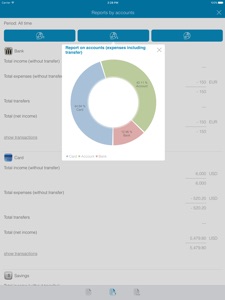

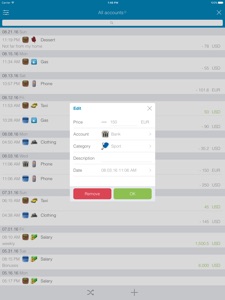

Description
Do you want to control your expenses and be always aware of how much money you have spent and obtained over the past day, week, month or even year? This program will be the best financial assistant for you in this regard.
You will always be informed of your financial possibilities. The app will show you, where you can save money and where you can spend more than usual. It is much easier to do this by using categories (food, clothes, car), accounts (cash, bank card, deposit), currencies (dollars, euros, pounds) and transfers (from one account to another).
Your details will be securely saved. Syncing with the cloud will save your data, even if the device fails to function. You can set the app logon password, just in case your device is used by others, so you can stop worrying about your data confidentiality.
You can easily use the application and you will be able to quickly add new recordings of expenses. The program requires a minimum of time for keeping records; it is easy enough for novices, while it provides rich functionality and a lot of settings for experienced users.
One base on different devices. Thanks to the syncing with the cloud, the whole family can use the application. Your phone will inform you of any change in the database with a notification. You can log in to the app using other devices or via WEB-interface (browser), following the link “http://walletsapp.com”.
Forget about past problems of unknown losses and counting money for a long time. Now you have a reliable program that will help you:
- Reduce your expenses;
- Calculate the total capital in different currencies;
- Save your family budget;
- Assess your financial possibilities;
As our ancestors used to say, money likes to be counted! Therefore, a personal banking system allows you to safely manage any money transactions, look through charts and reports, and sort your incomings and expenses according to different categories. Download the mobile application and do not lose sight of any financial transaction.
System capabilities:
- Addition of accounts (including multicurrency), categories (and subcategories);
- Addition of transactions and remittances (in the same or different currencies);
- View of the current exchange rates used in the application;
- Syncing with the cloud and with different devices;
- App logon password;
- View of the current funds in the same currency;
- Graphical reports according to the categories, accounts and currencies;
- Daily, weekly, monthly and annual reports on the incomings and expenses;
- Graphic report on the size of the capital in different currencies for a selected period;
- Log in to the application database via a browser (WEB-version), following the link http://walletsapp.com.
Differences from the free version:
- No advertising;
Create your own financial history and always keep up with the flow of your own cash!
What's New in Version 1.9
Support for ios14 and above
Seller
Name
Pavel Kataykin
Information
Developer
Categories
Version
1.9
Size
26.6 MB
Game Center
No
VPP Device Licensing
Yes
Rating
Rated: 4+
Compatibility
iOS 12.1 or later
Devices
iPhone 5s, iPhone 6, iPhone 6 Plus, iPhone 6s, iPhone 6s Plus, iPhone SE, iPhone 7, iPhone 7 Plus, iPhone 8, iPhone 8 Plus, iPhone X, iPhone XR, iPhone XS, iPhone XS Max, iPhone 11, iPhone 11 Pro, iPhone 11 Pro Max, iPhone SE (2nd generation), iPhone 12, iPhone 12 Pro, iPhone 12 Pro Max, iPhone 12 mini, iPhone 13, iPhone 13 Pro, iPhone 13 Pro Max, iPhone 13 mini, iPhone SE (3rd generation), iPhone 14, iPhone 14 Plus, iPhone 14 Pro, iPhone 14 Pro Max, iPhone 15, iPhone 15 Plus, iPhone 15 Pro, iPhone 15 Pro Max, iPad (5th Generation) Wi-Fi, iPad (5th Generation) Wi-Fi + Cellular, iPad (6th generation) Wi-Fi, iPad (6th generation) Wi-Fi + Cellular, iPad Pro, iPad Pro (Cellular), iPad Pro (9.7-inch), iPad Pro (9.7-inch) (Cellular), iPad Pro 12.9-inch (2nd generation), iPad Pro 12.9-inch (2nd generation) Wi-Fi + Cellular, iPad Pro (10.5-inch), iPad Pro (10.5-inch) Wi-Fi + Cellular, iPad Pro (11-inch), iPad Pro (11-inch) Wi-Fi + Cellular, iPad Pro 12.9-inch (3rd generation), iPad Pro 12.9-inch (3rd generation) Wi-Fi + Cellular, iPad Air, iPad Air (Cellular), iPad Air 2, iPad Air 2 (Cellular), iPad Air (3rd generation), iPad Air (3rd generation) Wi-Fi + Cellular, iPad mini Retina, iPad mini Retina (Cellular), iPad mini 3, iPad mini 3 (Cellular), iPad mini 4, iPad mini 4 (Cellular), iPad mini (5th Generation), iPad mini (5th Generation) Wi-Fi + Cellular, iPad (7th generation) Wi-Fi + Cellular, iPad Pro 11-inch (2nd generation), iPad Pro 11-inch (2nd generation) Wi-Fi + Cellular, iPad Pro 12.9-inch (4th generation), iPad Pro 12.9-inch (4th generation) Wi-Fi + Cellular, iPad Air (4th Generation) (Wi-Fi), iPad Air (4th Generation) (Wi-Fi + Cellular), iPad (8th generation) Wi-Fi, iPad (8th generation) Wi-Fi + Cellular, iPad Pro 11-inch (3rd generation), iPad Pro 11-inch (3rd generation) Wi-Fi + Cellular, iPad Pro 12.9-inch (5th Generation), iPad Pro 12.9-inch (5th Generation) Wi-Fi + Cellular, iPad (9th Generation), iPad (9th Generation) Wi-Fi + Cellular, iPad mini (6th Generation), iPad mini (6th Generation) Wi-Fi + Cellular, iPad Air (5th generation), iPad Air (5th generation) Wi-Fi + Cellular, iPad Pro 11-inch (4th generation), iPad Pro 11-inch (4th generation) Wi-Fi + Cellular, iPad Pro 12.9-inch (6th generation), iPad Pro 12.9-inch (6th generation) Wi-Fi + Cellular, iPad (10th generation), iPad (10th generation) Wi-Fi + Cellular, iPod touch (6th Generation), iPod touch (7th generation)
Languages
English, Arabic, Chinese, Czech, Danish, Dutch, Estonian, Finnish, French, German, Greek, Hebrew, Italian, Japanese, Korean, Norwegian Bokmål, Polish, Portuguese, Russian, Spanish, Swedish, Thai, Turkish, Ukrainian, Vietnamese
App Store: Customer Ratings
Ratings & Reviews
0.0 of 5 (No rating)
App Store: Customer Reviews
No Entry