Updating


iPhone Screenshots


iPad Screenshots




Description
Description:-
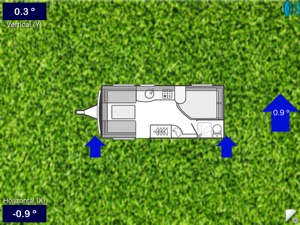
This is similar to other surface bubble level apps but has 2 unique features. Firstly it can speak the amount in Degrees, Dimensions (Metric or Imperial) or Blocks your Caravan is out of level front-to-rear and side-to-side, then confirm when it’s level in all directions.
Secondly it can have a customised offset when you intentionally need something with a small angle and this offset is remembered. If your iDevice has a cover or protruding camera these are also compensated for. It works on either an iPhone, iPad or 5th generation iPod running iOS 8.2 or above and doesn't require calibrating or the Internet.
CaravanLevel is aimed primarily for Caravan, Motorhome and RV enthusiasts displaying a diagram with arrows & ramps where its low but would also be useful for general DIY. It has an option to use the built in speech feature so app “says” where on the Vehicle it's low and by how much, then finally when it's all level. If you have chosen to use sounds or better still speech, then with your iDevice volume loud enough and the Caravan door open you can hear where and how much it needs raising in degrees from outside. Most useful of all is if you have a wireless Bluetooth Earbud (which are not too expensive) or wireless Bluetooth Headphones, you can hear as you walk around the outside making adjustments the amount Caravan or Vehicle is low. Alternatively it has the ability to play sounds indicating when the iDevice is low, nearly level or completely level but you need to see the screen as well so you know which area is low.
Basic method of use:-
1/ The first time only, level your Caravan or Motorhome as normal.
2/ Place iDevice on firm flat surface anywhere convenient, even places at a strange angle, like a Motorhome dashboard.
3/ Set-up CaravanLevel as described below and main screen will go pale blue.
4/ In the future whenever you arrive at a new site, just place iDevice in same location as before and using information displayed on CaravanLevel screen to adjust your Caravan or Motorhome until screen turns pale blue again. If you have sounds or better still speech enabled, this tells you where its low, making adjustments much easier.
Double Tap Gestures:-
There is a simple compass feature that just points ‘South’ as an aid to positioning your Caravan, Motorhome or awning towards the sun. This is also useful for users with solar panels so they don’t park in the shadow of trees. To display the yellow arrow just double tap with one finger in the main screen and to discard it, double tap again. NOTE:- Unfortunately this feature is not available on the iPod.
Swipe Gestures:-
To temporarily toggle sounds or speech On or Off just swipe horizontally either from Left to Right or Right to Left or touch the speaker button top right. If you go to another screen or close the app, sounds return to chosen switch state. To permanently turn sound On or Off, go to the ‘Settings’ screen and use the switch next to ‘Enable Sounds’ or ‘Spoken Feedback’ (both together is not permitted).
You can change the time interval between sounds or spoken advice telling you how low the vehicle is and which side(s) or corner. To increase the delay swipe Down (maximum approximately 30 seconds) and swipe Up to reduce delay (minimum approximately 2 seconds). Note this feature only works when sounds are enabled.
Compatibility:-
CaravanLevel is Universal and compatible with 5th generation iPod, all iPad’s and iPhone’s from iPhone 4S to iPhone 12, iPhone 12 Pro and iPhone 12 Pro Max.
Requires iOS 9.0 or later.
What's New in Version 1.6.1
• New feature in settings. It’s now possible to save all your settings in a draft email should you want a back-up or put the same values in another device. The link is near bottom of setting screen next to Reset button.
• Minor display problem corrected.
• Improved how speech is used following user requests to speed up information. Repeating spoken delay can now be set to a shorter time (minimum 2 seconds) and this is now the “gap” between each spoken phrase, regardless of how long the phrase is.
• I would like to introduce my new app call CaravanWatch which has all the same features as this app, with added benefit of displaying and speaking the same information on an Apple Watch. If you are fortunate enough to own an Apple Watch, you will no longer need a Bluetooth device to hear where and amount the caravan is low.
• Updated to fully support iOS 14.
If you have any suggestions or need help please contact me at :- supportcaduk@icloud.com
Seller
Name
Andrew Herring
Information
Developer
Categories
Version
1.6.1
Size
49.9 MB
Game Center
No
VPP Device Licensing
Yes
Rating
Rated: 4+
Compatibility
iOS 9.0 or later
Devices
iPhone 4S, iPhone 5, iPhone 5c, iPhone 5s, iPhone 6, iPhone 6 Plus, iPhone 6s, iPhone 6s Plus, iPhone SE, iPhone 7, iPhone 7 Plus, iPhone 8, iPhone 8 Plus, iPhone X, iPhone XR, iPhone XS, iPhone XS Max, iPhone 11, iPhone 11 Pro, iPhone 11 Pro Max, iPhone SE (2nd generation), iPhone 12, iPhone 12 Pro, iPhone 12 Pro Max, iPhone 12 mini, iPad 2 (Wi-Fi), iPad 2 (3G), iPad (3rd Generation) (Wi-Fi), iPad (3rd Generation) (4G), iPad (4th Generation) (Wi-Fi), iPad (4th Generation) (4G), iPad (5th Generation) Wi-Fi, iPad (5th Generation) Wi-Fi + Cellular, iPad (6th generation) Wi-Fi, iPad (6th generation) Wi-Fi + Cellular, iPad Pro, iPad Pro (Cellular), iPad Pro (9.7-inch), iPad Pro (9.7-inch) (Cellular), iPad Pro 12.9-inch (2nd generation), iPad Pro 12.9-inch (2nd generation) Wi-Fi + Cellular, iPad Pro (10.5-inch), iPad Pro (10.5-inch) Wi-Fi + Cellular, iPad Pro (11-inch), iPad Pro (11-inch) Wi-Fi + Cellular, iPad Pro 12.9-inch (3rd generation), iPad Pro 12.9-inch (3rd generation) Wi-Fi + Cellular, iPad Air, iPad Air (Cellular), iPad Air 2, iPad Air 2 (Cellular), iPad Air (3rd generation), iPad Air (3rd generation) Wi-Fi + Cellular, iPad mini (Wi-Fi), iPad mini (4G), iPad mini Retina, iPad mini Retina (Cellular), iPad mini 3, iPad mini 3 (Cellular), iPad mini 4, iPad mini 4 (Cellular), iPad mini (5th Generation), iPad mini (5th Generation) Wi-Fi + Cellular, iPad (7th generation) Wi-Fi + Cellular, iPad Pro 11-inch (2nd generation), iPad Pro 11-inch (2nd generation) Wi-Fi + Cellular, iPad Pro 12.9-inch (4th generation), iPad Pro 12.9-inch (4th generation) Wi-Fi + Cellular, iPad Air (4th Generation) (Wi-Fi), iPad Air (4th Generation) (Wi-Fi + Cellular), iPad (8th generation) Wi-Fi, iPad (8th generation) Wi-Fi + Cellular, iPod touch (5th generation), iPod touch (6th Generation), iPod touch (7th generation)
Languages
English
App Store: Customer Ratings
Ratings & Reviews
4.5 of 5 (10 Ratings)
App Store: Customer Reviews
No Entry