Updating


iPhone Screenshots



iPad Screenshots



Description
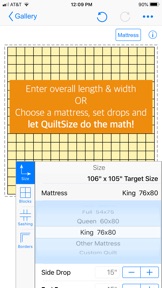
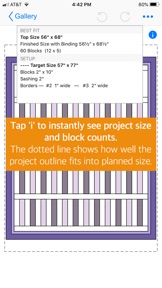
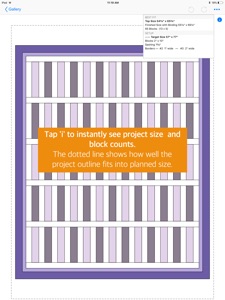
QuiltSize does the quilt math so you can quickly see the answer to the question, “How many blocks do I need?” First, set the overall size for your quilt and blocks. Now — as you play with borders, sashing, and setting — the diagram instantly adds and subtracts blocks to show how the quilt layout fits within the size you wanted.
IMPORTANT NOTE: Neither QuiltSize nor QuiltSandwich provide block designs. There are marvelous resources available to quilters for block designs — from fancy programs to pencil and paper. If you want to use pencil and paper, check out the app QuiltPaper. QuiltPaper creates unique quilter’s graph papers that can be printed or colored on your device.
Three steps (no in-app purchases!) is all it takes to know exactly how many blocks you’ll need —
STEP 1. Set the ideal size for the quilt. Tap to choose a standard mattress or set a custom size. Then, add side drops, end drops and a pillow tuck until it is just right.
STEP 2. Use menus to select an overall layout, choose setting, set block size, and add sashing and borders:
Layout — Choice of Block-to-block or Center panel
Setting — Tap to switch between Straight or On point
Blocks — Choose Squares or Rectangles
Pattern — Tap to switch between a pattern of Single or Alternating blocks
Sashing — Choice of Horizontal or Vertical layout and Cornerstone options
Borders — Ability to add four borders, width can vary on each side
STEP 3. How’s the diagram look? Not quite right?
Play with menu options to instantly update the layout until it looks just right!
It’s your plan, so of course you can share it!
Share your project layout diagram as an Image or with notes as a PDF.
*****
Want help with the quilt math to create your project?
QuiltSandwich does the quilt math so you can quickly answer the question, “How much fabric do I need?”
Just a tap will share the QuiltSize layout to QuiltSandwich!
QuiltSize sends the blocks as placeholders, and all pieces for sashing, borders, center panel, binding, batting and backing. QuiltSandwich creates yardage and cutting diagrams for all the pieces. Replace the placeholder blocks with the size and count of the block pieces and you’ll have a full set of yardage and cutting diagrams.
Got questions or comments? We’re here to help! Go to our website at http://www.quiltingapps.com/support-for-quiltsize.html for tips and video helps or to send a message.
Your design. Your project. Our math.
What's New in Version 2.5.0
Many thanks for the comments and efforts of beta testers who helped direct revisions for an improved version of QuiltSize. New features:
+ Center panel option added to the original block-by-block layout (Both with on point setting!)
+ Rectangular blocks added
+ Borders enhanced so that the width of each side can be set independently for modern layouts
+ Overall improvements that make the app easier to use
Seller
Name
NNN Software LLC
Information
Developer
Categories
Version
2.5.0
Size
24 MB
Game Center
No
VPP Device Licensing
Yes
Rating
Rated: 4+
Compatibility
iOS 9.0 or later
Devices
iPhone 4S, iPhone 5, iPhone 5c, iPhone 5s, iPhone 6, iPhone 6 Plus, iPhone 6s, iPhone 6s Plus, iPhone SE, iPhone 7, iPhone 7 Plus, iPhone 8, iPhone 8 Plus, iPhone X, iPhone XR, iPhone XS, iPhone XS Max, iPhone 11, iPhone 11 Pro, iPhone 11 Pro Max, iPhone SE (2nd generation), iPhone 12, iPhone 12 Pro, iPhone 12 Pro Max, iPhone 12 mini, iPad 2 (Wi-Fi), iPad 2 (3G), iPad (3rd Generation) (Wi-Fi), iPad (3rd Generation) (4G), iPad (4th Generation) (Wi-Fi), iPad (4th Generation) (4G), iPad (5th Generation) Wi-Fi, iPad (5th Generation) Wi-Fi + Cellular, iPad (6th generation) Wi-Fi, iPad (6th generation) Wi-Fi + Cellular, iPad Pro, iPad Pro (Cellular), iPad Pro (9.7-inch), iPad Pro (9.7-inch) (Cellular), iPad Pro 12.9-inch (2nd generation), iPad Pro 12.9-inch (2nd generation) Wi-Fi + Cellular, iPad Pro (10.5-inch), iPad Pro (10.5-inch) Wi-Fi + Cellular, iPad Pro (11-inch), iPad Pro (11-inch) Wi-Fi + Cellular, iPad Pro 12.9-inch (3rd generation), iPad Pro 12.9-inch (3rd generation) Wi-Fi + Cellular, iPad Air, iPad Air (Cellular), iPad Air 2, iPad Air 2 (Cellular), iPad Air (3rd generation), iPad Air (3rd generation) Wi-Fi + Cellular, iPad mini (Wi-Fi), iPad mini (4G), iPad mini Retina, iPad mini Retina (Cellular), iPad mini 3, iPad mini 3 (Cellular), iPad mini 4, iPad mini 4 (Cellular), iPad mini (5th Generation), iPad mini (5th Generation) Wi-Fi + Cellular, iPad (7th generation) Wi-Fi + Cellular, iPad Pro 11-inch (2nd generation), iPad Pro 11-inch (2nd generation) Wi-Fi + Cellular, iPad Pro 12.9-inch (4th generation), iPad Pro 12.9-inch (4th generation) Wi-Fi + Cellular, iPad Air (4th Generation) (Wi-Fi), iPad Air (4th Generation) (Wi-Fi + Cellular), iPad (8th generation) Wi-Fi, iPad (8th generation) Wi-Fi + Cellular, iPod touch (5th generation), iPod touch (6th Generation), iPod touch (7th generation)
Languages
English
App Store: Customer Ratings
Ratings & Reviews
0.0 of 5 (No rating)
App Store: Customer Reviews
No Entry